Template details
Miniport
A free, fully responsive HTML5 one-page portfolio template with intro, work, portfolio, and contact sections.
About this template
Miniport is a free, fully responsive HTML5 one-page portfolio template from HTML5 UP, designed for personal and portfolio sites that showcase a profile, services, and sample work.
What is Miniport?
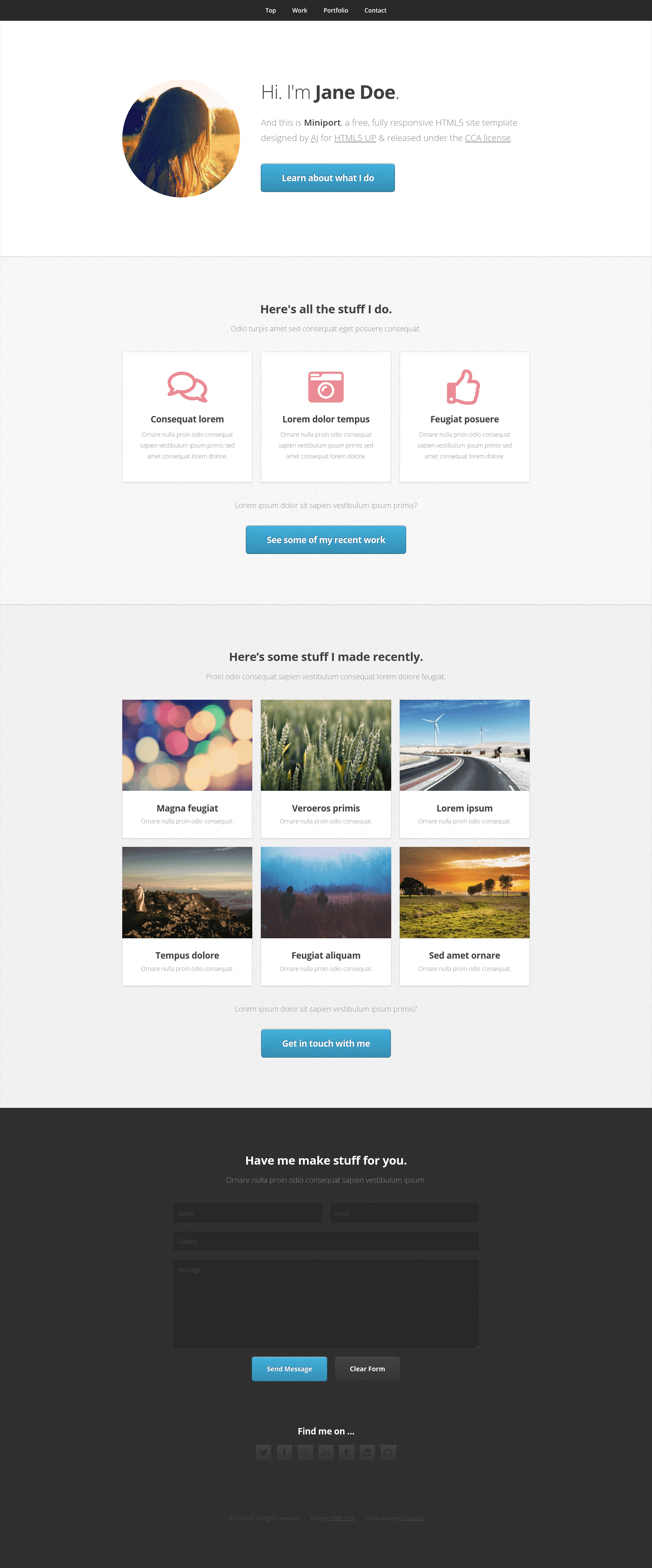
Miniport is a fully responsive HTML5 site template designed by AJ for HTML5 UP and released under the Creative Commons Attribution (CCA) license. It takes a single-page structure and produces a portfolio-oriented website with an intro banner, a three-column work/services area, a six-project portfolio grid, and a social contact section. The template runs on plain HTML and CSS, so it needs no server-side processing or build step.
The page prominently features a portrait image in the intro, three feature boxes with placeholder text, six portfolio thumbnails with titles, and a "Find me on..." section that includes a Twitter widget iframe for social integration. All demo content is placeholder, meant to be replaced by the user.
Key Features
- Fully responsive layout — the template adapts to mobile, tablet, and desktop viewports using a fluid CSS grid, so the one-page design reflows without horizontal scrolling.
- One-page portfolio structure — includes an intro banner with portrait and headline, a work section with three columns, a portfolio grid with six items, and a contact/footer area.
- Social media integration — the contact section embeds a Twitter widget iframe, letting you display a live Twitter feed on the page.
- Free CCA license — released under the Creative Commons Attribution license, so you can use and modify it freely as long as you credit HTML5 UP and AJ.
- No framework dependencies — built with plain HTML5 and CSS, with no JavaScript frameworks or build tools required, making it easy to host on any static server.
- Placeholder content included — comes with demo text and images (like pic00.jpg through pic06.jpg) so you can see the design before replacing them with your own content.
Who is it for?
- Freelancers and creatives — need a simple online presence that shows who they are, what services they offer, and a few featured projects.
- Job seekers — can put together a one-page resume-style site with a portrait, skills, and work samples without learning a CMS.
- Students and hobbyists — want a personal landing page to share a profile and social links, editable with basic HTML knowledge.
What can you do with Miniport?
- Display a portfolio: replace the six placeholder thumbnails and titles with your own project images and case-study names to present your work.
- List your services: edit the three work-section columns to describe your core offerings, such as design, development, and consulting.
- Add social proof: embed your Twitter feed in the "Find me on..." section to show live updates, and swap in links to other social profiles.
- Set up a personal landing page: change the intro portrait and headline to introduce yourself and link out to a full resume or blog.
Pricing and license
Miniport is free to download and use under the Creative Commons Attribution (CCA) license, which means you can deploy it commercially as long as you give credit to HTML5 UP and the designer AJ. No payment or subscription is required.
FAQ
Is Miniport free?
Yes, Miniport is completely free to download from HTML5 UP. It is released under the Creative Commons Attribution license, so you only need to include attribution when you use it.
Does Miniport use a framework like Bootstrap or Tailwind?
No. Miniport is built with plain HTML5 and CSS, with no CSS framework or JavaScript library included. The styling is custom-written for the template.
Can I use Miniport for a business website?
Yes, the template can be adapted for business use — the work and portfolio sections make it easy to present services and case studies. Just replace the placeholder content and keep the attribution requirement.
Do I need to know how to code to use Miniport?
Basic HTML knowledge helps. You will edit the index.html file to change text, images, and links, and you can adjust colors and layout by editing the included CSS files.
How do I replace the placeholder images?
Placeholder images are referenced in the HTML (for example, images/pic01.jpg). Replace those files or change the image source paths to your own images.