Template details
LinkyTree
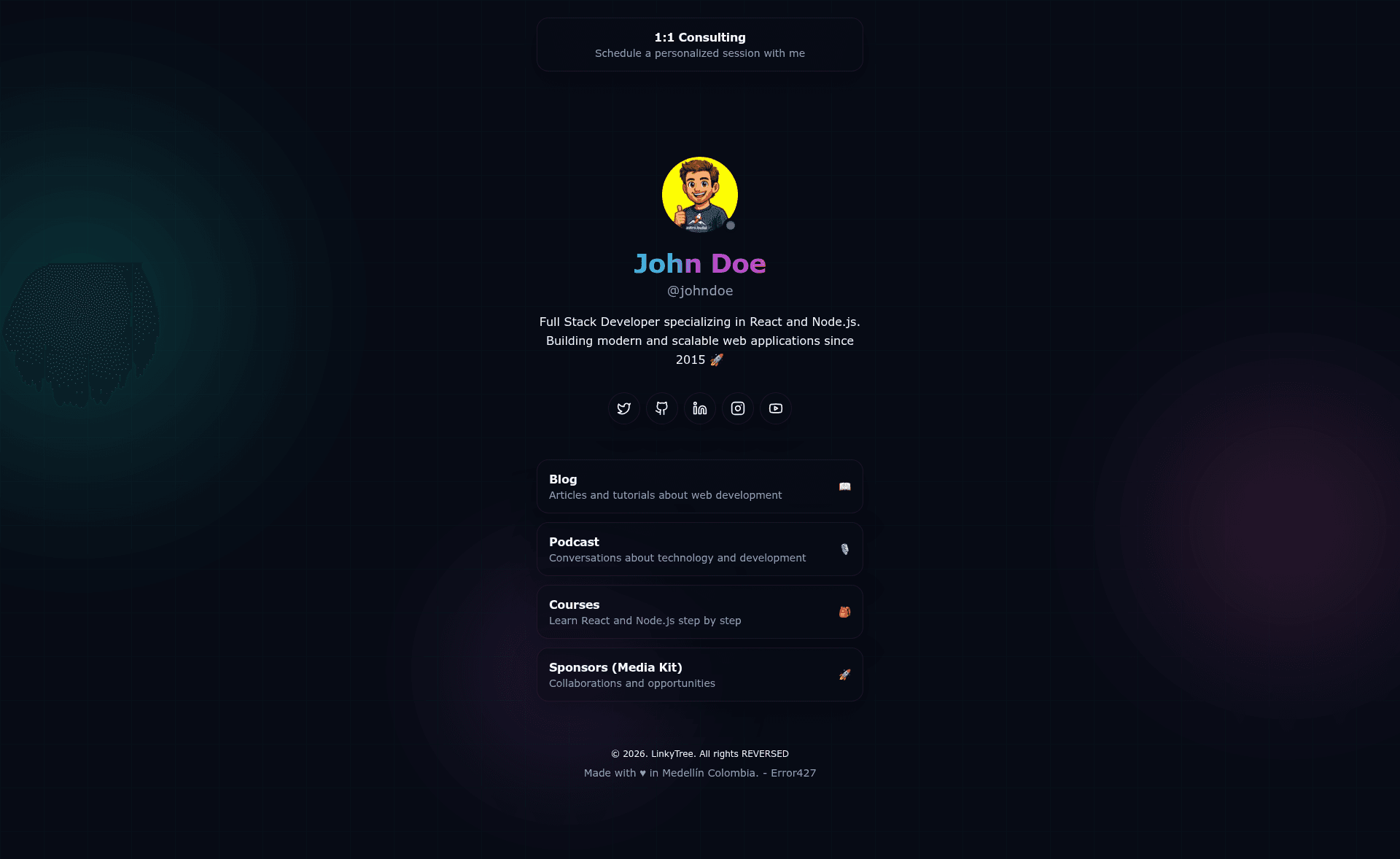
A link-in-bio page built with Astro and TailwindCSS. It renders your profile, social links, and link cards from a single data file.
About this template
LinkyTree is an open-source, link-in-bio page template built with Astro and TailwindCSS that renders a profile, social links, and clickable link cards from a single TypeScript data file.
What is LinkyTree?
LinkyTree is a minimalistic single-page template for creating a "link-in-bio" landing page. It takes configuration from src/data/site.ts and generates a static HTML page plus SEO endpoints (/robots.txt, /sitemap.xml, /humans.txt) using the Astro static site generator. The project is developed by gndx and published on GitHub under the MIT License. It uses Astro 5, TailwindCSS 4 (via the Vite plugin), and TypeScript with strict configuration.
Key Features
- Single data file — All site content (SEO, profile, featured link, social links, link cards) lives in
src/data/site.ts; editing that file rebuilds the entire page. - Interactive setup CLI — Run
npm run setupto be guided through filling in name, handle, bio, and social links; pressing Enter skips any platform you don't want. - Static generation —
npm run buildoutputs a completely staticdist/folder, so the site can be hosted on any static provider or Cloudflare Workers without a runtime server. - Pre-built SEO endpoints — Includes generated
robots.txt,sitemap.xml, andhumans.txtroutes that use thesite.seo.urlvalue for canonical origin. - Astro 5 + TailwindCSS 4 — Based on the current Astro and Tailwind releases (via Vite plugin), with global styles in
src/styles/global.cssusing CSS variables and utility classes. - TypeScript strict — The static configuration file is type-checked to catch errors at build time.
- Cloudflare-ready — Ships with a
wrangler.jsoncconfig; deploy withwrangler deployafter building.
Who is it for?
LinkyTree is aimed at developers and content creators who want a self-hosted alternative to managed link-in-bio services. Developers use it to quickly scaffold a page and then fully customize the source code, while personal brands can deploy it to their own domain to retain control over analytics and branding. Because it requires a Node.js toolchain to build, it suits users comfortable with command-line tools and Git.
What can you do with LinkyTree?
- Content creators — Publish a single page that showcases a bio, avatar, featured link, and a set of link cards directing followers to YouTube, TikTok, Store, or any URL.
- Developers — Use the template as a starting point to build a custom personal landing page, adding components or modifying the Astro layouts in
src/components/andsrc/layouts/. - Business owners — Set up a low-cost link hub for a product or event, pointing to sign-up pages, pricing, or documentation, and deploy it to Cloudflare Workers or any static host.
How does it work?
After cloning the repository, run npm install, then npm run setup to fill the basic fields interactively. Next, edit src/data/site.ts for fine-grained control over SEO, profile, featured link, social links, and link cards. Use npm run dev to preview at http://localhost:4321, and npm run build to produce the static site in dist/. Deploy by either running wrangler deploy (Cloudflare Workers) or uploading dist/ to Netlify, Vercel, GitHub Pages, or any static host.
Pros and cons
- Free and open source — MIT License, so it costs nothing and can be modified.
- Static by design — No runtime server means fast CDN delivery and no server costs.
- Single-page limitation — The template is built for one landing page only; it lacks a blog, portfolio, or multi-page router out of the box.
- Requires code editing — Content is managed in a TypeScript file rather than a visual editor, so non-developers will need to touch code.
Pricing
LinkyTree is free. The project is distributed under the MIT License, and the source code is available on GitHub with a link to sponsor the author via GitHub Sponsors.
Alternatives
- Linktree — a hosted, commercial link-in-bio service with a visual editor, requiring no coding or self-hosting.
FAQ
Is LinkyTree free?
Yes, LinkyTree is open source under the MIT License. You can use, modify, and deploy it for free, including for commercial purposes. There is no paid tier or subscription.
How do I add my social links?
Run npm run setup to answer interactive prompts for your social profiles, or edit the socialLinks array in src/data/site.ts directly. Pressing Enter in the setup CLI skips any platform you don't want.
Does LinkyTree need a server?
No. The build command generates a static dist/ folder containing only HTML, CSS, and JavaScript. You can serve these files from Cloudflare Workers, Netlify, Vercel, GitHub Pages, or any static host without a backend.
Can I change the domain and URL?
Yes. The site.seo.url field in src/data/site.ts controls the canonical URL, which is also used by robots.txt, sitemap.xml, and humans.txt to build the origin. Update it whenever you deploy under a different domain.
What versions of Astro and Tailwind does it use?
The template uses Astro 5 and TailwindCSS 4 (integrated via the Vite plugin). It also runs TypeScript with a strict configuration.