Template details
Loopstudio
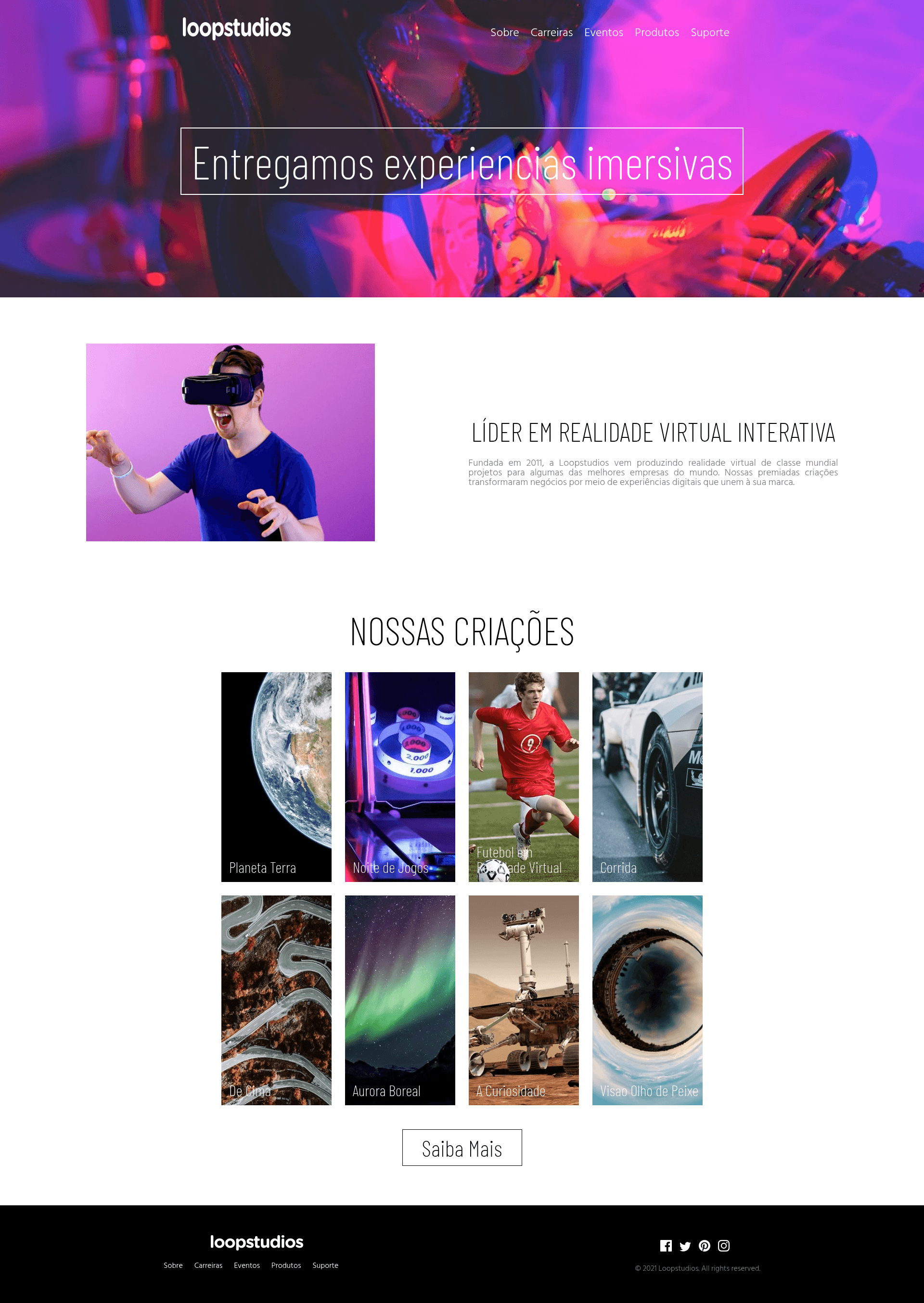
A static landing page for a virtual reality glasses company, built entirely with HTML and CSS and deployed on Vercel.
About this template
Loopstudio is a fully static landing page template for a virtual reality (VR) glasses company, built entirely with HTML and CSS and deployed on Vercel.
What is Loopstudio?
Loopstudio is a static one-page website for a VR eyewear brand, created as a study project by Lucas Alfeu da Silva Oliveira. The template takes no input data and outputs a responsive marketing page that can be served from any static host or through the included Vercel deployment. It is based on the Loopstudio design brief from Frontend Mentor (frontendmentor.io), which supplies the visual structure and component layout.
Key Features
- Pure HTML and CSS — No JavaScript, build tools, or CSS frameworks are used; all styling is hand-written CSS files.
- Responsive layout — The page includes breakpoints for mobile, tablet, and desktop; the repository contains screenshots of each viewport for reference.
- Frontend Mentor challenge — The design is adapted from the official Loopstudio challenge found at frontendmentor.io, useful for comparing against other solutions.
- Vercel deployment — The live demo is hosted at loopstudio-2.vercel.app, showing a production-ready static hosting setup.
- Simple local setup — Running the project requires only npm or yarn; after cloning, npm install and npm start launch a local server.
- VR-focused content — The page is tailored for a virtual reality glasses company, with a landing structure suited to product marketing.
Who is it for?
Loopstudio is for front-end learners who want to study responsive layout with only HTML and CSS, for developers who need a lightweight static landing page for a VR or tech product, and for bootcamp students who want to see a complete solution to the Frontend Mentor Loopstudio challenge.
What can you do with Loopstudio?
- Front-end students: examine the source code to learn how breakpoints are handled with pure CSS and how to structure a semantic HTML landing page.
- Indie VR and tech brands: copy or adapt the template to create a simple marketing page for a virtual reality product, then deploy it to Vercel for free.
- Portfolio builders: include the project on GitHub as proof of hand-written CSS and responsive design skills.
How does Loopstudio work?
To use the template, clone the repository from GitHub, install the dependencies with npm install, and then run npm start to serve the page locally. The site is fully static, so deployment can also be done by uploading the HTML and CSS files to any hosting service; the provided setup targets Vercel.
Pros and cons
- Pros: No external dependencies, fast load, easy to customize for a simple landing page, and responsive breakpoints are included.
- Cons: No JavaScript is present, so interactive elements such as form validation or mobile menus must be added manually; there is no CSS preprocessor or component system, so larger changes require editing the raw stylesheet.
FAQ
Is Loopstudio free to use?
Loopstudio is a public GitHub repository, so you can clone and use the source code without paying anything. The repository does not state a specific license, so for commercial use you may want to contact the author, Lucas Alfeu da Silva Oliveira.
What technologies does Loopstudio use?
The project uses only HTML and CSS on the front end. npm is used to run a local development server, and Vercel is set up for deployment. There is no JavaScript, no backend, and no CSS framework included.
Is Loopstudio responsive?
Yes, Loopstudio includes responsive layouts for mobile and tablet in addition to desktop. The repository contains screenshots labeled as tablet and mobile to show how the design adapts.
How do I run Loopstudio locally?
First install npm or yarn on your machine. Then clone the repository, run npm install to install dependencies, and finally run npm start to start the project. The page will be served locally through the npm server.
Does Loopstudio include JavaScript interactivity?
No, Loopstudio is intentionally a static page built only with HTML and CSS. Any animations, modals, or other interactive behavior would need to be added by the developer, as the template does not include any JavaScript files.