Template details
Lume
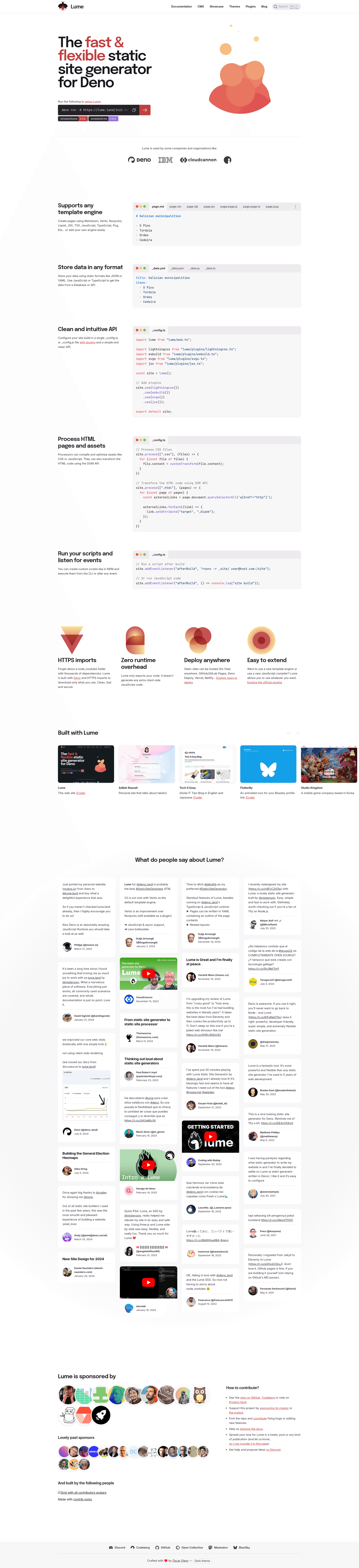
Lume is a fast, flexible static site generator for Deno that supports Markdown, YAML, JSX, Vento, and more, compiling to a static _site folder.
About this template
Lume is a Deno-native static site generator that transforms Markdown, YAML, JavaScript, TypeScript, JSX, Vento, and Nunjucks source files into a static HTML site in the _site directory.
What is Lume?
Lume is an open-source static site generator (SSG) built specifically for the Deno runtime, inspired by Jekyll and Eleventy. It takes a folder of source documents and templates and compiles them into plain HTML output, ready to deploy anywhere. The project is MIT-licensed and hosted on GitHub under the lumeland/lume organization.
Key Features
- Multi-format input — Supports Markdown, YAML, JavaScript, TypeScript, JSX, Vento, and Nunjucks out of the box, so pages can be authored in plain text or with programmatic templates.
- Processor hooks — Attach any transform to your assets, such as Terser for JavaScript minification or PostCSS for CSS processing, without a heavy bundler.
- Deno-native — Lume runs entirely on Deno, so there is no node_modules directory or complex module resolution; dependencies are fetched and cached only as needed.
- Simple CLI — A single command,
deno run -A https://cdn.jsdelivr.net/gh/lumeland/lume/cli.ts, builds the entire site into the_sitefolder. - Extensible — The generator is designed to be easy to extend with custom file formats and processors, letting teams adapt it to their own workflows.
- Open community — Maintained with a Discord server for help, an Open Collective for sponsorship, and documentation at lume.land.
Who is it for?
- Deno developers who want a static site generator that uses TypeScript and JavaScript without touching Node.js.
- Jekyll and Eleventy users looking for a faster, simpler alternative that still supports multiple template languages.
- Freelancers and small teams building blogs, documentation sites, or landing pages who need Markdown-based authoring and flexible template control.
- Performance-conscious site owners who appreciate the smaller footprint and speed of a Deno-based tool.
What can you do with Lume?
- Blog authors: write posts in Markdown with YAML front matter (like
title: Welcome to my page) and have Lume compile them to static HTML pages. - JavaScript/TypeScript developers: build pages using JSX or TypeScript templates, combining components and data fetched at build time.
- CSS and JavaScript processors: configure PostCSS for CSS and Terser for JS, so Lume handles minification and transpilation during the build.
- Site maintainers: organize content across multiple formats—some pages in Markdown, others in Vento or Nunjucks—and let Lume output a cohesive HTML site.
How does Lume work?
Start with Deno installed, then create a source file such as index.vto with YAML front matter and Vento template syntax. Run the build command deno run -A https://cdn.jsdelivr.net/gh/lumeland/lume/cli.ts, and Lume compiles the site into the _site directory. No configuration file is required for a basic site; the command picks up your source and outputs static HTML.
Alternatives
- Jekyll — a Ruby-based static site generator that uses Liquid templates.
- Eleventy — a JavaScript-based SSG with a plugin ecosystem and support for many template languages.
FAQ
Is Lume free?
Yes, Lume is open source under the MIT License, so you can use it for personal and commercial projects without cost.
What file formats does Lume support?
Lume supports Markdown, YAML, JavaScript, TypeScript, JSX, Vento, and Nunjucks. You can mix formats in the same site, and it is extensible with custom loaders.
Does Lume work with Node.js?
No, Lume runs on Deno, not Node.js. You need to install Deno to build sites with Lume, and there is no dependency on node_modules.
How do I build a site with Lume?
Install Deno, create a source file (for example, index.vto), then run the one-line CLI command deno run -A https://cdn.jsdelivr.net/gh/lumeland/lume/cli.ts. Lume outputs the generated site to the _site directory.