Template details
Maintenance Page
This template shows how to quickly trigger a maintenance page using Global Config
About this template
What is the Maintenance Page template?
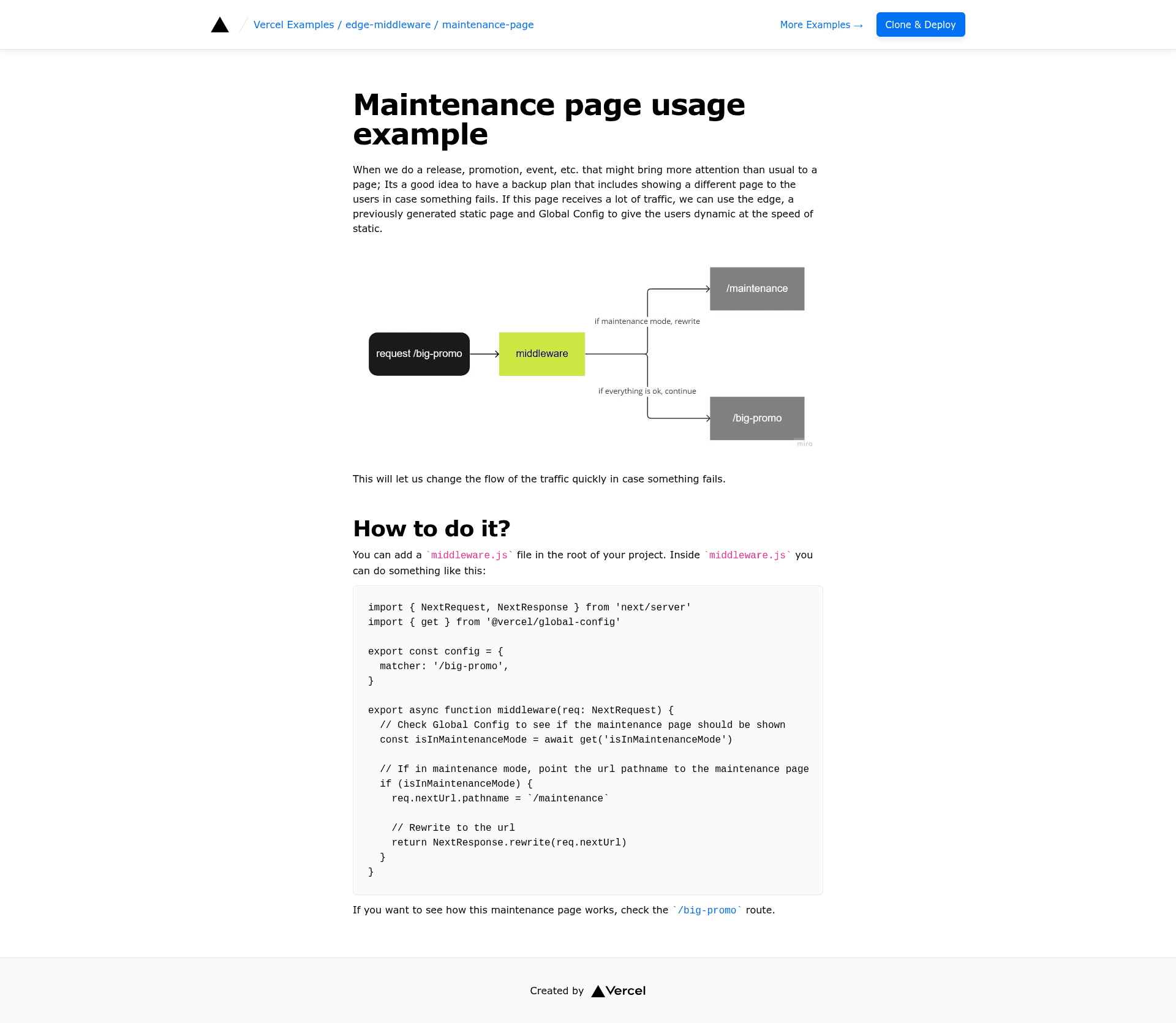
The Maintenance Page template is a Next.js example from Vercel that demonstrates how to serve a maintenance screen from the edge using Global Config. It takes a single boolean flag stored in a Global Config store, and when that flag is true, visitors see a styled maintenance page instead of the normal application. The template runs on Vercel's Edge Middleware and is available as a one-click deploy or a local pnpm project.
What makes it stand out?
- Edge Middleware — The maintenance check runs at the edge, so the redirect or rewrite happens before the request reaches your origin server, minimizing load on your application.
- Global Config toggle — The template reads the
isInMaintenanceModekey from a Global Config store; flipping that boolean to true or false switches between maintenance mode and normal operation without redeploying. - One-click deploy — A Vercel Deploy button pre-configures the project with the
GLOBAL_CONFIGenvironment variable and a store containing{ "isInMaintenanceMode": true }. - create-next-app support — You can bootstrap the example locally with
pnpm create next-app --example https://github.com/vercel/examples/tree/main/edge-middleware/maintenance-page. - Tailwind CSS styling — The page is styled with Tailwind CSS, as indicated by the template metadata.
- Demo available — A live demo is hosted at https://edge-maintenance-page.vercel.app so you can see the maintenance page in action.
Who is it for?
- Next.js developers who need a quick way to add a maintenance mode to an existing or new Next.js project.
- Site reliability engineers who want to take an app offline temporarily without changing application code or redeploying.
- Teams using Vercel who want to leverage Global Config for runtime feature toggles like maintenance windows.
What can you do with it?
- Toggle maintenance mode at runtime: Flip the
isInMaintenanceModeflag in your Global Config store to instantly show or hide the maintenance page. - Deploy a spare maintenance site: Use the one-click deploy to spin up a standalone maintenance page that can serve as a placeholder during site migrations or outages.
- Learn edge middleware patterns: Study how to intercept requests with Edge Middleware and conditionally render a static page based on configuration.
How does it work?
The template uses Vercel Edge Middleware to inspect the GLOBAL_CONFIG environment variable, which holds a connection string to your Global Config store. The middleware reads the isInMaintenanceMode flag; when it is true, the request is rewritten to a maintenance page component. The example includes instructions for both one-click deploy and local setup via create-next-app.
FAQ
Does this template require a Vercel account?
Yes, the one-click deploy and edge middleware features are designed for Vercel, and the demo is hosted on Vercel.
What is Global Config?
Global Config is a Vercel feature for storing runtime configuration. This template reads a boolean key from a Global Config store to decide whether to show the maintenance page.
Is the maintenance page customizable?
The template uses Tailwind CSS, so you can modify the styling and content of the page component to match your brand.