Template details
Spectral Jekyll Theme
A Jekyll version of the 'Spectral' theme by HTML5 UP.
About this template
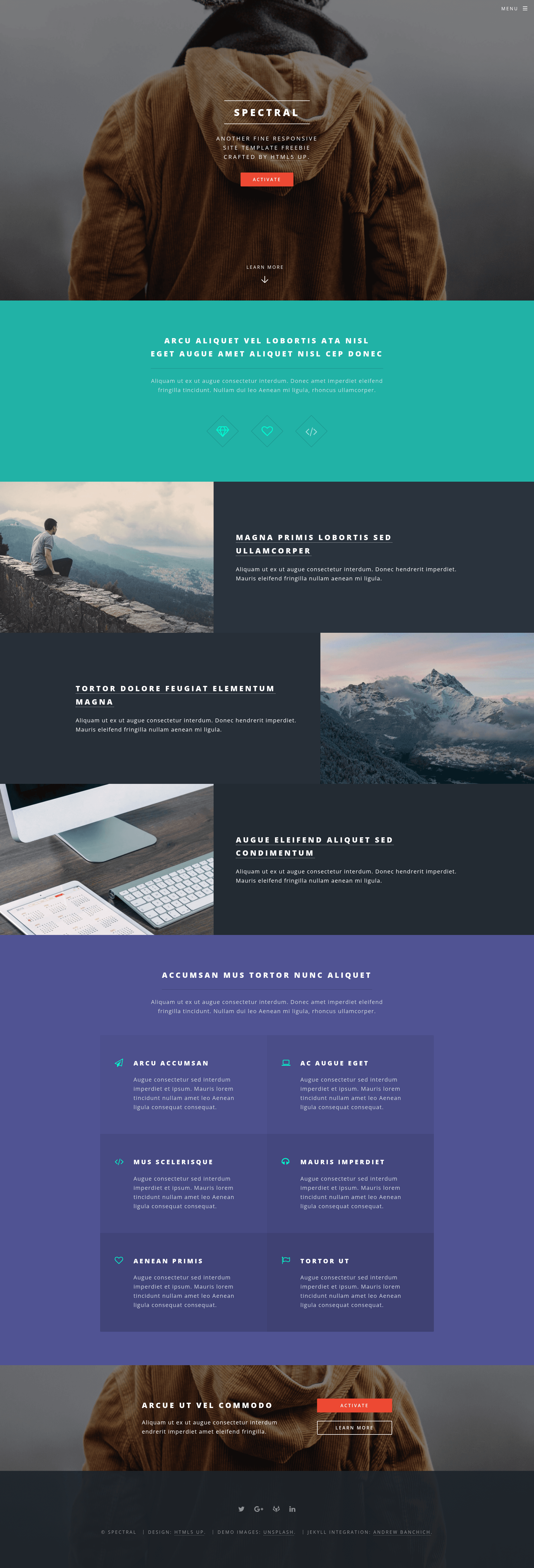
Spectral Jekyll Theme is a free, open-source Jekyll port of the HTML5 UP "Spectral" template, giving developers a ready-made responsive static-site theme that deploys to both GitHub Pages and GitLab Pages. It takes standard Jekyll content — posts, pages, front matter, and a central _config.yml file — and renders a modern, blocky, mobile-first site with configurable social footer links.
What is Spectral Jekyll Theme?
Spectral Jekyll Theme adapts the big, modern, blocky design of HTML5 UP's Spectral template into a Jekyll-based static site generator theme. It consumes Jekyll content (markdown posts and pages plus front matter) and outputs a fully responsive static website with a mobile-style menu, flexbox-based layout, and Font Awesome icons. The theme runs on any Jekyll-compatible platform, and the repository includes specific instructions for serving it on GitHub Pages (via a gh-pages branch) and GitLab Pages (via the included .gitlab-ci.yml). The original Spectral design was created by AJ for HTML5 UP; this repository is a community-maintained Jekyll port.
Key Features
- Configurable social profiles — Add social profile URLs in the _config.yml file; only the social buttons you specify appear in the site footer.
- Responsive flexbox layout — Uses CSS flexbox for a modern blocky layout, with non-flexbox fallbacks for IE8 and IE9.
- Built on Skel 3 — Inherits the Skel 3 responsive framework from HTML5 UP, a leaner rewrite of the original responsive framework.
- Sass with mixins — Uses Sass stylesheets and custom mixins/functions (optional; vanilla CSS is supported if you prefer).
- Font Awesome icons — Includes Font Awesome for UI and social icons out of the box.
- GitHub Pages and GitLab Pages ready — Fork the repo, edit _config.yml, and publish; the optional .gitlab-ci.yml handles GitLab CI builds.
- Front matter integration — Standard Jekyll front matter drives posts and pages; featured image support and auto-pulling homepage sections are listed as "coming soon" features.
- Free for personal and commercial use — Released under the Creative Commons Attribution 3.0 (CCA 3.0) license.
Who is it for?
- Jekyll bloggers — Anyone running a personal blog on Jekyll can fork the theme, add posts in markdown, and get a distinctive, responsive design with no front-end work.
- GitHub Pages users — Developers who want a polished portfolio or project site can deploy it by creating a gh-pages branch and editing the repository config.
- GitLab Pages users — Teams using GitLab can leverage the included .gitlab-ci.yml to build the site automatically with GitLab CI, requiring only a fork and config edits.
What can you do with Spectral Jekyll Theme?
- Personal blog: Publish markdown posts with Jekyll front matter and the theme renders them in a large, modern layout with footer social links.
- Portfolio landing page: Use static pages to showcase work; the planned featured-image support will allow per-post header images.
- Open-source project site: Deploy documentation or a project landing page on GitHub Pages or GitLab Pages using the provided deployment workflow.
How does Spectral Jekyll Theme work?
To get started, fork the repository and edit the _config.yml file to set your site title, social URLs, and other settings. Then add your content as Jekyll posts or pages. For GitHub Pages, create a branch named gh-pages; for GitLab Pages, the included .gitlab-ci.yml file automatically builds the site when you push. You can delete the .gitlab-ci.yml if you are only using GitHub.
Pricing
Spectral Jekyll Theme is free to use for personal and commercial projects under the Creative Commons Attribution 3.0 license (CCA 3.0), the same license as the original HTML5 UP template. No payment or account is required to download or reuse the theme.
Pros and cons
- Pros: Free CCA 3.0 license, responsive mobile-first design, simple social configuration, works with both major static hosting platforms, and includes fallbacks for older browsers.
- Cons: Skel 3 was still in development when the original theme was released, so it may have evolving APIs; the Jekyll port's featured images and auto-pulling sections are not yet implemented (marked "coming soon").
FAQ
Is Spectral Jekyll Theme free?
Yes, the theme is free for personal and commercial use under the Creative Commons Attribution 3.0 license. You can fork the repository, modify it, and publish sites without paying a fee.
How do I deploy Spectral Jekyll Theme to GitHub Pages?
Fork the repository and create a branch named gh-pages. Edit the _config.yml file with your details, and GitHub Pages will build and serve the Jekyll site. You can delete the .gitlab-ci.yml file if you're not using GitLab.
How do I add social links to the footer?
In the _config.yml file, add entries for the social profiles you want. Only the social buttons you include will appear in the footer, so you can pick exactly which platforms to show.
Does Spectral Jekyll Theme support blog posts?
Yes, it uses standard Jekyll markdown posts and front matter. Write posts in the _posts directory following Jekyll conventions, and the theme will render them in the blog layout.
What are the "coming soon" features?
The repository lists two planned additions: setting featured images in front matter for individual posts, and having front-page sections automatically pull from posts. These are not yet available in the current version.