Template details
Master Portfolio
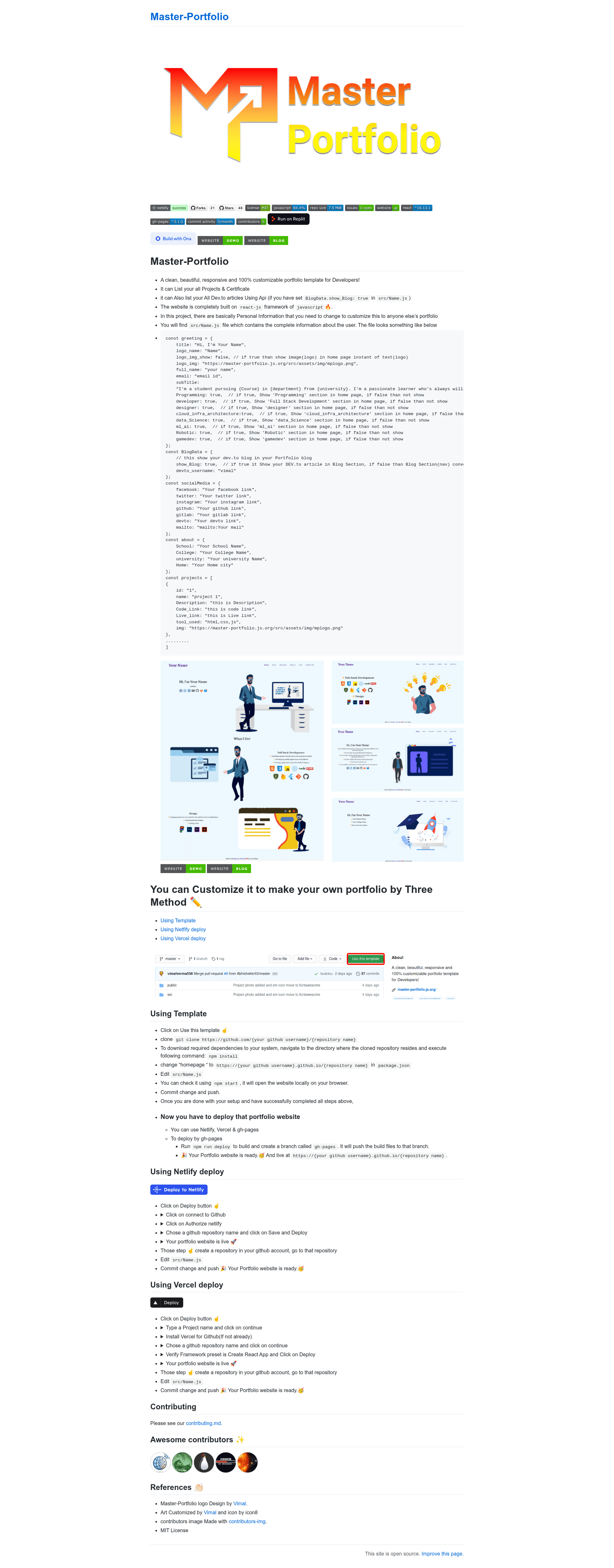
A clean, beautiful, responsive and 100% customizable portfolio template for Developers!
About this template
Master-Portfolio is a free, open-source React portfolio template for developers that turns a single configuration file into a responsive personal website with projects, certificates, and a Dev.to blog feed.
What is Master-Portfolio?
Master-Portfolio is a fully customizable portfolio template built on the React JavaScript framework, created by vimal-verma and distributed under the MIT License. It takes a single configuration file, src/Name.js, as input and renders a complete one-page developer portfolio with sections for greeting, skills, projects, certificates, and a blog. The site runs in any static hosting environment and includes one-click deployment setups for Netlify, Vercel, and GitHub Pages.
Key Features
- Single-file configuration — All personal data, social media links, project entries, and skill-section toggles live in
src/Name.js, so editing one file updates the whole site. - Dev.to blog integration — When
show_Blogis set to true, the template fetches and lists articles from a given Dev.to username, and the blog nav item becomes a skills section when disabled. - Project and certificate listing — Each project entry supports a name, description, code link, live link, tools used, and an image; certificates are listed via the same data structure.
- Responsive design — The layout is described as clean and responsive, adapting to desktop and mobile screens without additional configuration.
- Section toggles — Developers can independently show or hide interest areas such as Programming, Full Stack Development, Designer, Data Science, ML/AI, Robotics, and Game Dev using boolean flags.
- One-click deployment — Dedicated buttons deploy the template to Netlify, Vercel, or GitHub Pages, and a
npm run deploycommand builds and pushes the site to a gh-pages branch. - Social media links — Facebook, Twitter, Instagram, GitHub, GitLab, Dev.to, and email links are wired through the socialMedia config object.
Who is it for?
- Software developers — who need a personal portfolio site without writing frontend code from scratch; they edit
src/Name.jsand deploy. - CS students and recent graduates — who want to showcase academic projects, certificates, and Dev.to articles to recruiters.
- Open-source contributors — who want a GitHub Pages-hosted site and can reuse the template's gh-pages workflow for free static hosting.
What can you do with Master-Portfolio?
- Job seekers: present a clean, responsive portfolio with projects, live demos, and code links, and share the hosted URL (e.g., a Netlify site) on resumes.
- Tech bloggers: connect your Dev.to account to auto-display your latest articles directly on your portfolio's blog section.
- Multi-domain developers: use the toggles to highlight interests across full-stack, data science, ML/AI, robotics, and game development without restructuring the page.
How does Master-Portfolio work?
Clone or fork the repository, or use the "Use this template" button, then run npm install to install dependencies. Edit src/Name.js with personal information, run npm start to preview locally, and deploy with npm run deploy for GitHub Pages or one-click buttons for Netlify and Vercel. The template builds a static Create React App site that is ready to host on any static server.
FAQ
Is Master-Portfolio free?
Yes. The project is published under the MIT License, so it is free to use, modify, and distribute, including for commercial personal portfolios.
Do I need to know React to use Master-Portfolio?
No. You only need to edit the data in src/Name.js — the template handles rendering. Knowing React helps if you want to change the layout or add new sections.
How do I show my Dev.to articles?
Set show_Blog to true in src/Name.js and add your Dev.to username in the BlogData config. The portfolio will then fetch and list your articles.
Can I deploy to Vercel or Netlify?
Yes. The README provides one-click deploy buttons for both Netlify and Vercel, plus a gh-pages deploy command via npm run deploy.