Template details
MOS-APP-NEXTJS
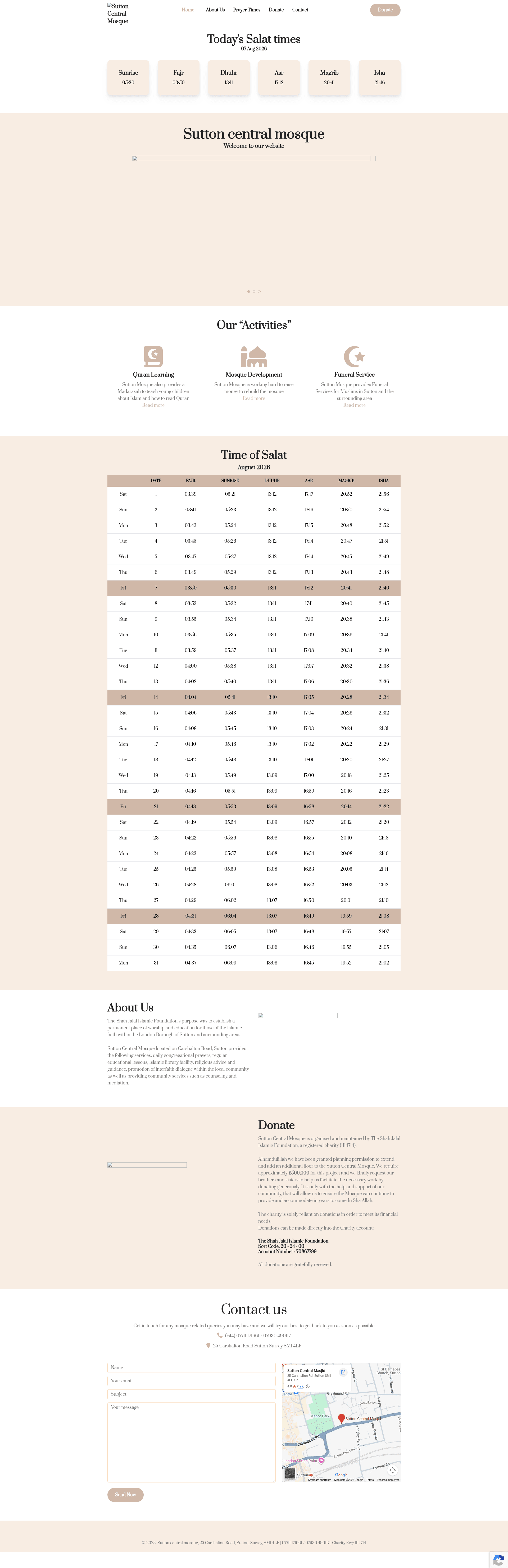
A free, open-source Next.js 13 template for building a mosque website with prayer times, announcements, and a contact form.
About this template
MOS-APP-NEXTJS (MosApp) is a free, open-source Next.js 13 website template for mosques, designed to publish prayer timings, announcements, and basic mosque information on a single responsive page. It is hosted on GitHub at mos-apps/mos-app-nextjs and comes with a live preview deployment on Vercel.
What is MOS-APP-NEXTJS?
MOS-APP-NEXTJS is a web development template built on Next.js 13.0 by the mos-apps GitHub organization. It takes configuration files — config/theme.json, config/menu.json, and config/config.json — as input to control colors, navigation, and site settings, and it outputs a statically generated, SEO-friendly mosque website with a working contact form. The template runs on the Next.js framework and can be deployed to any Node.js-compatible host, as demonstrated by its Vercel-powered live demo.
Key Features
- Simple and minimal design — A clean, uncluttered single-page layout designed for quickly scanning prayer times and announcements.
- Next.js 13 framework — Built on Next.js 13.0, leveraging modern React features and predictable production builds.
- Fully responsive layout — The single-page design adapts to mobile, tablet, and desktop screens for consistent viewing.
- Google Analytics support — Includes a built-in hook for adding Google Analytics to track visitor behavior.
- Caching enabled — The template comes with caching enabled to improve page load speed and reduce server requests.
- Contact form — A contact form is included so visitors can send messages directly from the page.
- SEO friendly — Structured with search engine optimization in mind, helping the mosque site appear in local search results.
- Configurable theme and menu — Theme color, menu items, and other settings live in separate JSON config files, so non-developers can rebrand the site without editing React components.
Who is it for?
- Mosque administrators — Use it to keep the community informed about prayer times, events, and announcements without maintaining a custom website.
- Web developers — Use it as a clean Next.js starter for mosque or religious-organization projects, with configuration separated from code.
- Community volunteers — Set up and update a simple online presence quickly, since the entire site can be edited through three JSON files and standard npm commands.
What can you do with MOS-APP-NEXTJS?
- Publish prayer timings: Display daily and weekly prayer schedules in a minimal layout that is easy to read on phones.
- Share announcements: Post news and event notices directly on the homepage for visitors to see.
- Accept visitor inquiries: The built-in contact form lets community members send questions or requests to the mosque's email.
- Deploy to production: Run
npm run buildto generate a production-ready build, then host it on Vercel or another Node.js platform.
How does it work?
- Install Node.js (recommended LTS version) from nodejs.org.
- Download the template from GitHub or clone the repository.
- Run
npm installin the project folder to install dependencies. - Run
npm run devto preview locally; edit config/theme.json, config/menu.json, and config/config.json to customize the site. - Run
npm run buildto compile a production build for deployment.
FAQ
Is MOS-APP-NEXTJS free to use?
Yes, the template is open source and publicly available on GitHub, so anyone can download, modify, and use it without paying licensing fees.
How do I run it on my local machine?
Install Node.js (LTS recommended), then run npm install and npm run dev in the project directory. This starts a development server with live-reload in your default browser.
How do I customize the colors and menu?
Open config/theme.json to set the theme color, config/menu.json to edit menu items, and config/config.json to adjust other site-wide settings. No component editing is required.
What Next.js version does it use?
The badge in the README indicates Next.js 13.0. Use a compatible Node.js environment (the recommended LTS version) to run the template.