Template details
MotherDuck Embedded Dives
Next.js template for building AI-powered, user-defined analytics UIs with MotherDuck embedded Dives.
About this template
MotherDuck Embedded Dives is a deployable Next.js boilerplate for building AI-powered, user-defined analytics apps that query MotherDuck — a serverless cloud data warehouse powered by DuckDB — through embedded, code-based Dives.
What is MotherDuck Embedded Dives?
It is a starter template from MotherDuck that gives you a full Next.js application where visitors can browse starter Dives, open full-page previews, and use an AI chat interface to customize each Dive in place. The template takes MotherDuck credentials and an AI provider key as environment variables and outputs a live web app with a Dive gallery, preview routes, and a chat-based remix workflow. It runs on Vercel and can be deployed with a single click that provisions a MotherDuck integration, a Supabase Postgres integration for chat history, and runs database migrations from the migrations/ directory.
What makes MotherDuck Embedded Dives stand out?
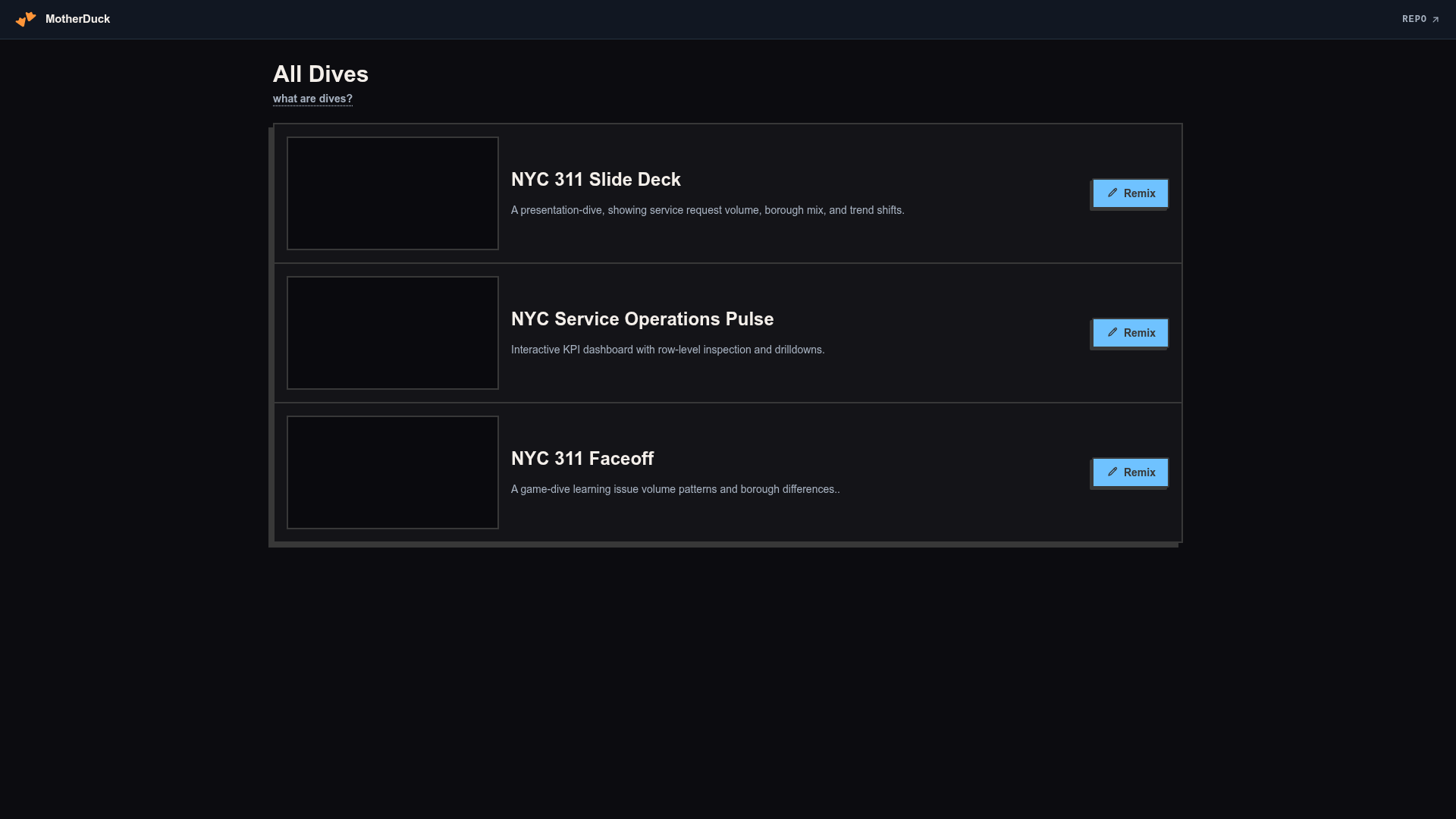
- Three starter Dives — slides, dashboard, and game mini-apps built on NYC 311 data, displayed in a gallery with live previews.
- AI dive remix workflow — users explore the underlying data via chat and customize each Dive in place; editing instructions are defined in app/_lib/chat/system-prompt.ts.
- Multiple auth modes — public anonymous sessions, shared-password sign-in with one MotherDuck service account, or per-user MotherDuck personal access tokens with PAT encryption.
- Flexible AI providers — Anthropic, OpenAI, or Vercel AI Gateway through the Vercel AI SDK, with optional model overrides via AI_MODEL_ANTHROPIC, AI_MODEL_OPENAI, and AI_MODEL_GATEWAY.
- One-click Vercel deployment — provisioning MotherDuck (sets MOTHERDUCK_TOKEN), Supabase (sets POSTGRES_URL), and running migrations automatically.
- Fully customizable code — starter Dive components live in dives/presentation-dive.tsx, dives/dashboard-dive.tsx, and dives/game-dive.tsx, with metadata in app/_lib/dive-provisioning.ts.
Who should use MotherDuck Embedded Dives?
- Data product developers building embeddable analytics widgets want a working reference app for MotherDuck's Dive component model.
- AI engineers integrating LLM chat with SQL queries can reuse the AI provider abstraction and system-prompt architecture.
- Teams deploying internal dashboards need a place to start with auth options and multi-user provisioning instead of building from scratch.
- MotherDuck users who want to test Dives' flexibility for interactive presentations, dashboards, and data games before embedding them in their own apps.
What can you do with MotherDuck Embedded Dives?
- Deploy a public demo where visitors can browse starter Dives, open previews, and remix them via chat; each edit creates an isolated anonymous MotherDuck service account.
- Prototype a multi-tenant analytics app by enabling password mode with a shared service account or personal PAT mode for individual user credentials.
- Customize the AI behavior by editing the system prompt in app/_lib/chat/system-prompt.ts or changing model defaults in app/_lib/chat/ai-provider.ts.
How does MotherDuck Embedded Dives work?
After you deploy with Vercel and add at least one AI key (ANTHROPIC_API_KEY, OPENAI_API_KEY, or AI_GATEWAY_API_KEY), visitors open the app, choose a Dive, and click Remix. In public demo mode, the first edit creates an anonymous MotherDuck service account and clones the starter Dives for that browser session, then the chat interface can modify the Dive's code and data queries. For local development, you run a Postgres container, set POSTGRES_URL, and run npm run dev.
Pros and cons
- One-click deploy — Vercel clone provisions MotherDuck and Supabase integrations and runs the template's migrations automatically.
- Multiple auth and AI options — supports anonymous, shared password, or personal PAT auth, and Anthropic, OpenAI, or AI Gateway models.
- MIT license — template source is free to reuse and modify.
- Demo auth is not production-ready — the page states you must replace it with your own identity provider and add authorization, rate limits, monitoring, and session cleanup before shipping at scale.
FAQ
What is a Dive?
A Dive is a code-based, fully customizable React component that queries MotherDuck, a serverless cloud data warehouse powered by DuckDB. Dives can be used to build interactive dashboards, presentations, or even data-driven games, and they fetch live data via SQL at runtime.
What environment variables do I need to set?
You must set MOTHERDUCK_TOKEN and POSTGRES_URL, plus at least one AI provider key: ANTHROPIC_API_KEY, OPENAI_API_KEY, or AI_GATEWAY_API_KEY. Optional overrides like AI_MODEL_ANTHROPIC, AI_MODEL_OPENAI, and AI_MODEL_GATEWAY allow you to change model defaults.
Can I use my own data with this template?
Yes. Load or attach your data in MotherDuck, then update the SQL in the starter Dive files. The project uses MotherDuck sample_data by default; for production, the page recommends modeling access with MotherDuck shares, per-user databases, or row-level filters.
Is the included authentication safe for production?
No. The template's auth modes are for demo purposes. The README instructs you to connect your own identity provider, add authorization around users/workspaces/Dives/chat history/data access, add rate limits, and add monitoring before launching publicly.
How do I switch AI providers?
Set the corresponding API key in Vercel project settings and optionally override the model with AI_MODEL_ANTHROPIC, AI_MODEL_OPENAI, or AI_MODEL_GATEWAY. The default models are claude-sonnet-4-6, gpt-5.4, and anthropic/claude-sonnet-4.6 respectively.