Template details
New Age Jekyll Theme
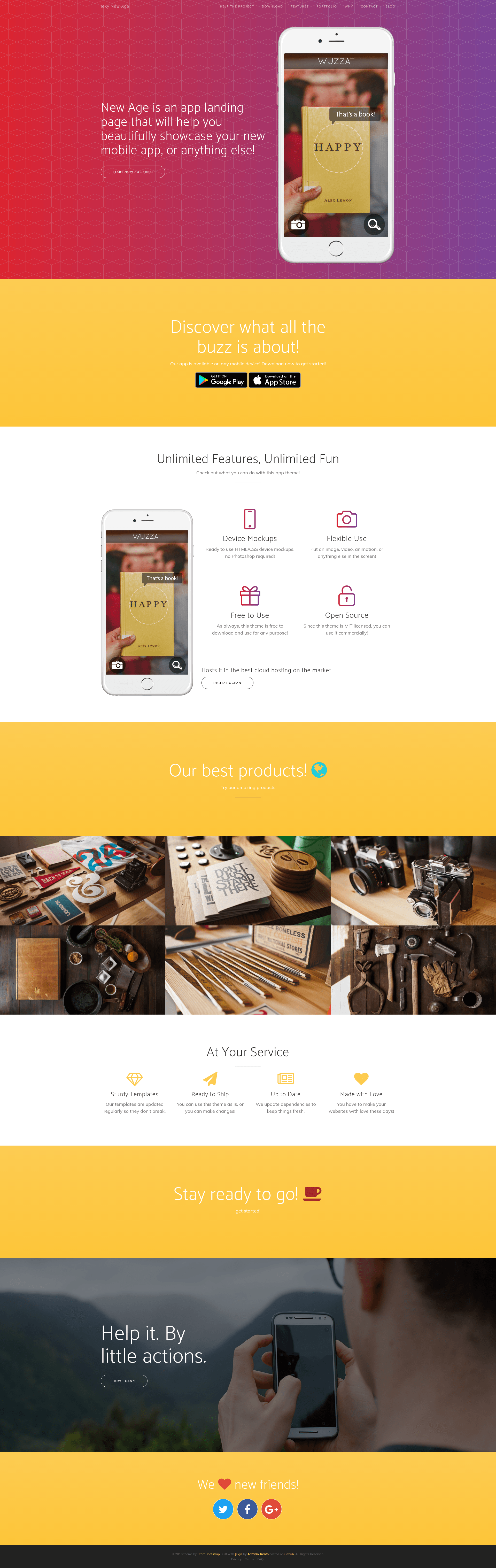
A Jekyll theme based on the New Age Bootstrap template for landing pages, portfolios, and blogs, with integrated marketing and analytics tools.
About this template
New Age is a Jekyll theme by Antonio Trento that ports the Start Bootstrap New Age template, providing a static-site foundation for landing pages, squeeze pages, portfolios, and blogs with built-in marketing and analytics integrations.
What is New Age Jekyll theme?
New Age is an open-source Jekyll theme created by Antonio Trento, based on the Start Bootstrap New Age template. It transforms Markdown content and _config.yml settings into a static HTML site, making it suitable for Jekyll hosting environments like GitHub Pages. The repository is publicly available on GitHub and currently has 120 stars, though the project is no longer actively maintained.
Key Features
- Marketing integrations — Google AdWords, Google Analytics, Disqus comments, and AddThis social sharing are all wired in and configured through
_config.yml. - Start Bootstrap base — Built directly from the New Age Bootstrap theme, giving you a responsive grid and Bootstrap styling out of the box.
- External libraries included — Google Fonts, Font Awesome, Normalize.CSS, and WOW.js handle typography, icons, CSS reset, and scroll animations.
- Adjustable color scheme — Primary and secondary colors are defined in
css/main.css, and the theme uses gradient backgrounds in some page areas. - Flexible page types — Supports landing pages, squeeze pages, portfolio sections, and blog posts all in one theme.
- Jekyll-native workflow — Content lives in Markdown files with front matter; site-wide settings live in
_config.yml.
Who is it for?
- Marketers — Build squeeze pages and landing pages that already have Google AdWords and Analytics tracking installed, reducing setup time.
- Freelancers and agencies — Present a portfolio and client landing pages with social sharing and comment capabilities without custom coding.
- Bloggers — Publish posts with Disqus comments and AddThis sharing buttons enabled by default.
What can you do with New Age Jekyll theme?
- Launch a landing page — Assemble hero, features, and call-to-action sections in Markdown, and push the site to GitHub Pages.
- Showcase a portfolio — Use the responsive Bootstrap grid and Font Awesome icons to display projects attractively.
- Run a blog — Write posts in Markdown, then let Disqus and AddThis handle reader interaction and social distribution.
How does it work?
Clone the repository, add your Google AdWords, Analytics, Disqus, and AddThis credentials to _config.yml, and optionally edit css/main.css for branding. Write your content as Markdown files with Jekyll front matter, then run the standard Jekyll build command to generate static HTML.
Pros and cons
- Pros: Free to use and modify; includes four marketing/engagement integrations by default; color customization is straightforward via CSS; based on a well-known Bootstrap template.
- Cons: No longer maintained, so it lacks recent updates and potential security patches; the author notes that some unused parts may need removal for production use.
FAQ
Does New Age Jekyll theme work with GitHub Pages?
Yes, it's a standard Jekyll theme, so you can publish it directly on GitHub Pages by pushing the repository and enabling Pages in your settings.
How do I change the primary color?
Open css/main.css and locate the primary and secondary color variables. The background areas of the theme use a gradient, so adjust both colors to fully change the look.
What social/marketing tools are integrated?
The theme includes Google AdWords, Google Analytics, Disqus comment system, and AddThis social sharing. You set your identifiers in _config.yml.
Can I use this theme for a business website?
Because it supports landing pages, portfolios, and blogs, you can adapt it for a business site. However, since the project is unmaintained, you may want to review it for modern web standards before a major launch.