Template details
Nextplate
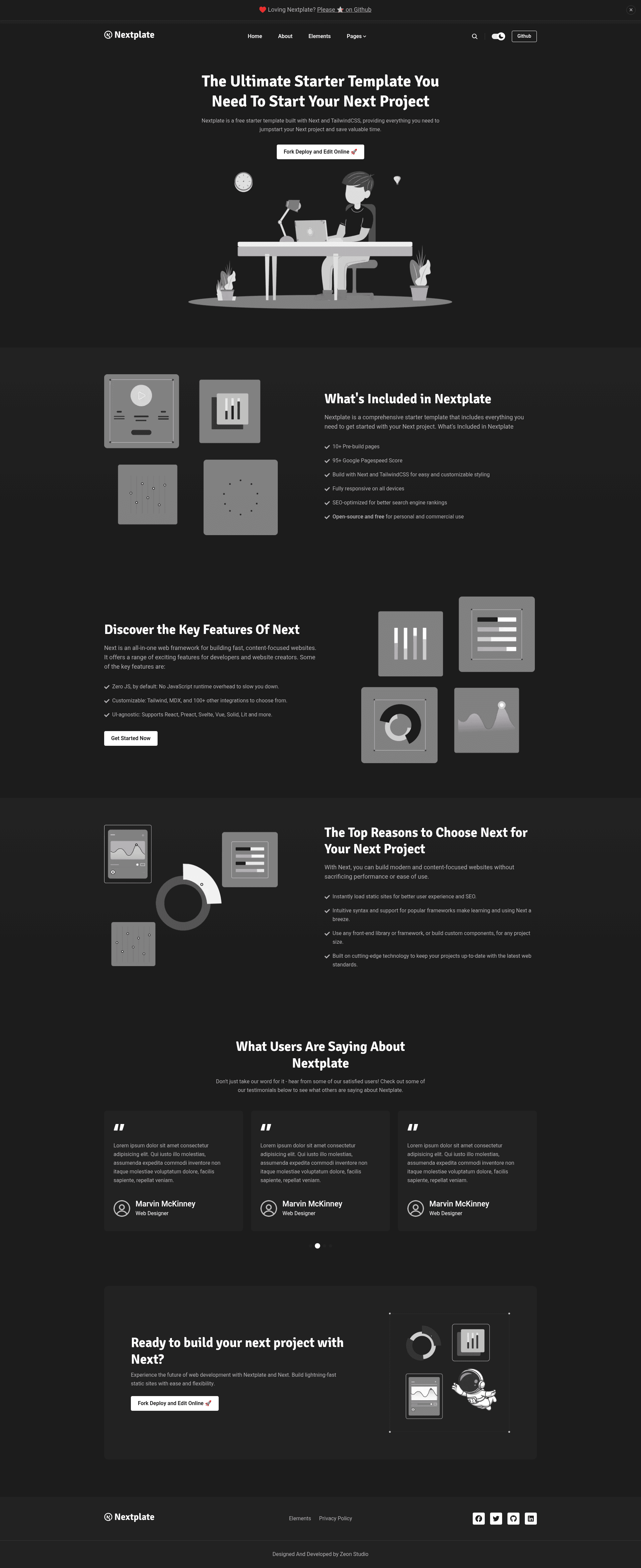
Free Next.js 16 + Tailwind CSS + TypeScript starter with 15+ pages, Markdown/MDX blog, dark mode, search, i18n, and LLM docs.
About this template
Nextplate is a free, open-source Next.js starter template from Zeon Studio that ships with Tailwind CSS 4 and TypeScript, and is built to launch a blog-and-marketing site with 15+ pre-designed pages.
What is Nextplate?
Nextplate is a boilerplate that combines Next.js 16.1, Tailwind CSS v4, and TypeScript into a static site generator for content and marketing sites. It takes Markdown or MDX content files plus a central configuration and outputs a fully responsive site with pages for homepage, blog, authors, tags, categories, search, contact, privacy policy, elements, and a custom 404. The template is designed and developed by Zeon Studio, and is pre-configured for deployment to Netlify and Docker.
Key Features
- 15+ pre-designed pages — Includes homepage, about, contact, authors, author single, blog, blog single, tags, tag single, categories, category single, search, elements, privacy policy, and custom 404.
- Markdown/MDX content — All publishable text lives in Markdown or MDX files, written to
src/config/config.jsonfor site settings. - Dark mode — A toggleable theme built with Tailwind CSS.
- Search functionality — A dedicated search page finds posts across the site.
- Multi-author support — Author profiles and per-author pages, plus similar-posts suggestions.
- LLM-ready docs generation — After
npm run build, generatesllms.txt,llms-full.txt, and optional per-page.mdfiles; routing rules use include/exclude glob patterns. - Multilingual support (i18n) — A second demo demonstrates multi-language output.
- Sitepins CMS integration — Edit text, images, and configuration visually through a Git-based headless CMS.
Who is it for?
- Next.js developers — Start a new project without wiring up Tailwind, TypeScript, and content routing from zero; the template already includes a build pipeline and Netlify settings.
- Content editors — With Sitepins, non-technical editors can update the site's text and images without writing code or using a CLI.
- Indie founders and startups — Launch a polished marketing site and blog quickly, with contact form, tags, categories, and SEO-friendly static output.
- AI/LLM engineers — Use the built-in
generate-llmscommand to turn the built site intollms.txtand per-page Markdown for ingestion by language models.
What can you do with Nextplate?
- Publish a blog — Write posts in Markdown/MDX, organize them with tags and categories, and get similar-post suggestions plus Disqus comments.
- Generate LLM-ready documentation — Run the build, then
npm run generate-llms, to createllms.txt,llms-full.txt, and optional individual.mdfiles for all chosen routes. - Deploy a website — Push to Netlify using the included configuration, or run the provided Dockerfile to launch the container on any host.
- Run a multilingual site — Use i18n support to serve content in multiple languages, as shown in the separate multilang demo.
How does Nextplate work?
Installing dependencies with npm install and running npm run dev starts a local development server. A production build is created with npm run build, after which the npm run generate-llms command produces the LLM files according to src/config/config.json. The llms section of src/config/config.json contains include/exclude patterns that allow filtering routes such as /blog/ or /blog/*. For visual content editing, the Sitepins button clones the repository and connects a Git-based CMS.
Pricing
Nextplate is free and open source; the code is released under the MIT license. The demonstration images in the repository are not part of the MIT license and are only for preview purposes.
FAQ
Is Nextplate free?
Yes, Nextplate is free to use. The code is MIT-licensed, while the demo images have their own licenses and are not permitted for redistribution.
What versions of Next.js and Node.js does Nextplate require?
Nextplate requires Next.js 16.1 or higher, Node v22.10 or higher, npm v10.2 or higher, and Tailwind CSS v4.
How do I generate LLM-ready files?
After running npm run build, execute npm run generate-llms. The output includes llms.txt, llms-full.txt, and optional per-page Markdown files, with include/exclude patterns set in src/config/config.json.
Does Nextplate support multilingual sites?
Yes, Nextplate includes i18n support, and there is a live multi-language demo at nextplate-multilang.netlify.app.
Can I update content without code?
Yes, Nextplate comes pre-configured with Sitepins, a Git-based headless CMS. Clicking the "Edit with Sitepins" button lets you clone the project and edit content visually.