Template details
Spotify Clone with Astro View Transitions
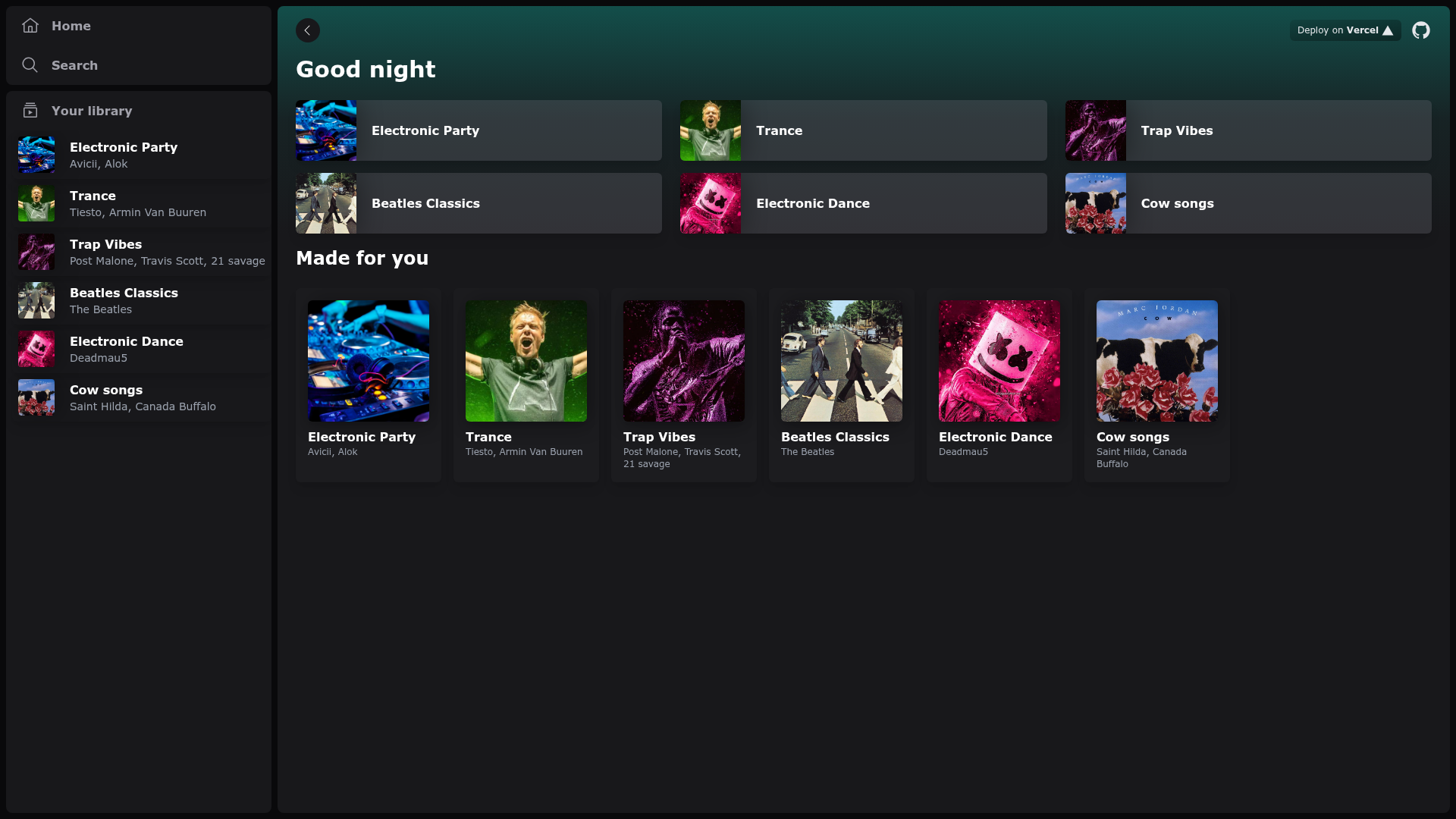
Spotify-inspired interface using Astro's View Transitions, Tailwind CSS, and Svelte.
About this template
Spotify Clone with Astro View Transitions is an open-source boilerplate that recreates a Spotify-like music interface using Astro's client router and the View Transitions API to animate navigation between pages. It is built with Tailwind CSS for styling and Svelte for interactive components, and it runs on any Node.js 22.12+ environment with Bun as the package manager.
What is the Spotify Clone with Astro View Transitions?
This template is a demonstration project that takes the visual design of Spotify's desktop web app and implements it as a multi-page Astro site where page changes use native View Transitions instead of full reloads. The input is the source code in this repository, and the output is a deployable static site with smooth animated navigation. The project is maintained by GitHub user igorm84 and is published as a Vercel template, with a live demo hosted at https://spotify-astro-transitions.vercel.app/.
Key Features
- Astro View Transitions — Uses Astro's built-in client router with the View Transitions API, configured with fallback="none" so older browsers do a normal full-page navigation without animation.
- Tailwind CSS — Styling is done with Tailwind, giving the clone the familiar green-and-black Spotify layout through utility classes.
- Svelte components — Interactive elements such as the player controls are written in Svelte, demonstrating how to mix Astro islands with a UI framework.
- Bun tooling — The project uses Bun for installation, development, and build scripts (bun install, bun run dev, bun run build) and requires Node.js 22.12 or newer.
- One-click Vercel deploy — A Deploy with Vercel button is available, and the project is listed in Vercel's template gallery, so you can clone and host it without manual configuration.
- Live demo — A running instance of the final site is available at spotify-astro-transitions.vercel.app, letting you inspect the animated transitions before committing to the code.
- Browser support for Baseline 2025 — Native same-document View Transitions work in Chrome and Edge 111+, Firefox 144+, Safari and iOS 18+, and corresponding mobile browsers, as noted by MDN's Baseline 2025 marker.
Who is it for?
- Astro developers who want a real-world example of the View Transitions API with the client router, including how to set fallback behavior for older browsers.
- Front-end engineers building music or media web apps who need a starting point for a sidebar-and-player layout similar to Spotify's.
- Svelte users who want to see Svelte islands embedded inside an Astro page and how they coexist with static content.
- Technical learners who prefer reading working code over documentation, since this repo combines the Astro docs, MDN docs, and a complete sample in one place.
What can you do with the template?
- Study animated page transitions: Explore how Astro's client router intercepts internal links and applies the View Transitions API, then experiment by editing the fallback setting.
- Build a music interface prototype: Use the existing sidebar, playlist cards, and player bar as a base, then swap in your own data and styling.
- Test deployment pipelines: Clone the repo and press the Deploy with Vercel button to see a production build with animated navigation go live in minutes.
- Compare framework integration: Inspect how Svelte components are used inside Astro's islands architecture, which is a different pattern from using Astro with React or Vue.
How does the template work?
To run it locally, you need Node.js 22.12 or newer and Bun installed. Run bun install to fetch dependencies, bun run dev to start the development server, and bun run build to create a production bundle. The repository also provides check scripts: bun run check for migration checks and bun run format:check to enforce code formatting before you submit changes. When you navigate between pages in the dev server, Astro's client router applies the View Transitions API to animate the DOM state change.
FAQ
Is the Spotify Clone with Astro View Transitions free?
Yes, the source code is publicly available on GitHub under the igorm84 repository, and you can clone, modify, and deploy it without payment. No license file is shown in the repository, so check the repo for any added terms before commercial use.
What browsers support the View Transitions?
Native same-document View Transitions work in Chrome and Edge 111+, Firefox 144+, Safari and iOS 18+, and corresponding mobile browsers. Because the template sets fallback="none", unsupported browsers will still load pages normally without animation.
How do I install and run the template?
You need Node.js 22.12 or newer and Bun. Run bun install to install dependencies, bun run dev for local development, and bun run build to create a production build. The repo also includes bun run check and bun run format:check for validation.