Template details
Nuxt Invoice App
Open-source Nuxt.js + Firebase template for building an invoice management app.
About this template
Nuxt Invoice App is an open-source boilerplate for building invoice management applications with Nuxt.js and Firebase, providing a ready-to-run Nuxt project with invoice creation, listing, and detail viewing.
What is Nuxt Invoice App?
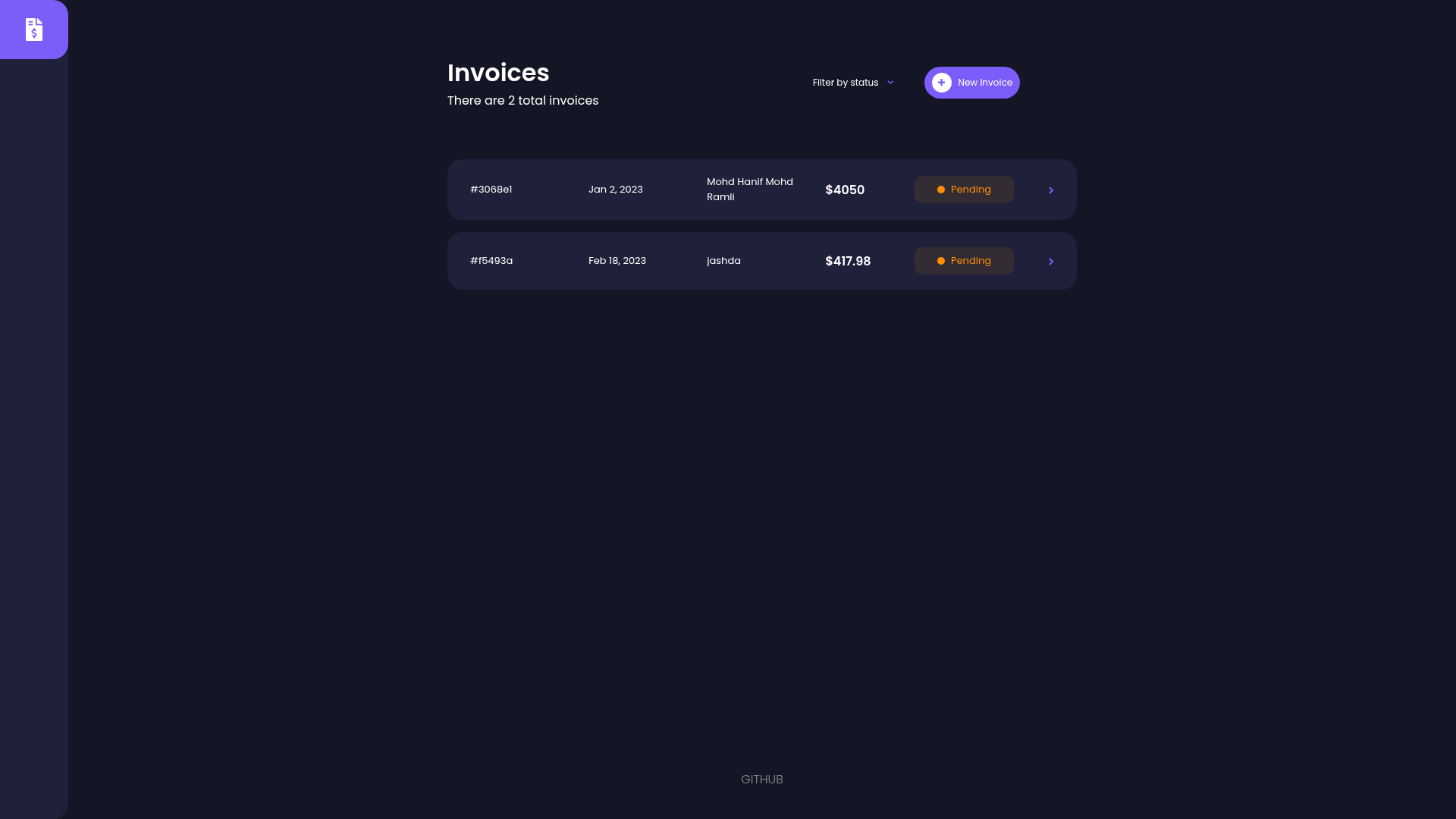
Nuxt Invoice App is a web application template built with Nuxt.js (a Vue.js framework) and Firebase, focused on managing invoices. It takes invoice data — client details, line items, amounts — and renders them in a clean interface with a home dashboard, a create-invoice modal, and a single-invoice detail page. The project runs on Nuxt's universal rendering and includes a Firebase backend for data persistence and authentication. The repository metadata confirms it is a Nuxt.js and Firebase invoice app and has 12 GitHub stars, indicating a small but public open-source project.
The readme includes the standard Nuxt.js build commands: install dependencies with npm install, run a hot-reload dev server at localhost:3000 with npm run dev, build and launch a production server with npm run build and npm run start, or generate a fully static site with npm run generate. A live demo is deployed at https://nuxt-invoice-app.vercel.app/, showing the app running on Vercel.
Key Features
- Nuxt.js framework — Uses the Nuxt.js framework on top of Vue.js, which provides server-side rendering, static generation through npm run generate, and a hot-reloading development server on localhost:3000.
- Firebase integration — Backed by Firebase, covering data storage and typical backend services; you can build on this to add custom security rules and collections.
- Create-invoice modal — A modal interface for adding new invoices, collecting the fields needed to store a complete invoice record in Firebase.
- Invoice list dashboard — The home page displays all existing invoices, giving an at-a-glance overview of the invoice collection.
- Single-invoice detail view — Clicking an invoice opens a dedicated detail page that shows the full record, which can be extended into a printable invoice layout.
- SCSS-based styling — Styling uses SCSS, so colors, spacing, and component styles can be adjusted through SCSS variables and partials.
- Open-source code — The full source is available on GitHub, making it possible to fork, audit, and modify every part of the app.
Who is it for?
- Freelancers and small agencies — A working invoice dashboard with create, list, and detail views that saves hours of wiring up Firebase and a Nuxt project manually.
- Nuxt.js learners — A compact, real-world Nuxt app that demonstrates how pages, a modal component, and Firebase calls fit together in one small codebase.
- Developers starting an invoicing product — A forkable base that already includes the core invoice flows, so product-specific work can focus on tax rules, payments, or reporting.
What can you do with Nuxt Invoice App?
- Add new invoices: Use the create-invoice modal to enter client and line-item data and persist it to Firebase through the app's data layer.
- Browse all invoices: The home dashboard lists every invoice, making it easy to see unpaid clients or recent entries at a glance.
- Inspect a single invoice: Open the detail page for any invoice to view the full record, ready to be adapted into a PDF or print view.
- Generate and deploy a static site: Run npm run generate to create a static build that can be hosted on Vercel or any static file host, as demonstrated by the live demo.
FAQ
Is Nuxt Invoice App free?
The repository metadata describes it as an invoice app using Nuxt.js and Firebase, and the source code is publicly available on GitHub, so the template itself is free to use under the project's license.
What stack does Nuxt Invoice App use?
It uses Nuxt.js, which is built on Vue.js, as the frontend framework, SCSS for styling, and Firebase for backend services such as data storage and authentication.
Does Nuxt Invoice App use Firebase for authentication?
Yes, Firebase is listed as the backend technology. The readme does not detail the authentication configuration, but the integration includes Firebase services that you can extend with your own authentication flows and security rules.
Can I deploy it as a static site?
Yes. The build setup includes npm run generate, which creates a static version of the app. The live demo is hosted on Vercel, indicating static hosting is a supported deployment path.