Template details
jekyll-bootstrap-theme
A Jekyll starter theme using Bootstrap's Sass source, with variable overrides and single-file style.css output on GitHub Pages.
About this template
jekyll-bootstrap-theme is a Jekyll starter template that integrates the Bootstrap framework via its Sass source files instead of a precompiled CSS file, letting you override Bootstrap's CSS variables and compile everything into a single style.css when hosted on GitHub Pages.
What is jekyll-bootstrap-theme?
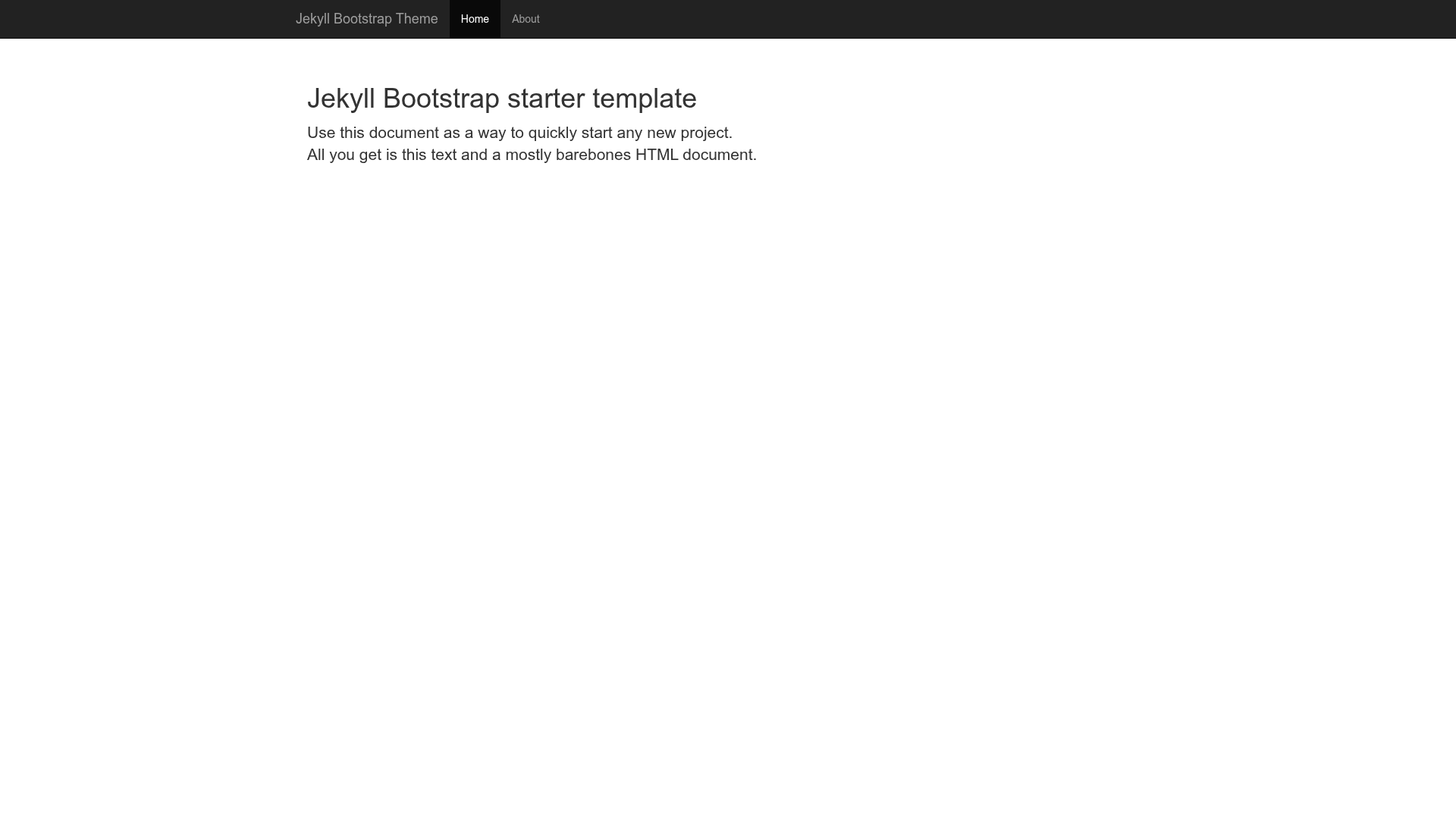
jekyll-bootstrap-theme is a Jekyll starter theme from the henrythemes collection. It takes a standard Jekyll site (posts, pages, layouts) as input and produces a static website with a single compiled stylesheet named style.css. The theme uses Bootstrap's Sass/SCSS source, and GitHub Pages' built-in Sass support compiles it with no external build step. A live demo is available at henrythemes.github.io/jekyll-bootstrap-theme.
Key Features
- Bootstrap Sass source — The theme uses the official bootstrap-sass port, giving you access to Bootstrap's variables, mixins, and functions instead of a fixed compiled CSS file.
- Variable overrides — Because Bootstrap's Sass source is included, you can change (override) all Bootstrap CSS variables to customize colors, spacing, typography, and more.
- GitHub Pages ready — GitHub Pages has built-in support for Sass/SCSS, so your site compiles into a single style.css file without local build tooling.
- Single-file output — The final rendered site produces one all-in-one-file stylesheet, simplifying caching and deployment.
- Live demo — A working example of the theme is hosted at henrythemes.github.io/jekyll-bootstrap-theme, showing the default look before you install.
- Starter structure — As a Jekyll starter theme, it provides the basic layouts and directories needed to begin a blog or simple static site.
Who is it for?
- Jekyll developers who want a Bootstrap-based starting point without writing the integration themselves.
- Front-end developers who prefer working with Sass variables to customize Bootstrap to match a brand or design system.
- Static site maintainers who publish to GitHub Pages and want automatic Sass compilation without maintaining a separate CSS build pipeline.
- Bloggers looking for a simple, responsive theme that ships with Bootstrap's grid and components.
What can you do with jekyll-bootstrap-theme?
- Launch a Bootstrap blog quickly: scaffold a Jekyll site and get Bootstrap's grid, buttons, navbars, and utilities styled and ready.
- Rebrand via variables: change Bootstrap's primary color, font stack, or border radius once in a Sass file and have those changes apply site-wide.
- Publish to GitHub Pages: push your Jekyll project to a GitHub Pages-enabled repository and let the platform compile your SCSS to style.css automatically.
- Learn Bootstrap's Sass architecture: because the source is included, you can explore how Bootstrap's mixins and variables are structured.
How does jekyll-bootstrap-theme work?
The page's build & update notes say to get a copy of the bootstrap-sass archive, the official Sass port of Bootstrap. With Jekyll's Sass/SCSS compiler — which GitHub Pages enables automatically — the theme's SCSS files are processed into a single style.css file. The theme is a Jekyll starter, so you write content as Markdown and the theme provides the layouts and styling.
Alternatives
- Shiori by Elle Kasai — another Jekyll theme that ships with pre-defined color themes (e.g. Dark, Turquoise, Green, Blue, Purple, Orange, Red).
FAQ
Is jekyll-bootstrap-theme free?
The theme is publicly hosted on GitHub under the henrythemes organization, and no license or pricing is mentioned on the page. Given that it is distributed as a public repository, you can download and reuse it, but you should check the repository's license file for exact terms.
Does jekyll-bootstrap-theme work with GitHub Pages?
Yes. The page explicitly notes that GitHub Pages has built-in support for Sass/SCSS, so the theme compiles its Bootstrap source into a single style.css when published to GitHub Pages.
What does jekyll-bootstrap-theme produce?
It produces a static Jekyll website with a single compiled stylesheet named style.css. The theme uses the Bootstrap Sass source so the final CSS includes only the components and overrides you define.
How do I customize colors in jekyll-bootstrap-theme?
Because the theme uses Bootstrap's Sass source, you can override Bootstrap's CSS variables in your SCSS files. The page's example section is currently marked "tbd", so you'll need to refer to Bootstrap's Sass documentation for the specific variable names.
Where is the live demo?
The live demo is at henrythemes.github.io/jekyll-bootstrap-theme.