Template details
online-resume
A minimalist Jekyll theme for your resume.
About this template
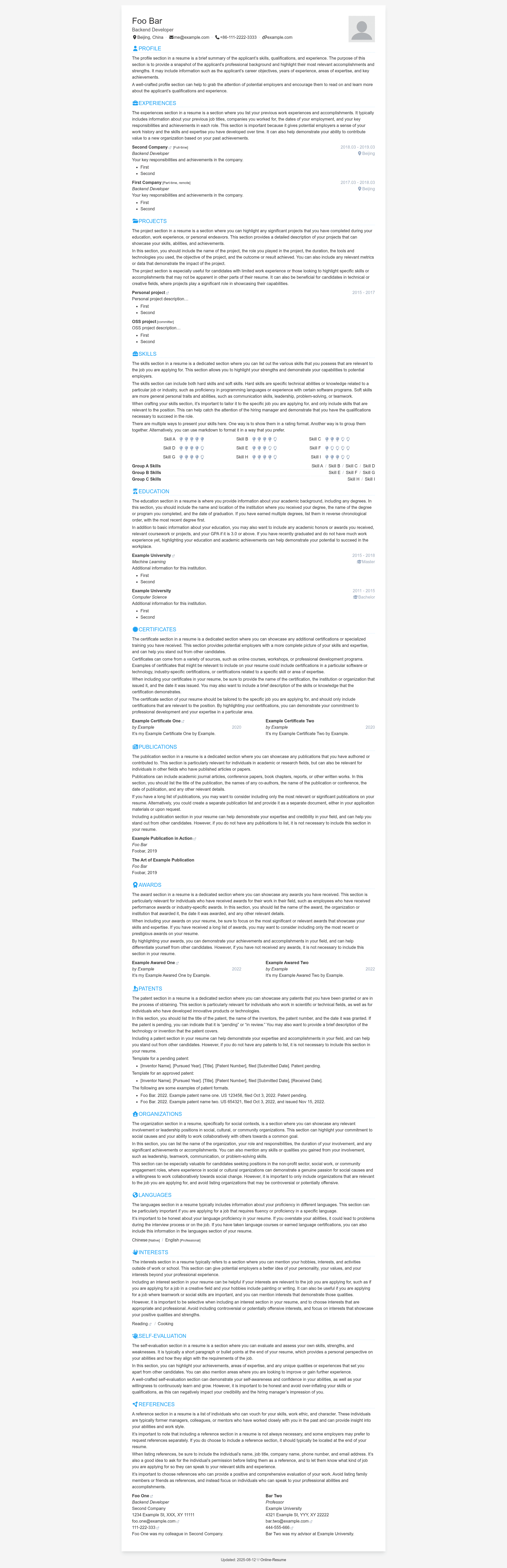
Online-resume is a minimalist Jekyll theme that turns a YAML resume file into a responsive web page and a print-ready PDF, deployable to any static hosting platform. It is an open-source project on GitHub by tarrex, released under an MIT license.
What is online-resume?
Online-resume is a Jekyll theme for building and hosting a resume website. You write your resume content in a YAML data file using Markdown syntax, and the theme renders it as a clean, responsive web page. The same page can be printed to PDF directly from the browser without extra software. The source repository is at github.com/tarrex/online-resume, and a live demo is available at tarrex.github.io/online-resume.
Key Features
- YAML-driven content — Edit
_data/data.ymlto update your work experience, education, skills, and other sections without touching HTML. - Markdown support — Resume entries are written in Markdown inside the YAML file, allowing simple formatting like bold and lists.
- Git-managed workflow — Because all content lives in plain text, your resume history is automatically version-controlled with Git.
- Multi-language ready — Copy the data file and an index page to add translations; the documentation shows a step-by-step Chinese example.
- Customizable styles — Set your theme color and basic styles in
_config.yml, and swap the profile photo viaassets/images/profile.png. - Modular sections — Every resume section has an
orderand ashowoption, so you can rearrange or hide parts of the page. - Responsive display — The layout adapts to desktop and mobile screens without extra work.
- Static hosting compatible — Works with GitHub Pages, Cloudflare Pages, Vercel, Netlify, or any other static file host.
Who is it for?
- Job seekers — Publish a professional online resume quickly by forking the repo, enabling GitHub Pages, and editing one YAML file.
- Developers and designers — Keep a resume in plain text under version control, then deploy it for free on GitHub Pages.
- Multilingual candidates — Create additional language versions by following the documented copy-and-edit workflow, such as the English-to-Chinese example in the FAQ.
- Students and academics — Use the minimalist layout to present academic experience and publications without building a site from scratch.
What can you do with online-resume?
- Host a resume on GitHub Pages — Follow the quick-start steps to fork, set the deployment branch to
master, and edit_data/data.yml. - Print or save as PDF — Open the live page in a browser and use the built-in print function to export a clean PDF resume.
- Deploy to other platforms — Use the linked Cloudflare Pages and Vercel guides to deploy the Jekyll site outside GitHub.
- Create language variants — Add a translated data file (for example
cn.yml) and a matching index page (for examplecn.html) to serve your resume in multiple languages.
FAQ
How do I change the order of sections in the resume?
Each section in the YAML data file has an order option. The smaller the number, the closer the section appears to the top of the page. You can edit these values directly in _data/data.yml.
How do I hide a section but keep its content?
Set the show option of that section to false in the YAML data file. The content stays in the file but will not appear on the rendered resume.
How do I create a resume in another language?
Copy _data/data.yml to a new file such as _data/cn.yml, translate the content, then copy the root index.html to cn.html and change the data-source assignment in that file to point to the new data file. After rebuilding, the translated resume is available at a URL like https://YOUR_GITHUB_USERNAME.github.io/online-resume/cn.
Can I deploy this on Cloudflare Pages or Vercel?
Yes. The repository provides links to the official Cloudflare Pages and Vercel guides for deploying a Jekyll site. Because the output is static, you can also host it on any platform that serves static files.
Alternatives
If you prefer a different static site generator, there is an official Hugo version of this theme with the same resume-focused design.