Template details
Pehtheme Hugo
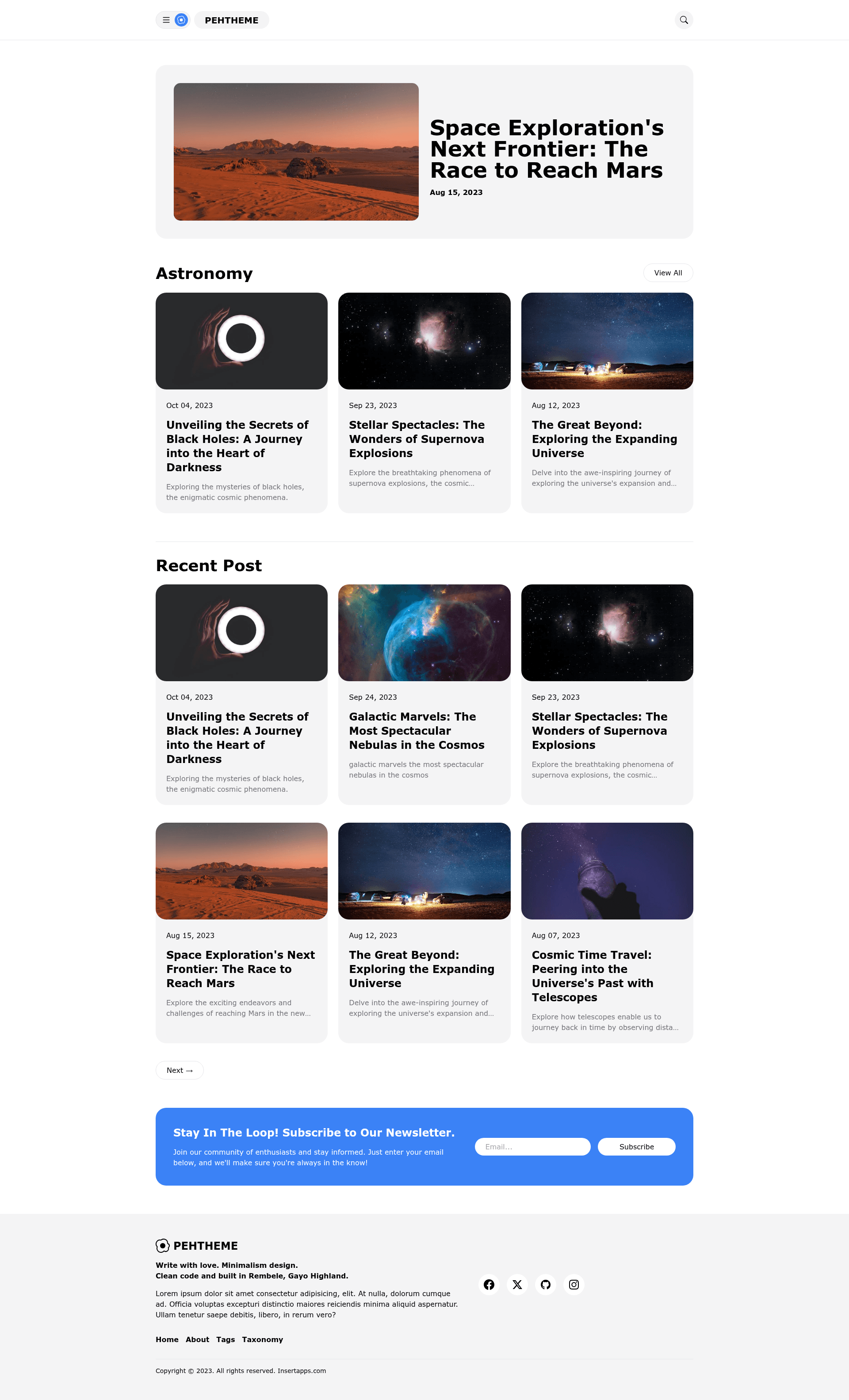
Open-source Hugo blog theme inspired by Material Design v3, built with Tailwind CSS, featuring a two-column layout and no JavaScript dependencies.
About this template
Pehtheme Hugo is an open-source Hugo theme inspired by Material Design v3, built with Tailwind CSS and designed to produce lightweight, JavaScript-free static blogs.
What is Pehtheme Hugo?
Pehtheme Hugo is an open-source theme for the Hugo static site generator, inspired by Material Design v3 and built with Tailwind CSS. It takes Hugo Markdown content as input and renders a two-column blog layout with a main content area, sidebar, and homepage featured-posts section. The theme is maintained in the fauzanmy/pehtheme-hugo GitHub repository and is MIT licensed.
Key Features
- Tailwind CSS styling — The entire theme is styled with Tailwind utility classes, so you can customize colors, spacing, and typography by editing a single Tailwind config file.
- Featured posts — Mark any post with the
featuretag to have it displayed in a featured section on the homepage. - No JavaScript dependencies — The only interactive element, a navigation toggle, is built with vanilla JS; no frameworks, libraries, or build-time JS are required.
- Two-column blog layout — The design pairs a main content column with a sidebar that lists recent posts, giving readers a clear content hierarchy.
- Sidebar Ads box — A dedicated sidebar region lets you drop in ad units or promotional blocks without modifying template files.
- Semantic HTML — The markup uses meaningful HTML5 elements (header, main, article, aside, footer) for better accessibility and SEO.
- Integration-ready configuration — In
hugo.tomlyou can set summary length, Google Analytics 4 measurement ID, Disqus shortname, and pagination size (home posts per page). - Example site included — The
exampleSitedirectory ships withassets,content, andhugo.tomlfiles you can copy straight into a new Hugo project.
Who is Pehtheme Hugo for?
- Hugo bloggers — Anyone already using Hugo who wants a Material Design–inspired visual upgrade without adding JavaScript frameworks.
- Performance-conscious developers — Teams or individuals who need a blog that scores well on PageSpeed Insights; the lack of JS dependencies and use of static HTML keeps the payload small.
- Ad-supported publishers — Site owners who monetize with sidebar ads can use the built-in Ads box as a placeholder for their ad network code.
What can you do with Pehtheme Hugo?
- Launch a personal blog — Copy the example site, write posts in Markdown, tag a few as
feature, and you have a homepage with featured content and a recent-posts sidebar. - Customize the design with Tailwind — Copy
tailwind.config.jsandinput.css, runnpm run dev, and edit utility classes to change the look without touching core theme files. - Measure traffic and engagement — Paste your GA4 measurement ID and Disqus shortname into
hugo.tomlto enable analytics and comments across the site.
How does Pehtheme Hugo work?
The theme follows a standard Hugo setup: after cloning the repository, you copy the assets, content, and hugo.toml folders/files from exampleSite into the root of your Hugo project, then run hugo server. For custom styling, you also copy package.json, postcss.config.js, tailwind.config.js, and assets/input.css, then run npm install and npm run build to compile the Tailwind output.
FAQ
Is Pehtheme Hugo free?
Yes. The theme is open-source and released under the MIT License, so you can use, modify, and distribute it freely, including in commercial projects.
Does Pehtheme Hugo require JavaScript?
No. The theme has zero JavaScript dependencies. The only script is a vanilla JS toggle for the mobile navigation menu, and every other part of the site renders as static HTML.
How do I display featured posts on the homepage?
Add the feature tag to any post's front matter. Pehtheme Hugo's homepage will then collect posts carrying that tag and show them in the featured section.
How do I set up Google Analytics and Disqus?
In your hugo.toml file, add a [services.googleAnalytics] block with your GA4 measurement ID and a [services.disqus] block with your Disqus shortname. The theme picks these up automatically.
Can I change the number of posts shown on the homepage?
Yes. Set the pagerSize value in the [pagination] section of hugo.toml; the example uses 10 posts per page.