Template details
resume-nextjs
Next.js resume template that renders a static HTML resume from editable TypeScript payload data.
About this template
resume-nextjs is an open-source Next.js resume template that renders a static HTML resume from TypeScript payload data and is built for hosting on GitHub Pages. The project is a Next.js port of the older resume-legacy template, created by uyu423 with contributions from four other developers. The template uses Bootstrap CSS for styling and requires Node.js version 18 or higher, with an .nvmrc file to pin the recommended version.
What is resume-nextjs?
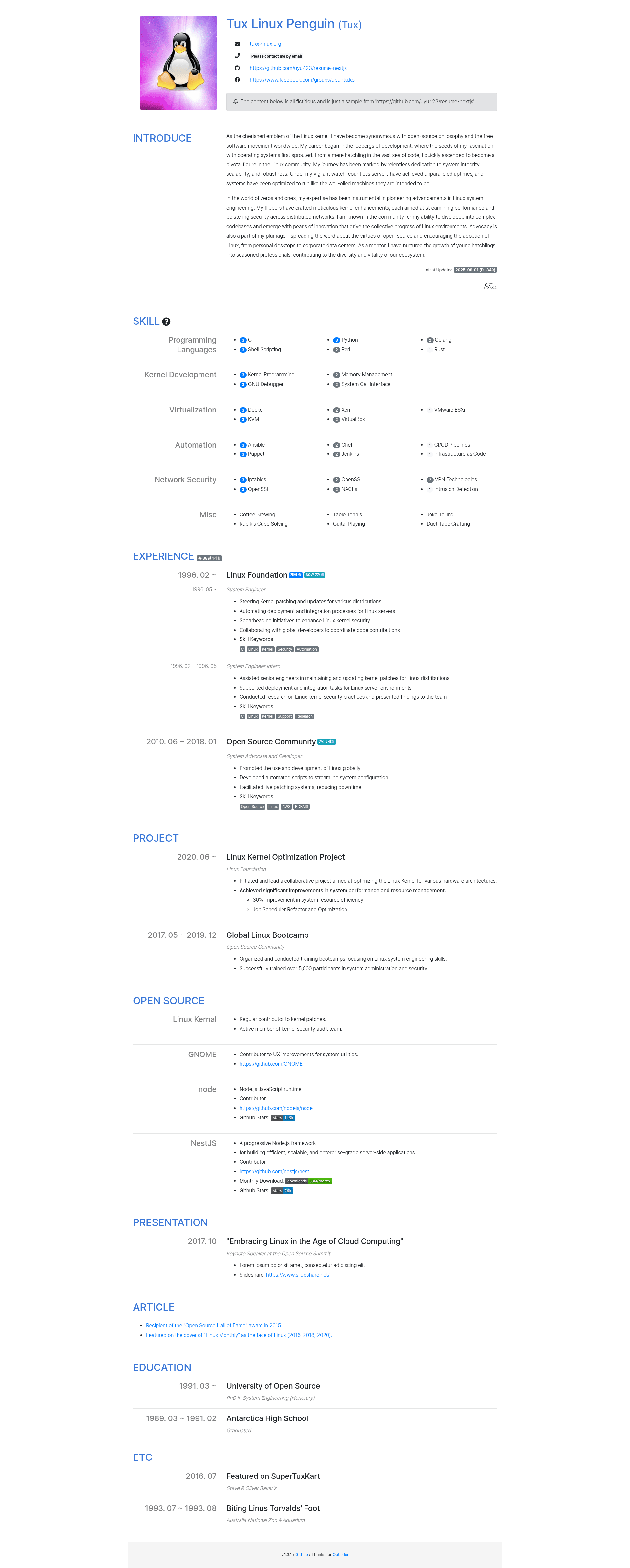
resume-nextjs is a static web resume generator powered by Next.js. You write your career information in TypeScript payload files under the payload/ directory, and the template renders a styled, single-page resume that can be previewed locally or exported to static HTML. It is the successor to the resume-legacy template and is maintained on GitHub. A live sample is available at https://uyu423.github.io/resume-nextjs, and more examples are listed in EXAMPLE.md.
Key Features
- Payload-driven content — Edit the TypeScript files in payload/ to change your resume. The template supports ten content sections: Profile, Introduce, Skill, Experience, Project, Open Source, Presentation, Article, Education, and ETC, plus a _global payload for site title, SEO, and favicon.
- Static export for GitHub Pages — Running npm run export generates the finished static site into the docs/ directory, which can be published directly from the master branch /docs folder in GitHub Pages settings.
- Section toggling — All payloads except _global and footer accept a disable boolean field; setting it to true removes that section from the rendered resume.
- Custom domain support — When the homepage field in package.json contains a custom domain, the export process automatically generates a docs/CNAME file. If the homepage matches a *.github.io URL, no CNAME is created.
- Built-in API documentation — TypeDoc HTML documentation with sample screenshots for every payload is generated with npm run typedoc and published under /typedoc.
- Node 18 compatibility — The project sets NODE_OPTIONS=--openssl-legacy-provider to avoid the ERR_OSSL_EVP_UNSUPPORTED error on Node.js 18 and newer versions.
Who should use resume-nextjs?
- Software developers and engineers — Publish a technical resume with dedicated sections for skills, projects, open source work, presentations, and articles.
- Job seekers with GitHub accounts — Set up a free hosted resume by forking the repository, editing payload files, and enabling GitHub Pages.
- Creators who want a simple static site — Get a clean, readable resume layout without handling HTML, CSS, or React component code directly.
What can you do with resume-nextjs?
- Build a developer resume: Use the Experience, Project, Skill, and Open Source payloads to present your career history, side projects, technical skills, and open source contributions in a structured timeline.
- Showcase speaking and writing: Add talks to the Presentation payload and blog posts or articles to the Article payload to display content you have published.
- Include education and extras: Record academic history in the Education payload and add awards, certifications, or volunteer work in the ETC payload.
How does resume-nextjs work?
Fork the repository, git clone your fork, and run npm install to set up dependencies. Edit the TypeScript payload files under payload/ with your personal data, then run npm run dev to preview the resume locally. When you are satisfied, run npm run export to generate static HTML in the docs/ directory and push the changes to your repository; the site is then served by GitHub Pages from the docs folder.
FAQ
Can I host the resume on GitHub Pages?
Yes. The template is designed for GitHub Pages: npm run export writes static HTML to docs/, and you select the master branch /docs folder as the publishing source in the repository's Pages settings. When using a custom domain, the docs/CNAME file is created automatically from the homepage field in package.json.
Which Node.js version is required?
Node.js 18 or higher is recommended. The repository includes an .nvmrc file and sets NODE_OPTIONS=--openssl-legacy-provider to work around the ERR_OSSL_EVP_UNSUPPORTED error that occurs on Node.js 18 and later versions.
How do I change the order of resume sections?
The README explains that section order is not configurable through payload data. You must rearrange the component rendering order in pages/index.tsx. The project maintainers note that a data-driven solution is being considered.
Why are my images or CSS 404ing on the exported site?
If assets return 404 after export, the homepage field in package.json likely does not match your deployment path. The README points to issues #24 and #37, which cover broken images in production builds and missing assets in index.html when deploying under a sub-path.