Template details
SaasStellar
Multi-theme SaaS landing page template built with Remix, TailwindCSS, and shadcn/ui.
About this template
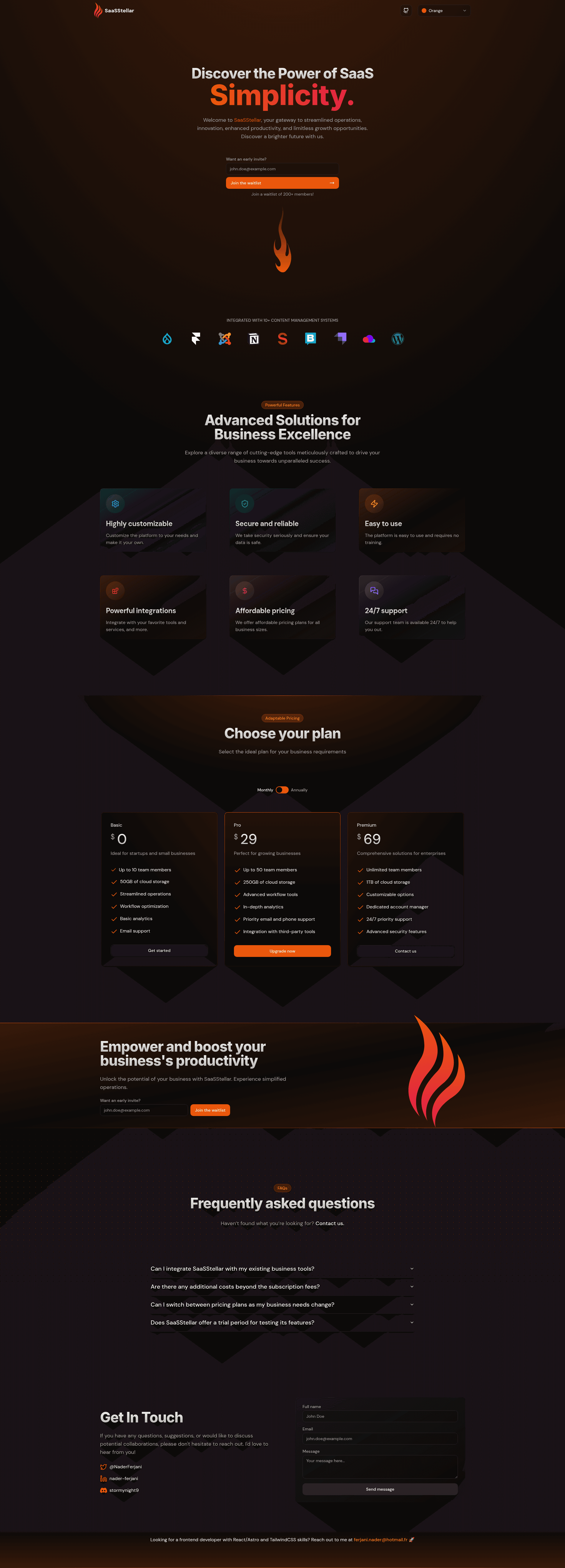
SaasStellar is an open-source SaaS landing page template built with Remix, TailwindCSS, and shadcn/ui that gives you 11 themes for launching a marketing site.
What is SaasStellar?
SaasStellar is a ready-to-use landing page template for SaaS products, built on the Remix framework with TailwindCSS and shadcn/ui components. It takes your product content and produces a responsive, accessible marketing page with SEO metadata, analytics integration, and a working contact form. The template is maintained by stormynight9 and published on GitHub under the MIT License, so you can freely use it in commercial projects.
Key Features
- 11 built-in themes — Switch between eleven visual themes without touching code, giving you variety for different brand aesthetics.
- SEO-ready with OpenGraph — Includes meta tags and OpenGraph markup so links shared on social media display proper titles, descriptions, and previews.
- Google and Vercel Analytics — Pre-wired analytics integrations let you track visitor behavior by adding your tracking IDs.
- Automatic sitemap generation — A sitemap is generated automatically to help search engines index your landing page.
- Formspree form submissions — The contact form posts submissions to Formspree, so you don't need to build a backend.
- Partytown integration — Third-party scripts are moved off the main thread to improve page performance.
- Prettier and ESLint configured — Code formatting and linting are set up out of the box for consistent, clean code.
- Fully responsive and accessible — The layout adapts to any screen size and follows accessibility best practices.
Who is it for?
- SaaS founders — Launch a landing page for a new product without hiring a designer or writing layout CSS from scratch.
- Marketing teams — Create a high-converting page for a feature launch or campaign, then adjust themes and copy to match the brand.
- Developers — Customize a Remix + TailwindCSS codebase and extend it with new sections, all while keeping the existing analytics and form plumbing.
What can you do with SaasStellar?
- Indie hackers: Set up a professional SaaS landing page in under an hour by cloning the repo and running pnpm commands.
- Agencies: Hand off a clean, commented Remix codebase to clients, with ESLint and Prettier already enforcing code quality.
- Product teams: A/B test different themes visually to see which layout converts better before writing custom CSS.
How does SaasStellar work?
The template is a GitHub repository you clone and run locally: copy the repo, install dependencies with pnpm, and start the development server with pnpm dev. Once running, you edit the site content and theme selection in the Remix code, then deploy the resulting static or server-rendered page to any Remix-compatible host like Vercel.
Pricing
SaasStellar is free and open source under the MIT License, so there are no licensing fees or subscription tiers. You only pay for the hosting and services you connect to, such as Formspree or analytics providers.
FAQ
Is SaasStellar free?
Yes, SaasStellar is released under the MIT License, meaning you can use, modify, and distribute it freely, including in commercial SaaS projects. The source code is available on GitHub.
Which framework does SaasStellar use?
SaasStellar is built with Remix, a React-based web framework, along with TailwindCSS for styling and shadcn/ui for UI components. It also integrates Formspree for forms and Partytown for script performance.
How do I get started with SaasStellar?
Clone the repository, run pnpm install to install dependencies, and then run pnpm dev to start the development server. You can then adapt the theme and content in the Remix files. A live demo is available at https://saasstellar.nader.run/.
Does SaasStellar include analytics?
Yes, SaasStellar has built-in integrations for Google Analytics and Vercel Analytics. You can add your tracking identifiers in the configuration, and the template will handle loading the scripts via Partytown.
Can I use SaasStellar with a different form backend?
The template uses Formspree for form submissions out of the box. You would need to modify the form handling code to use a different service, since there is no pluggable form provider included.