Template details
Gatsby WordPress Theme Libre
A Gatsby theme plugin for creating blogs from headless WordPress CMS.
About this template
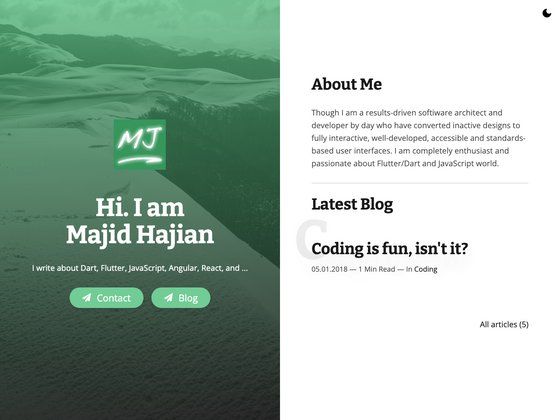
Gatsby WordPress Theme Libre is an open-source Gatsby theme plugin that builds a static blog front-end sourced from a headless WordPress CMS, replacing the WordPress engine with the Libre 2 skin.
What is Gatsby WordPress Theme Libre?
Gatsby WordPress Theme Libre is a Gatsby theme plugin for creating blogs from a headless WordPress CMS. It takes WordPress content as its input and produces a lightning-fast static website as output, running on the Gatsby React framework. The theme features the standard Libre 2 skin and is developed by the Draftbox team with contributions from Arun Priyadarshi, Keyur Raval, Shyam Lohar, and Tanmay Desai. It is released under the MIT license.
Key Features
- WordPress Libre 2 skin — A pixel-ported version of the Automattic Libre 2 WordPress theme, giving the static site a familiar blog design.
- SEO optimized — Includes metadata handling and search-friendly markup out of the box.
- Fully responsive — The theme layout adapts to mobile, tablet, and desktop viewports.
- Gatsby images — Uses gatsby-image for optimized, lazy-loaded images sourced from WordPress media.
- AMP Pages — Generates Accelerated Mobile Pages for improved mobile performance.
- RSS Feed — Outputs an RSS feed for blog subscribers and syndication.
- Sitemap — Generates an XML sitemap for search engine indexing.
- Contact Form & Subscribe Form — Built-in forms for reader engagement.
- Social Sharing — Includes share buttons for posts.
- Styled 404 page — A customized not-found page.
- Composable and extensible — Built as a Gatsby theme plugin that can be composed with other themes and extended with shadowing.
Who should use Gatsby WordPress Theme Libre?
- WordPress bloggers who want to eliminate slow server-side rendering and serve their content as static files. They can keep writing in WordPress and present the site through a faster Gatsby front-end.
- Gatsby developers who need a ready-made WordPress-connected theme instead of building the content sourcing and layout from scratch. They can clone the starter, configure the WordPress endpoint, and start customizing.
- Agencies and freelancers building client blogs on WordPress who want to offer better performance, AMP support, and SEO without moving the client off WordPress.
What can you do with Gatsby WordPress Theme Libre?
- Migrate an existing WordPress blog to a static site: Point the theme's gatsby-source-wordpress plugin at the existing WordPress API, and the theme pulls posts, pages, categories, tags, media, and taxonomies into a static Gatsby build.
- Launch a new blog with a starter: Use the companion starter repository to get a working example site running locally with a few commands, then modify the config file to connect any WordPress backend.
- Serve pages as AMP and RSS: The theme automatically generates AMP versions of posts and an RSS feed, so content reaches mobile users and feed readers without extra plugins.
How does Gatsby WordPress Theme Libre work?
The theme works by connecting to a headless WordPress installation through the gatsby-source-wordpress plugin. Developers clone the starter (or install the theme plugin), create a .wordpress-config.json file with the WordPress base URL and protocol, and run yarn workspace example develop to start the site locally. Then gatsby build produces a static site that can be deployed anywhere.
Pros and cons
- Pro: MIT licensed — free to use, modify, and redistribute.
- Pro: Static output means faster loads and better security than a traditional WordPress installation.
- Pro: Includes AMP, RSS, sitemap, and social sharing, reducing the need for WordPress plugins.
- Con: Requires manual configuration of the WordPress endpoint; WordPress.com-hosted sites need extra API keys and routes.
- Con: Requires knowledge of Gatsby and React to customize beyond the default skin.
FAQ
Is Gatsby WordPress Theme Libre free?
Yes. The theme is released under the MIT license on GitHub, so it is free to use, modify, and distribute for personal or commercial projects.
Does the theme replace my WordPress backend?
No. It is a front-end only replacement. The theme sources content from a headless WordPress CMS, so WordPress still powers the admin area and content storage, while Gatsby renders the public site.
Can I use this with a WordPress.com blog?
Yes, but WordPress.com-hosted blogs require additional configuration keys beyond a self-hosted setup, such as the appropriate routes and authentication details, as noted in the gatsby-source-wordpress documentation.
How do I set up the theme on an existing Gatsby project?
You can install the theme plugin from the repository and follow the theme-specific README, or use the recommended starter repo to scaffold a new project. The repository's example folder contains a working configuration and can be run with Yarn workspaces.