Template details
Simple Product Responsive Template
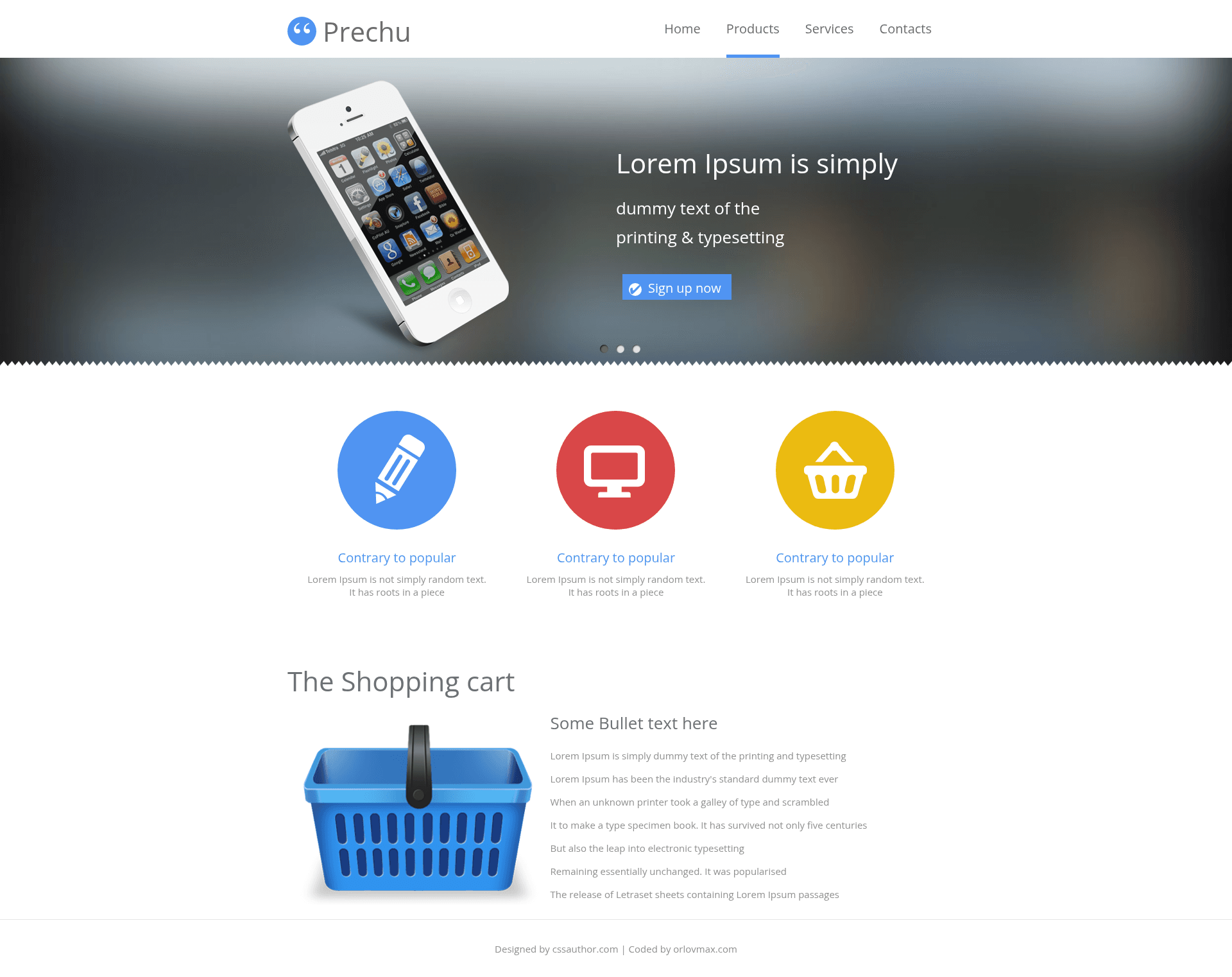
Free simple responsive website template for product pages, built with Pug, Sass, and Gulp.
About this template
The Simple Product Responsive Template is a free, archived one-page website template for product pages, built with Pug and Sass and automated with Gulp.
What is the Simple Product Responsive Template?
The Simple Product Responsive Template is a free static website template designed by cssauthor and coded by Maxim Orlov, published under the website-templates GitHub organization. It takes Pug templates and Sass stylesheets as source files and compiles them into a static, responsive HTML/CSS product page. The repository includes a complete Gulp build pipeline with separate dev and build directories, a configurable data file for site settings, and BrowserSync for live reload. The project is currently marked ARCHIVED, meaning it is no longer actively developed, but the source remains available for use under the MIT license.
Key Features
- Pug templating — Page layouts and blocks are written in Pug under dev/pug, including layouts, helpers, vendor code, and a blocks library, and they can pull site-wide settings from dev/data/config.json through config keys.
- Sass preprocessing — Styles are authored in Sass files (screen.sass, custom.sass, noscript.sass) with a blocks library, helpers, and vendor code; the build adds vendor prefixes and combines media queries automatically.
- Gulp task runner — The gulpfile.js and gulp_tasks directory define tasks: cleanup, dev, build, rebuild, and server, each handling compilation, asset syncing, minification, and server startup.
- BrowserSync live reload — The dev and server tasks launch a BrowserSync static server, and live reload is enabled so edits to Pug, Sass, or images refresh the page instantly.
- Build optimization — The build task minifies images, stylesheets, and HTML, and the rebuild task runs the full sequence from Sass and Pug compilation through minification.
- Responsive product layout — The template is a light, simple responsive design with a product mockup, demonstrated in the live demo and accompanied by responsive test screenshots in the screenshots folder.
- Editorconfig consistency — An .editorconfig file at the repository root defines indent style, trailing whitespace handling, and other editor preferences for contributors.
- Clear folder structure — Source lives in dev (images, pug, sass, helpers, fonts, data) and compiled output goes to build (index.html, page.html, static/css, static/images, static/fonts).
Who is it for?
- Front-end developers who want a ready-made Gulp workflow with Pug and Sass to start a product page without setting up tooling from scratch.
- Product teams and startups that need a clean, simple responsive one-page site for a product, with content editable through a JSON config file.
- Open-source learners who want to study a real project structure separating dev source, Gulp tasks, and a build output, including how to define reusable blocks and helpers.
What can you do with it?
- Launch a product page: Use the demo layout as a starting point, then customize the content and styling through dev/data/config.json and the Sass blocks.
- Rapidly prototype with live reload: Run gulp dev to compile and serve the site with BrowserSync, then watch changes appear immediately in the browser.
- Produce an optimized build: Run gulp build or gulp rebuild to minify images, CSS, and HTML and output a production-ready static site.
- Learn the Gulp + Pug + Sass stack: Explore the gulp_tasks/config files, dev/pug layouts, and dev/sass helpers to understand how these tools fit together in a template.
How does it work?
The template follows a straightforward workflow: install dependencies with npm install, then run Gulp tasks from the gulpfile.js. The dev task compiles Sass and Pug, syncs images and helper files, and starts a BrowserSync server; the build task adds minification and outputs the site to the build folder. Global site settings are read from dev/data/config.json and become available in Pug templates via config keys.
Pros and cons
- Free and MIT licensed — The template can be used and modified without licensing fees, and the license file is included.
- Separated dev/build workflow — Source files in dev/ and compiled assets in build/ keep a clean pipeline.
- Automated optimization — Minification and vendor prefixing are handled by Gulp tasks.
- Archived project — The repository is marked ARCHIVED, so updates and bug fixes are unlikely; users may need to maintain the code themselves.
- Static-only site — No CMS, backend, or JavaScript framework is included; it produces a pure static HTML/CSS page.
Pricing
Free — the template is released under the MIT license and requires no payment.
FAQ
Is the template free to use?
Yes, the Simple Product Responsive Template is free and released under the MIT license, as stated in the repository license file. This allows personal and commercial use with attribution.
What technologies does it use?
The template uses Pug for HTML templating, Sass for CSS preprocessing, Gulp as the task runner, and BrowserSync for local live reload. It produces static HTML, CSS, images, and fonts.
How do I start using the template?
Clone the repository, run npm install to install dependencies from package.json, then run gulp dev to start the development server. Edit dev/data/config.json to adjust site settings, and use gulp build to create a minified production build.
Does the template include live reload?
Yes, the dev and server tasks run a BrowserSync static server with live reload configured, so changes to source files automatically refresh the browser during development.
Is the template still maintained?
The repository is marked ARCHIVED, which indicates it is no longer actively maintained by the original authors. The source remains functional, but users should expect no future updates or official support.