Template details
Slack Bolt with Nitro
A template for building Slack apps with Bolt and Nitro, deployable to Vercel.
About this template
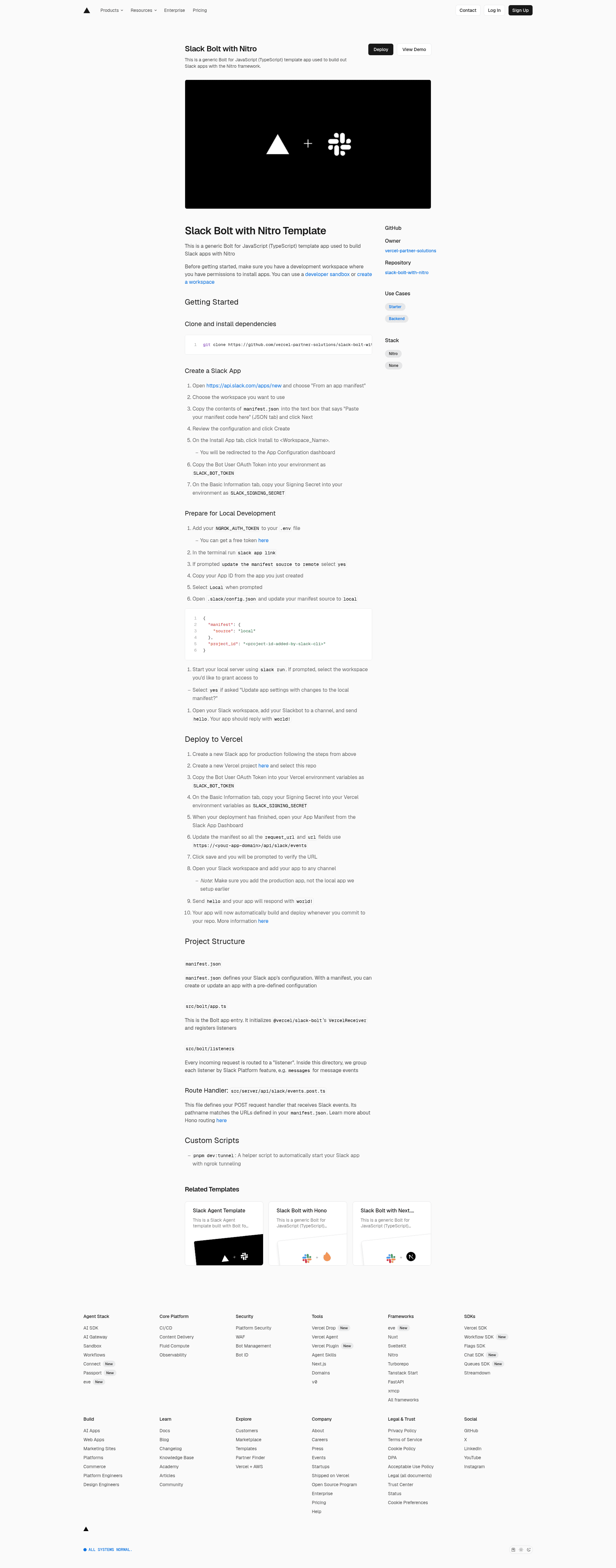
Slack Bolt with Nitro is a Vercel-deployable template for building Slack apps using Bolt for JavaScript (TypeScript) and the Nitro server framework. This GitHub template from vercel-partner-solutions wires up a Bolt app entry that initializes @vercel/slack-bolt's VercelReceiver, registers listeners grouped by Slack Platform feature, and exposes a Nitro route handler at src/server/api/slack/events.post.ts to receive Slack events.
What is Slack Bolt with Nitro?
Slack Bolt with Nitro is a starter repository for creating Slack apps with the Bolt for JavaScript SDK (written in TypeScript) and the Nitro server runtime. The template takes a Slack app manifest (manifest.json) and environment variables SLACK_BOT_TOKEN and SLACK_SIGNING_SECRET as input, and produces a running Slack bot that listens for events and responds to messages—the sample command hello replies with world!. It runs on Vercel's serverless platform and is maintained by vercel-partner-solutions.
Key Features
- Bolt for JavaScript (TypeScript) — The template initializes @vercel/slack-bolt's VercelReceiver, so your Slack listeners work on Vercel's serverless functions without extra infrastructure.
- Nitro route handler — The POST endpoint at src/server/api/slack/events.post.ts handles Slack events; its pathname matches the request URLs defined in your manifest.json, and it uses Hono-style routing via Nitro.
- Slack App Manifest — manifest.json defines your app's configuration (scopes, event subscriptions, URLs) so you can create or update the app from a pre-defined config.
- One-click Vercel deployment — A "Deploy with Vercel" button clones the repo and prompts you to set SLACK_BOT_TOKEN and SLACK_SIGNING_SECRET as environment variables.
- Local development with ngrok — The
pnpm dev:tunnelscript starts the app with ngrok tunneling; you need a free NGROK_AUTH_TOKEN and the Slack CLI'sslack runcommand to test locally. - Organized listeners — Incoming requests are routed to listeners grouped by Slack Platform feature (e.g. a messages folder for message events), keeping bot logic manageable.
- Automated deployments — Once connected, Vercel rebuilds and deploys the app automatically whenever you commit to the repository.
Who is it for?
- Slack app developers — Build event-driven bots that respond to messages and Slack actions in TypeScript without managing your own server.
- Teams deploying bots on Vercel — Use the template to get a production Slack bot running on Vercel's edge/serverless platform with Git-based deploys.
- Developers starting from a manifest — Create a new Slack app from manifest.json in minutes and iterate locally with the Slack CLI and ngrok.
What can you do with Slack Bolt with Nitro?
- Prototype a Slack bot: Send
helloin a channel after adding the app, and the bot replies withworld!—a quick end-to-end verification that events are flowing. - Deploy a production Slack app: Create a separate production Slack app, set the two environment variables in Vercel, then update the manifest's request URLs to point at your deployment domain.
- Extend with custom listeners: Add new listeners under src/bolt/listeners grouped by feature, and the Bolt app entry picks them up for handling Slack events.
How does Slack Bolt with Nitro work?
The template follows a straightforward setup path: clone the repository and install dependencies with pnpm, create a Slack app from manifest.json at api.slack.com, and copy the Bot User OAuth Token and Signing Secret into your environment. For local development, add your NGROK_AUTH_TOKEN, run slack app link and then slack run; for production, deploy to Vercel and point the manifest's URLs to your deployment. The VercelReceiver initializes Bolt to process incoming Slack events through the Nitro route handler.
FAQ
What environment variables does Slack Bolt with Nitro require?
The template requires SLACK_BOT_TOKEN (the Bot User OAuth Token from your Slack app) and SLACK_SIGNING_SECRET (from the Basic Information tab). Both are set in Vercel's environment variables during deployment and in your local .env for development.
Do I need an ngrok account for local development?
Yes, local development uses the pnpm dev:tunnel script to create an ngrok tunnel, and the template asks for a free NGROK_AUTH_TOKEN in your .env file. The Slack CLI's slack run command then starts the local server.
How do I verify the app is working?
After setup, add the Slackbot to a channel and send hello. The app replies with world!, confirming that the Bolt app is receiving and responding to Slack events through the VercelReceiver.
Does the template deploy automatically to Vercel?
Yes, once your repository is connected to Vercel with the Vercel Git integration, every commit triggers a new build and deployment. You only need to update the request_url and url fields in your Slack App Manifest to point at your deployment domain.