Template details
Small Business Starter
An Astro 7 and Tailwind CSS v4 static site template for small businesses, with services, reviews, blog, and Netlify Forms.
About this template
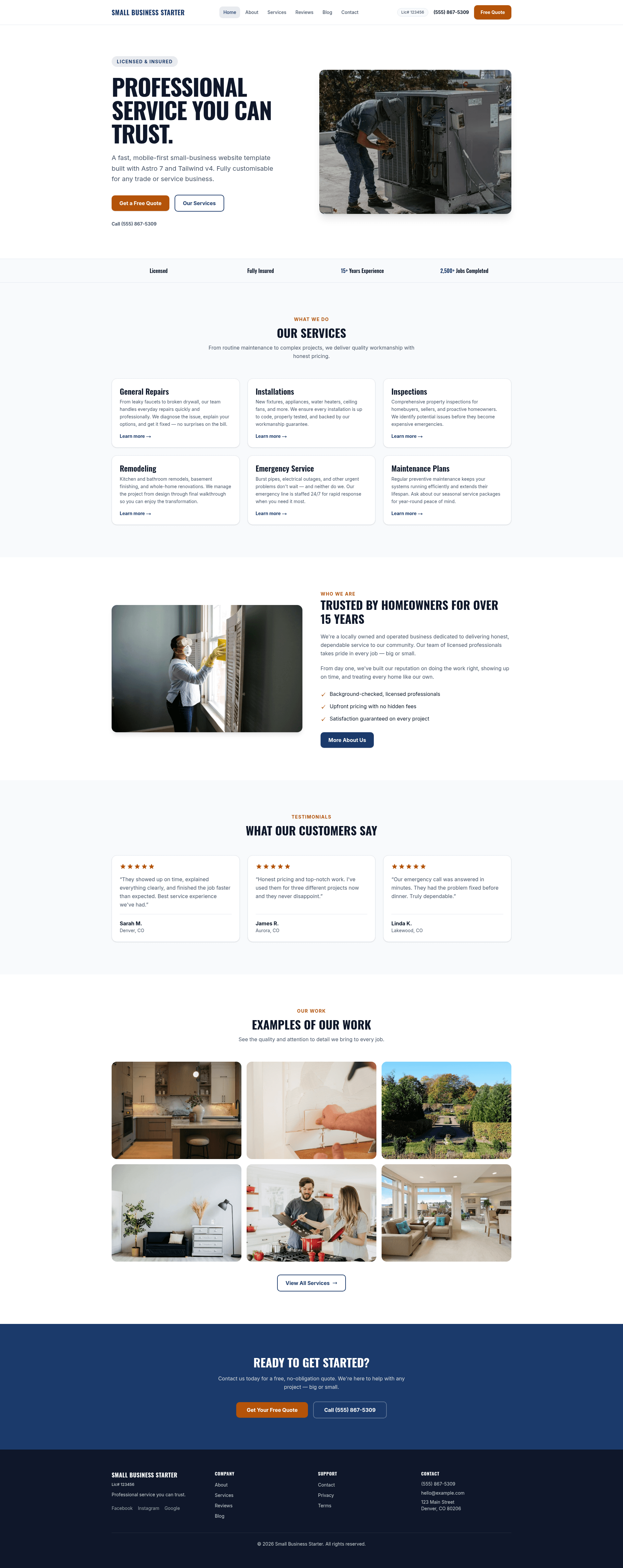
Small Business Starter is an Astro 7 and Tailwind CSS v4 website template for small businesses, contractors, and local service providers, producing a nine-page static site whose copy, colours, and photos are edited from a handful of TypeScript and CSS files.
What is Small Business Starter?
Small Business Starter is a free, MIT-licensed static website template built on Astro 7 with Tailwind CSS v4 for small businesses and local service contractors. Its inputs are TypeScript data files (src/data/siteData.ts, src/config/brand.ts, src/data/privacy.ts, src/data/terms.ts), one CSS theme file (src/styles/theme.css), and Markdown blog posts under src/content/blog/; its output is a static site built into dist/. Business name, tagline, SEO description, licence number, email, phone, address, hours, emergency-service tagline, social links, navigation, service cards, reviews, about story, team members, trust items, and footer navigation all come from the single src/data/siteData.ts file, which powers the entire site. The documented deploy target is Netlify, where build settings are read from netlify.toml and the contact form is handled by Netlify Forms with no extra configuration.
What makes Small Business Starter stand out?
- One data file for all content —
src/data/siteData.tsholds the business name, tagline, meta description, licence/contractor number, email, click-to-call phone fields, address with Google Maps link, hours, emergency tagline, socials, header nav, service cards, customer reviews, about story paragraphs, team cards, homepage trust bar items, and footer nav columns; empty strings hide optional fields and links. - Theme tokens in a single CSS file —
src/styles/theme.cssdefines--color-primary,--color-accent,--color-background,--color-surface,--color-text,--color-text-muted,--color-dark,--color-dark-surface, and a--radius-*scale inside a Tailwind v4@themeblock; Tailwind auto-generates utilities such asbg-primary,text-accent, androunded-mdfrom them, so no other file needs editing when colours change. - Nine routes out of the box —
/,/about,/services,/reviews,/contact,/blog,/blog/[slug],/privacy, and/terms, each backed by a file undersrc/pages/. - Markdown blog with frontmatter — posts live in
src/content/blog/withtitle,description,author,date,tags, anddraftfields; the filename becomes the URL slug, and three starter posts ship with the template. - Auto-discovered gallery — files dropped into
src/assets/images/gallery/appear automatically and the filename becomes the alt text (kitchen-remodel.jpgbecomes "Kitchen Remodel"); hero images (landscape, at least 1600 × 1200 px) and about images (portrait or square, at least 900 × 700 px) are imported explicitly fromsrc/config/images.ts. - SEO plumbing included —
@astrojs/sitemapandastro-robots-txtgenerate the sitemap and robots file, while the domain set in bothastro.config.mjsandsiteData.tsdrives canonical URLs, Open Graph tags, and JSON-LD structured data. - Legal and social assets covered —
src/data/privacy.tsandsrc/data/terms.tsrender the privacy and terms pages from an effective date plus an ordered list of heading-and-paragraph sections, and the template documents a 16 × 16 px SVG favicon plus a 1200 × 630 px OG image (PNG or JPG, ideally under 300 kB). - Playwright tests and pnpm scripts —
pnpm devserves atlocalhost:4321,pnpm buildoutputs todist/,pnpm previewserves the production build, andpnpm testruns the included Playwright suite.
Who should use Small Business Starter?
- Trades and service contractors — plumbing, remodeling, electrical, and similar businesses that need service cards, a homepage trust bar ("Licensed", "15+ Years"), customer reviews, hours, and a click-to-call phone number from one editable file.
- Freelance developers and small agencies — anyone building a client site who wants a working content model, legal pages, and a documented nine-step polishing checklist instead of a blank Astro project.
- Small businesses that publish content — owners who want Markdown blog posts sitting alongside service and review pages without a CMS.
- Netlify-focused builders — teams already hosting on Netlify that want Netlify Forms on the contact page without wiring a backend.
What can you do with Small Business Starter?
- Contractors: list services as title-and-description cards, add testimonials with quote, name, location, and rating, and surface licence numbers that hide themselves when left blank.
- Local shops: publish a full address with a Google Maps link, business hours in the contact page sidebar, and social links for Facebook, Instagram, and Google, hiding any that are not used.
- Content marketers: add or replace the three starter Markdown posts, where each filename becomes the post slug and the
draftflag controls publication. - Client handoff: swap
favicon.svgandog-image.png, rewrite the privacy and terms sections, set the production domain in two files, and deploy from GitHub to Netlify.
How does Small Business Starter work?
- Run
pnpm installthenpnpm dev; the dev server starts athttp://localhost:4321. - Work through the checklist: edit
siteData.tsfor business content,theme.cssfor colours and radius,brand.tsfor identity, the image folders, then the favicon, OG image, legal data, blog posts, and domain. - Run
pnpm buildto emit the static site intodist/, or push to GitHub and connect the repo to Netlify, which auto-detects the build fromnetlify.toml.
Pros and cons
- Content, services, reviews, team, and navigation are all edited in one file rather than scattered across page components.
- Colours and border radius live in a single
@themeblock, so rebranding does not require touching component markup. - Gallery images are discovered from filenames, removing a manual listing step.
- The contact form needs no third-party service because it uses Netlify Forms.
- Remote Unsplash placeholders are used for hero and about images until local files are added, and Astro does not optimise remote images, so they must be replaced before going live.
- Changing fonts requires editing the font name in three places:
brand.ts, thefontsarray inastro.config.mjs, and the@theme inlinefallback stacks intheme.css.
FAQ
Is Small Business Starter free?
Yes. It is released under the MIT license, which allows free use, modification, and distribution. There is no paid tier mentioned in the documentation, and the source is intended to be edited directly for each client or business.
What stack does Small Business Starter use?
Astro 7 handles the framework and static output, Tailwind CSS v4 with @tailwindcss/typography handles styling, @astrojs/sitemap and astro-robots-txt cover SEO files, Playwright covers testing, and Netlify provides static hosting plus the contact form backend.
How do I change the colours and fonts?
Colours, border radius, type scale, and spacing come from the @theme block in src/styles/theme.css; Tailwind v4 generates utility classes from those variables automatically. Fonts require updating the name in src/config/brand.ts, the fonts array in astro.config.mjs, and the fallback stacks in theme.css.
Where do I edit business information like services and reviews?
Everything lives in src/data/siteData.ts: name, tagline, meta description, licence, email, phone, address, hours, emergency tagline, socials, navigation, service cards, reviews, about story, team cards, trust items, and footer navigation. Leaving a field as an empty string hides the related element.
Do I have to host it on Netlify?
The documented deployment path is Netlify, where netlify.toml supplies build settings and the contact form uses Netlify Forms. The build output is a static dist/ folder, but moving the contact form to another host would require replacing that form handling yourself.