Template details
Software Developer Portfolio
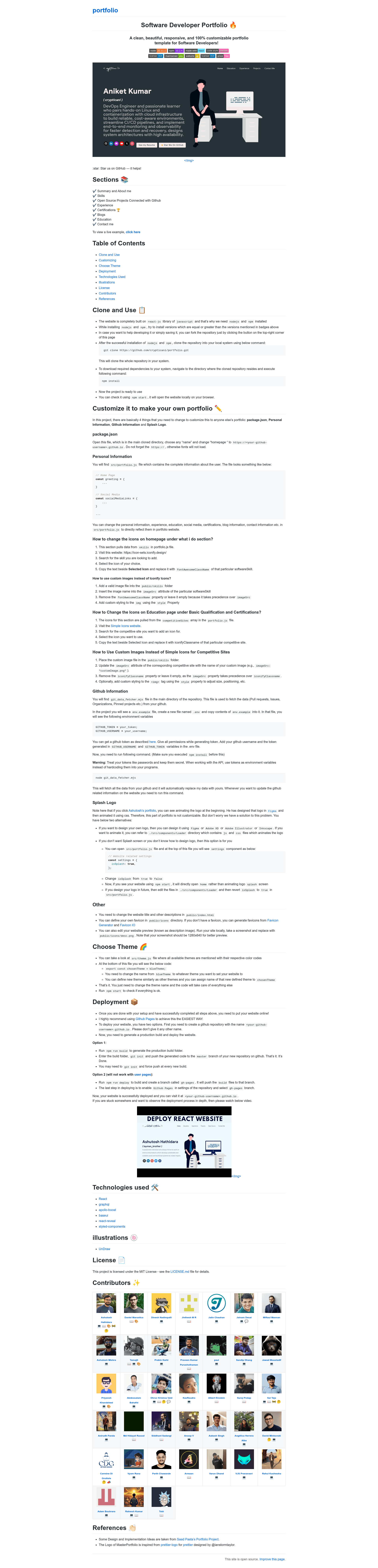
A developers portfolio website template. Coded in React.
About this template
Software Developer Portfolio is a free, MIT-licensed React portfolio template that generates a responsive personal website for developers, with GitHub-synced project sections, multiple themes, and one-command deployment to GitHub Pages.
What is Software Developer Portfolio?
Software Developer Portfolio is a single-page React application that turns a personal data file (src/portfolio.js) and a GitHub token into a full portfolio website. It outputs a responsive site with sections for summary and about me, skills, open source projects fetched from GitHub, experience, certifications, blogs, education, and contact. The project runs on Node.js 20.11.1 and npm 10.2.4, and the live demo is hosted at https://crypticani.github.io. It is maintained by the open-source community and is a continuation of the MasterPortfolio project by Ashutosh Hathidara.
Key Features
- One-file personalization — All personal information, experience, education, social links, and certifications live in
src/portfolio.js; edit that file and the site updates everywhere. - Live GitHub integration — A
node git_data_fetcher.mjsscript pulls pull requests, issues, organizations, and pinned projects from GitHub using aGITHUB_TOKENandGITHUB_USERNAMEstored in a.envfile. - Theme switcher —
src/theme.jscontains multiple predefined color themes; changing thechosenThemeexport swaps the entire site's colors. - Splash screen animation — An animated logo loader is included, and it can be disabled by setting
isSplashtofalseinsrc/portfolio.js. - Styled with styled-components — The UI is built with styled-components, Base Web (
baseui) components, andreact-revealfor scroll animations. - GitHub Pages deployment — Running
npm run buildand pushing the build folder, ornpm run deploy(which creates agh-pagesbranch), publishes the site atyour-github-username.github.io. - Customizable icons — Skills icons come from Iconify, with an option to use custom images placed in
public/skills; education icons use Simple Icons with a similar image override.
Who is it for?
- Software developers — Create a professional portfolio that showcases your GitHub activity, skills, and experience without designing from scratch.
- Job seekers — Stand out with a personalized site that includes certifications, blogs, and a contact section, deployable for free on GitHub Pages.
- Open-source contributors — The GitHub data fetcher automatically displays your contributions, pinned repos, and organizations, so the site stays current as you work.
- Students — Present education background, certifications, and side projects with a responsive, clean layout.
What can you do with it?
- Showcase GitHub work: Connect a GitHub token and run the data fetcher to surface pull requests, issues, organizations, and pinned projects directly on the site.
- Swap the whole design: Change one line in
src/theme.jsto apply a different color theme, or define a custom theme with your own color codes. - Customize every section: Edit
src/portfolio.jsto update the greeting, social media links, skills, experience, certifications, blogs, and education content. - Deploy in two ways:
npm run buildfor a static folder, ornpm run deployto push to agh-pagesbranch on yourgithub.iorepository.
How does the template work?
First, clone the repository and run npm install to install dependencies. Then edit src/portfolio.js with your personal information, create a .env file containing GITHUB_TOKEN and GITHUB_USERNAME, run node git_data_fetcher.mjs to pull GitHub data, and optionally swap the theme in src/theme.js. Finally, deploy via npm run build or npm run deploy to GitHub Pages.
Pricing
The template is free. The repository carries an MIT license and a price badge that reads "price-free".
Alternatives
- MasterPortfolio — the original project by Ashutosh Hathidara that this template extends; it shares the same structure and many of the same contributors.
- DeveloperFolio — an earlier React portfolio template by Saad Pasta that this project cites as a design influence.
FAQ
Is Software Developer Portfolio free?
Yes, the template is free to use and modify. The repository displays a price-free badge and is released under the MIT License, so you can use it for personal projects without paying a license fee.
Do I need a GitHub account to use this template?
You need a GitHub account if you want the Open Source Projects section to work. The template uses a GitHub token and username in a .env file and a script to fetch pull requests, issues, and pinned repos. Without it, you can still use the other sections by editing src/portfolio.js.
How do I change the color theme?
Open src/theme.js and look for the chosenTheme export at the bottom. Replace blueTheme with the name of any existing theme, or define your own theme object with your preferred color codes, then run npm start to preview.
What is the recommended Node.js version?
The badges indicate Node.js 20.11.1 and npm 10.2.4. The README recommends installing versions equal to or greater than the ones shown, so use a recent Node.js release to avoid compatibility issues.
Can I host this on something other than GitHub Pages?
The template's deployment instructions focus on GitHub Pages, but since the build output is a static React site, you can host the build folder on any static web host, such as Netlify, Vercel, or a personal server.