Template details
SvelteKit AI Chatbot
A full-featured, hackable SvelteKit AI chatbot template with streaming chat UI.
About this template
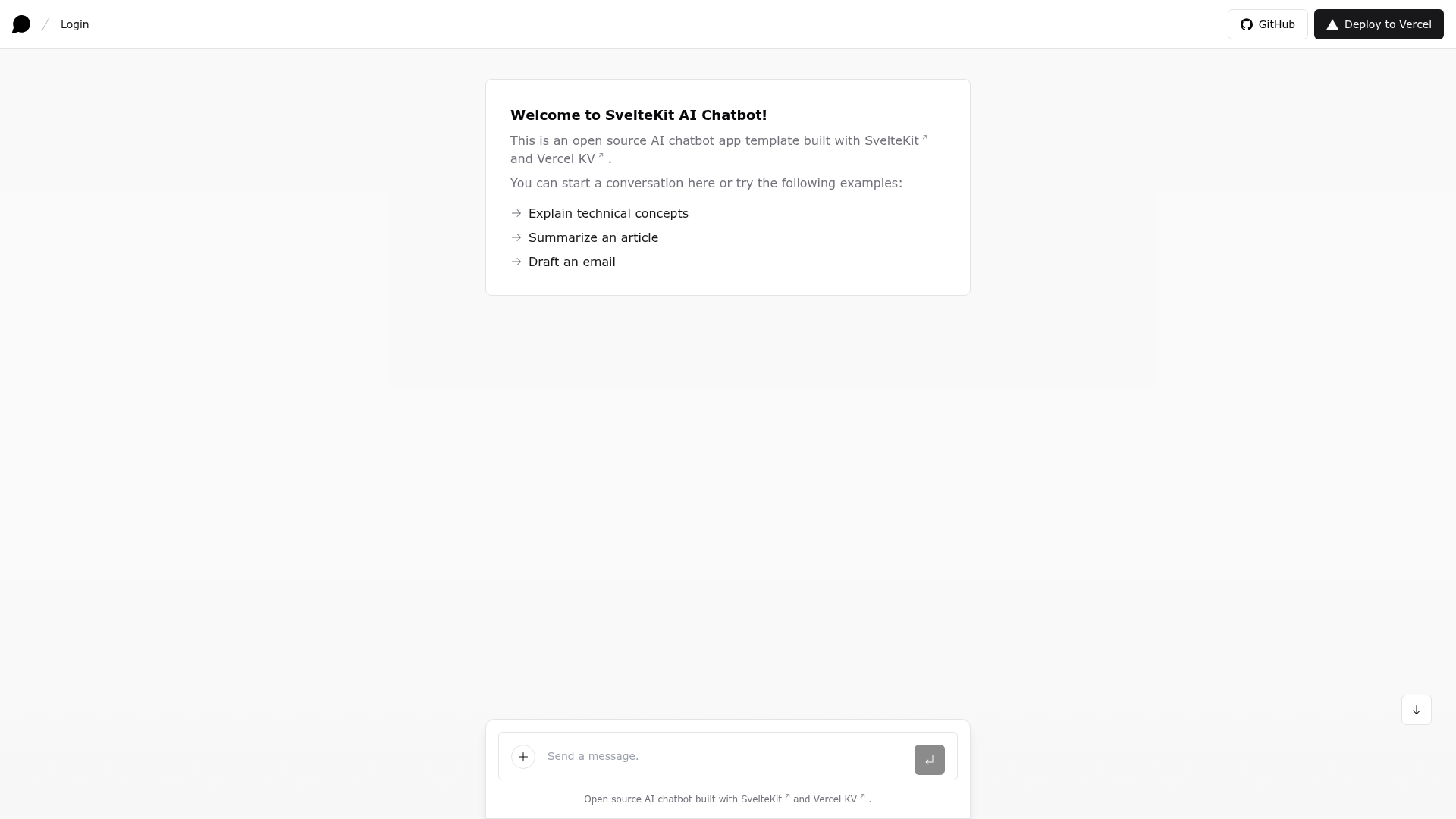
SvelteKit AI Chatbot is an open-source, unofficial SvelteKit port of the Vercel Labs AI Chatbot that provides a full-featured, streaming chat UI built with SvelteKit, the Vercel AI SDK, OpenAI, and Vercel KV.
What is SvelteKit AI Chatbot?
SvelteKit AI Chatbot is an open-source AI chatbot app template that runs on SvelteKit and the Vercel AI SDK, shipping with OpenAI's gpt-3.5-turbo as the default model. It takes an OpenAI API key and optional Auth.js credentials as inputs and produces a deployable web app with a streaming chat interface, chat history via Vercel KV, and GitHub OAuth login. The template is maintained by Jian Yuan Lee as an unofficial port of the Next.js version from Vercel Labs.
Key Features
- SvelteKit framework — Built on SvelteKit, the full-stack Svelte framework, with edge runtime readiness for low-latency responses on Vercel.
- Vercel AI SDK — Integrates the Vercel AI SDK for streaming chat UI and model-agnostic access to LLM providers.
- Multi-provider support — Ships with OpenAI's gpt-3.5-turbo by default, and can switch to Anthropic, HuggingFace, or custom models via LangChain with just a few lines of code.
- shadcn/ui + Tailwind CSS — Uses shadcn-svelte, Tailwind CSS, Radix Svelte, Svelte Headless UI, and Phosphor Icons for a polished and accessible UI.
- Auth.js authentication — Includes GitHub OAuth authentication via Auth.js, configured through GITHUB_ID and GITHUB_SECRET environment variables.
- Vercel KV storage — Implements chat history, rate limiting, and session storage with Vercel KV, though these are marked as under construction.
- One-click Vercel deployment — Deploys via a Vercel button that clones the repo, sets the required environment variables, and provisions a KV store automatically.
Who is it for?
SvelteKit AI Chatbot is for developers who want to launch a production-minded AI chat experience without building the streaming UI and authentication plumbing from scratch. It is best suited to SvelteKit users who are comfortable configuring environment variables and deploying to Vercel.
- SvelteKit developers — Use the template to add a customizable AI chat assistant to an existing SvelteKit application, reusing its streaming UI, routing, and auth.
- Startup teams — Deploy a branded chatbot to Vercel in minutes, then swap in the LLM provider that fits their use case and budget.
- Open-source contributors — Fork the repository to experiment with new model providers, custom prompt logic, or alternative storage backends.
What can you do with it?
- Build a customer-support assistant — Connect the chat UI to your own backend or knowledge base and get a streaming interface for handling user questions.
- Prototype an AI feature — Rapidly compare OpenAI, Anthropic, HuggingFace, or LangChain-backed responses by changing a few lines of code.
- Learn the Vercel AI SDK — Study a working SvelteKit implementation of streaming chat with the Vercel AI SDK, including edge runtime configuration and Auth.js integration.
How does it work?
To run the template locally, you first install the Vercel CLI, link your project with vercel link, and pull environment variables with vercel env pull. Then run npm install and npm run dev to start a development server at localhost:5173. For production, the one-click deploy button on the README clones the repository, sets the required environment variables (OPENAI_API_KEY, AUTH_SECRET, GITHUB_ID, GITHUB_SECRET), and creates a Vercel KV database.
Pros and cons
- Open-source and free — The template itself has no license fee; you only pay for the OpenAI API, Vercel KV, and other services you connect.
- Familiar architecture — Inherits the structure of the popular Vercel AI Chatbot, making it easier to find help and community resources.
- Flexible model support — The Vercel AI SDK makes it simple to switch providers or use LangChain.
- Work in progress — Chat history, rate limiting, and session storage via Vercel KV are explicitly marked as under construction, so those features may not be production-ready.
- Unofficial port — The project is not maintained by Vercel, so updates may not be as frequent as the official Next.js template.
Alternatives
- vercel-labs/ai-chatbot — The official Next.js template this project ports, using React instead of Svelte and the same Vercel AI SDK.
FAQ
Is SvelteKit AI Chatbot free?
Yes, the template is open-source and free to use. You only pay for the third-party services it connects to, such as the OpenAI API, Vercel KV, and any authentication providers you enable.
Which LLM providers does it support?
The template ships with OpenAI's gpt-3.5-turbo as the default. Thanks to the Vercel AI SDK, you can also use Anthropic, HuggingFace, or LangChain-backed models by changing a few lines of code.
How do I run it locally?
Install the Vercel CLI with npm i -g vercel, then run vercel link to link your local project. Pull environment variables with vercel env pull, then run npm install and npm run dev. The app will be available at localhost:5173.
Does it require Vercel?
The template is designed to run on Vercel's Edge Runtime and uses Vercel KV for storage, so deploying on Vercel is the simplest path. The README includes a one-click deploy button and instructions for creating a KV database instance.
Is this the official Vercel chatbot template?
No, it is an unofficial SvelteKit port of the official Next.js AI Chatbot from Vercel Labs, maintained by Jian Yuan Lee.