Template details
MCP UI by Flowbite
Open-source UI component library for building MCP apps for ChatGPT, Gemini, Claude, and MCP clients like Cursor.
About this template
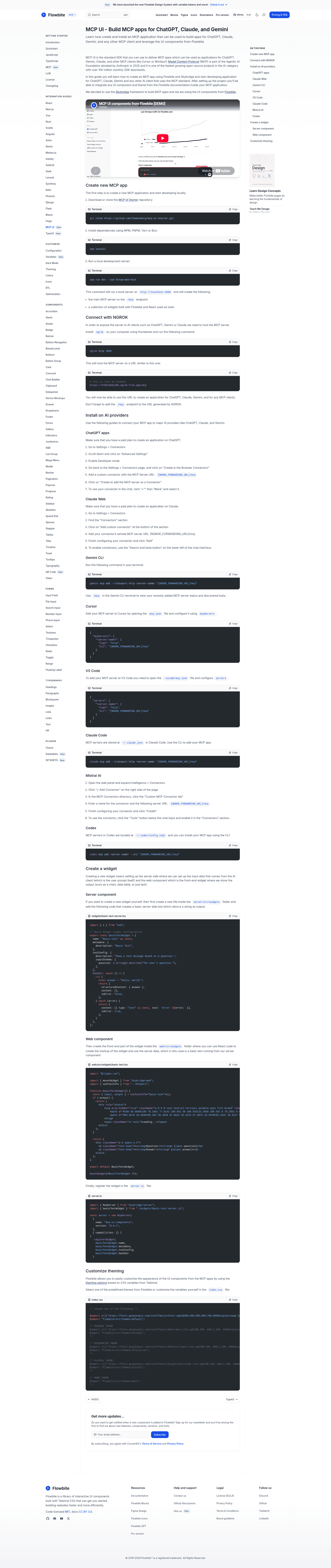
MCP UI by Flowbite is an open-source template and component library for building Model Context Protocol (MCP) apps that run inside ChatGPT, Gemini, Claude, and other MCP clients such as Cursor and Windsurf.
What is MCP UI by Flowbite?
MCP UI by Flowbite is an open-source library of UI components, widgets, and examples for building apps that work as ChatGPT apps, Gemini apps, Claude apps, and any other MCP client such as Cursor or Windsurf. It is built on top of the Flowbite UI framework and the SkyBridge framework, and the repository provides both a backend MCP endpoint and a React frontend for rendering components.
The template runs an Express server on port 3000 that exposes an MCP endpoint at /mcp, alongside a Vite HMR dev server serving the React-based UI elements. It requires Node.js version 24 or later and an HTTP tunnel such as ngrok to expose the local server to MCP clients.
Key Features
- Prebuilt component examples — basic text, radio group, checkbox group, line chart, e-commerce product cards, QR code generation, and table data widgets are included as ready-to-use examples.
- Flowbite UI and Tailwind CSS — all components are styled with the Flowbite UI framework (Tailwind CSS based) and can be themed via
index.css. - Multiple theming options — five predefined themes are included: default, minimal, enterprise, playful, and mono, selectable by editing the CSS imports.
- Broad client integration guides — documentation covers connecting to ChatGPT, Claude Web, Gemini CLI, Cursor, VS Code, Claude Code, Mistral AI, and Codex with step-by-step instructions.
- Local development workflow — run
npm install, thennpm run devto start the Express and Vite servers, then expose withngrok http 3000and register the forwarding URL with the/mcpsuffix. - Live demo — a hosted demo at mcp-ui-kit-c89068fd.alpic.live/try lets you see the components in action before installing.
Who is MCP UI by Flowbite for?
This template is aimed at developers and teams building MCP apps for AI assistants. It is useful for:
- Developers creating custom MCP servers who need ready-made UI widgets to display results in ChatGPT, Claude, or Gemini.
- Product teams prototyping agent workflows who want to quickly wire a React frontend to an MCP backend without building UI from scratch.
- Prompt engineers and MCP tinkerers who want to experiment with connectors across multiple clients like Cursor, Windsurf, VS Code, and Codex.
Common use cases
- ChatGPT app builders: register the MCP server URL as a custom connector in ChatGPT’s developer mode and render charts, tables, and e-commerce widgets inside chat.
- Gemini CLI users: add the server with
gemini mcp add --transport httpand use the discovered tools in the terminal. - Claude Code / Claude Web users: add the custom connector and use the components in conversation via the tools menu.
- Cursor and VS Code users: configure the MCP server in
mcp.jsonand let the agent call the tools automatically.
How does MCP UI by Flowbite work?
The repository is structured as a single Node.js project. After installing dependencies with npm install (or bun, pnpm, or yarn), running npm run dev starts an Express server on port 3000 with an MCP endpoint at /mcp, plus a Vite HMR server for the React app. You then create a public tunnel with ngrok http 3000, take the generated forwarding URL, append /mcp, and register it as a connector in your chosen MCP client. The client can then call the available tools, which return Flowbite-styled UI elements.
FAQ
Is MCP UI by Flowbite free?
Yes, the repository is open-source and available on GitHub under the Flowbite organization.
Which MCP clients are supported?
The documentation includes installation guides for ChatGPT, Claude Web, Claude Code, Gemini CLI, Cursor, VS Code, Mistral AI, and Codex. Any MCP client that supports remote HTTP MCP servers can use the same endpoint.
What version of Node.js is required?
The project requires Node.js 24 or later, as stated in the prerequisites. An HTTP tunnel such as ngrok is also required for exposing the local server during development.
What UI components are included?
The included examples are basic text, radio group, checkbox group, line chart, e-commerce products, QR code, and table data. These are built with Flowbite UI components.
Can I customize the look?
Yes, theming is handled through index.css using Flowbite’s theming system. You can choose from predefined themes like default, minimal, enterprise, playful, and mono, or create your own.