Template details
TeXt
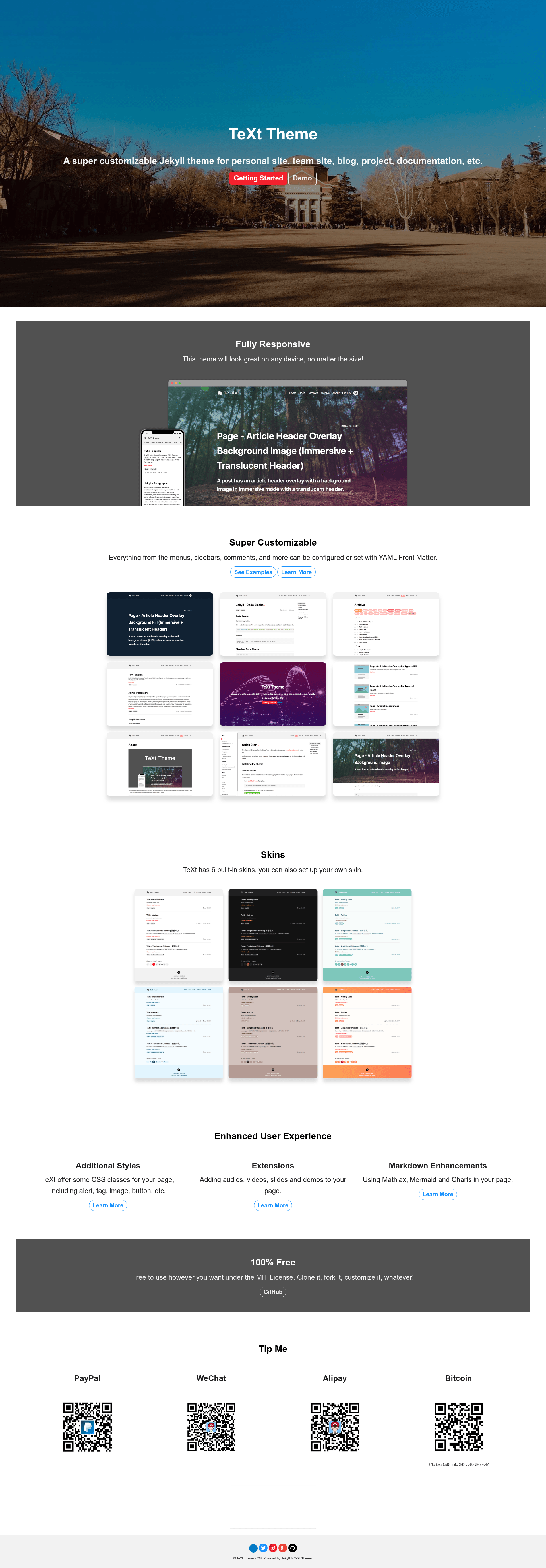
A highly customizable Jekyll theme for personal sites, team sites, blogs, projects, and documentation, with 6 skins and Markdown enhancements.
About this template
TeXt is a super customizable Jekyll theme for building personal sites, team sites, blogs, projects, and documentation, with an iOS 11-inspired design that uses large titles, round buttons, and cards. It takes Markdown content and YAML configuration as input and generates a static HTML website via Jekyll. The theme is developed by kitian616 and released under the MIT license.
What is TeXt?
TeXt is a Jekyll theme that provides a complete static-site foundation for blogs, project documentation, team sites, and personal pages. You write posts in Markdown, set options in the site's _config.yml file, and Jekyll builds the output into plain HTML and assets. The theme includes 6 built-in skins (default, dark, forest, ocean, chocolate, orange), support for custom skins, and a Tomorrow-based highlight theme with 5 color variants.
Key Features
- Responsive design — The layout adapts to desktop, tablet, and mobile screen sizes using semantic HTML.
- Built-in skins — Six named skins (default, dark, forest, ocean, chocolate, orange) are included, and you can define your own skin.
- Markdown enhancements — MathJax for math typesetting, Mermaid for diagrams, and Chart.js for interactive charts can be used directly in posts.
- Internationalization — Built-in i18n support lets you publish content in multiple languages without extra plugins.
- Search and table of contents — A search feature and automatic table-of-contents generation come out of the box.
- Content extensions — Audio, video, slides, and demo content can be embedded via dedicated extensions.
- Sharing and comments — AddToAny and AddThis buttons handle sharing; Disqus, Gitalk, and Valine are supported for comments.
- Analytics and pageviews — Google Analytics and LeanCloud pageview tracking can be enabled from configuration.
Who is it for?
- Bloggers who want a clean Jekyll blog with tag, archive, and author pages, plus a built-in search.
- Open-source project maintainers who need a documentation site with navigation, table of contents, and code highlighting.
- Team sites that want a shared static site with multiple authors and internationalization.
- Developers who prefer Jekyll's static workflow and want a theme they can customize via skins, layouts, and configuration files.
What can you do with TeXt?
- Documentation writers: produce a project site with dedicated documentation layouts, navigation, and code blocks using one of 5 Tomorrow highlight themes.
- Multilingual content teams: publish the same site in several languages using the built-in i18n system.
- Educators and presenters: embed slides, videos, and Mermaid diagrams into posts to build interactive lessons.
- Personal site owners: create a portfolio or résumé page with the home, archive, and layout examples as starting points.
How does TeXt work?
TeXt works like any standard Jekyll theme. You install it (the repo includes a gem release, jekyll-text-theme), add your Markdown posts and pages, set the _config.yml options for skin, navigation, and integrations, and then run Jekyll to build a static site. The documentation provides a Quick Start guide and a migration guide for updating from version 1.x to 2.x.
FAQ
Is TeXt free?
Yes, TeXt is open source and MIT licensed, so you can use, modify, and distribute it freely, including in commercial projects.
Does TeXt support multiple languages?
Yes, it has built-in internationalization (i18n) support. You can write posts in different languages and configure language-specific navigation and UI strings.
What Markdown enhancements are included?
TeXt adds MathJax for LaTeX-style math, Mermaid for flowcharts and diagrams, and Chart.js for data-driven charts, all usable from Markdown.
Can I add comments to my posts?
You can enable Disqus, Gitalk, or Valine comment systems. Each is configured through the theme's settings, and you can pick whichever fits your site's auth model.
Which highlight themes are available?
TeXt uses the Tomorrow color scheme with five variants: tomorrow, tomorrow-night, tomorrow-night-eighties, tomorrow-night-blue, and tomorrow-night-bright.