Template details
VS Code NextJS Portfolio
A Next.js and Tailwind CSS portfolio template that renders a software developer's personal site as a Visual Studio Code style editor.
About this template
VS Code NextJS Portfolio is a Next.js portfolio template for software developers that presents a personal site inside a Visual Studio Code style editor interface rather than a conventional scrolling web page.
What is VS Code NextJS Portfolio?
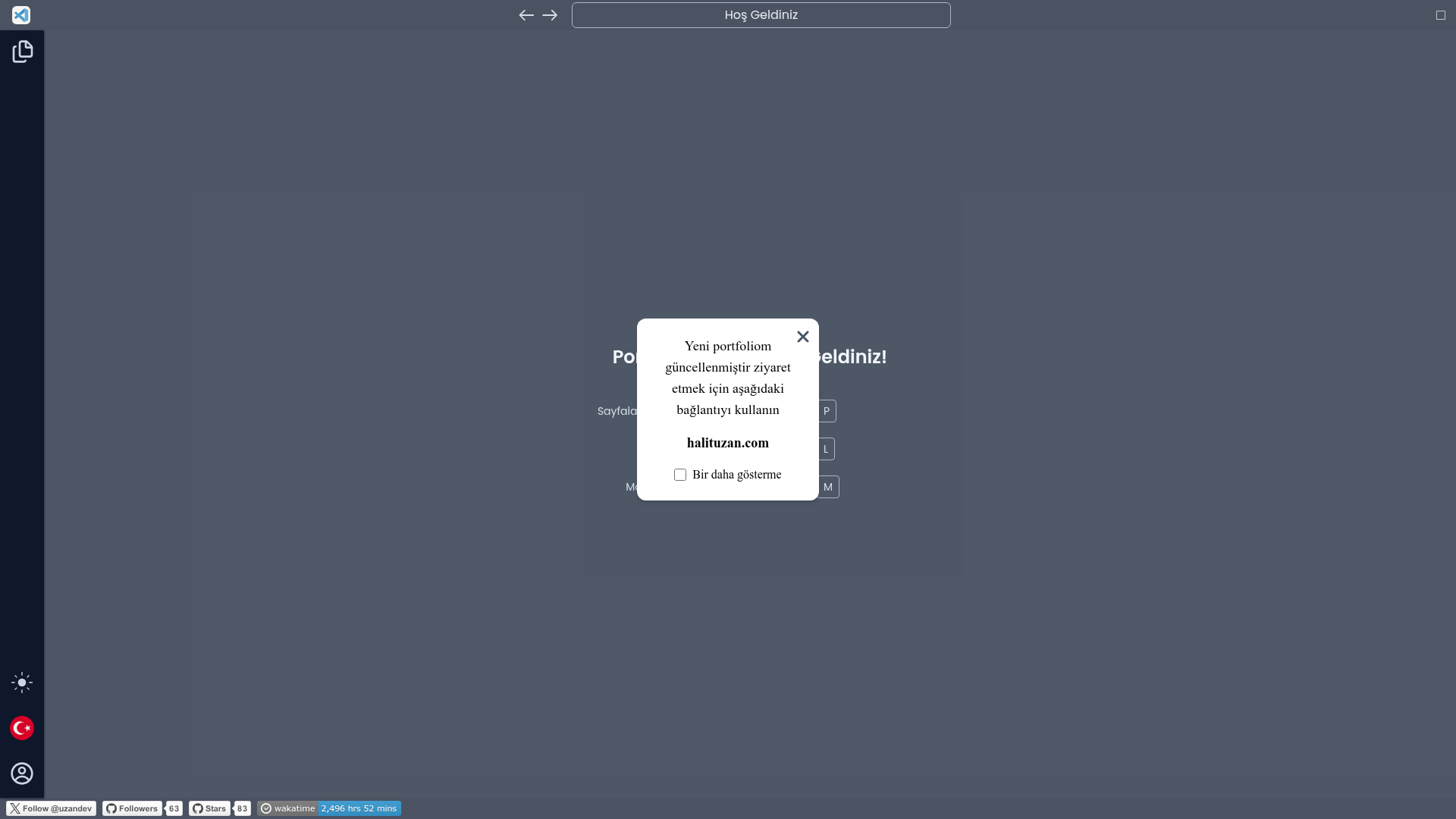
VS Code NextJS Portfolio is a developer portfolio template built with Next.js and styled with Tailwind CSS, in which the visitor's browsing experience mimics the Visual Studio Code workbench. Instead of clicking through a standard navbar, visitors open portfolio pages through a keyboard-driven page selector and switch language and display mode from shortcuts, exactly as they would inside an editor. The project is maintained by GitHub user halituzan (Halit Uzan), and the current live version is published at halituzan.com.
Key Features
- VS Code workbench look — portfolio content is framed as an editor window, so sections read like files and panels rather than ordinary landing-page blocks.
- Command-palette navigation — pressing CTRL + P opens a page selector for jumping between portfolio sections without a mouse.
- Language switching — CTRL + L changes the site language; the demo landing copy is written in Turkish, so at least a Turkish-language variant ships with the template.
- Mode switching — CTRL + M toggles the interface mode, giving visitors a second display setting beyond language.
- Next.js foundation — the template is built on Next.js with React, matching its repository tagging as a Next.js portfolio template.
- Tailwind CSS styling — layout and components are styled with Tailwind CSS utility classes.
- Social and activity links — the demo page collects an X (formerly Twitter) follow link for uzandev, a GitHub profile link for halituzan, a GitHub stars link, and a WakaTime badge tracking total time coded since June 10, 2023.
- Published live example — halituzan.com is the updated deployment and also serves as a visual reference for the finished template.
Who should use VS Code NextJS Portfolio?
- Software developers building a personal site — use it to publish projects, skills and contact links without designing a layout from scratch.
- Front-end engineers who want a memorable portfolio — the editor metaphor and keyboard shortcuts replace the usual hero-and-cards homepage.
- Developers targeting more than one language audience — the built-in CTRL + L language toggle suits bilingual portfolios, particularly Turkish and English.
- Next.js users already working with Tailwind CSS — the stack matches so pages and components can be extended directly in the same codebase.
Use cases
- Job-seeking developers: ship a working live portfolio at a custom domain that demonstrates both front-end skill and personality through the editor interface.
- Keyboard-first users: visitors who prefer shortcuts can browse every section via CTRL + P instead of scrolling and clicking.
- Bilingual developers: serve Turkish and other language audiences from one deployment by switching language with CTRL + L.
How does it work?
The template replaces traditional site navigation with editor-style shortcuts. Visitors press CTRL + P to open the page selector and jump between portfolio pages, CTRL + L to switch the site language, and CTRL + M to change the interface mode. The page also offers a dismiss option so returning visitors can hide the welcome prompt.
FAQ
What is VS Code NextJS Portfolio?
It is a Next.js and Tailwind CSS portfolio template that renders a developer's personal site as a Visual Studio Code style editor. The live example is halituzan.com, maintained by GitHub user halituzan, and visitors navigate pages with keyboard shortcuts instead of a standard menu.
Which keyboard shortcuts does the template use?
CTRL + P opens the page selector for viewing portfolio pages, CTRL + L changes the site language, and CTRL + M changes the display mode. These three shortcuts replace conventional navigation, menus and theme toggles in the interface.
What technology stack does the template use?
The project is a Next.js portfolio template styled with Tailwind CSS, tagged as a Next.js and React front-end project. Its social links, GitHub stars link and WakaTime coding-time badge are collected on the welcome page as part of the demo content.
Who made VS Code NextJS Portfolio?
The template is published by developer Halit Uzan, who uses the handle halituzan on GitHub and uzandev on X (formerly Twitter). The updated version of the portfolio is hosted at halituzan.com, which acts as the reference deployment for the template.