Template details
Watery
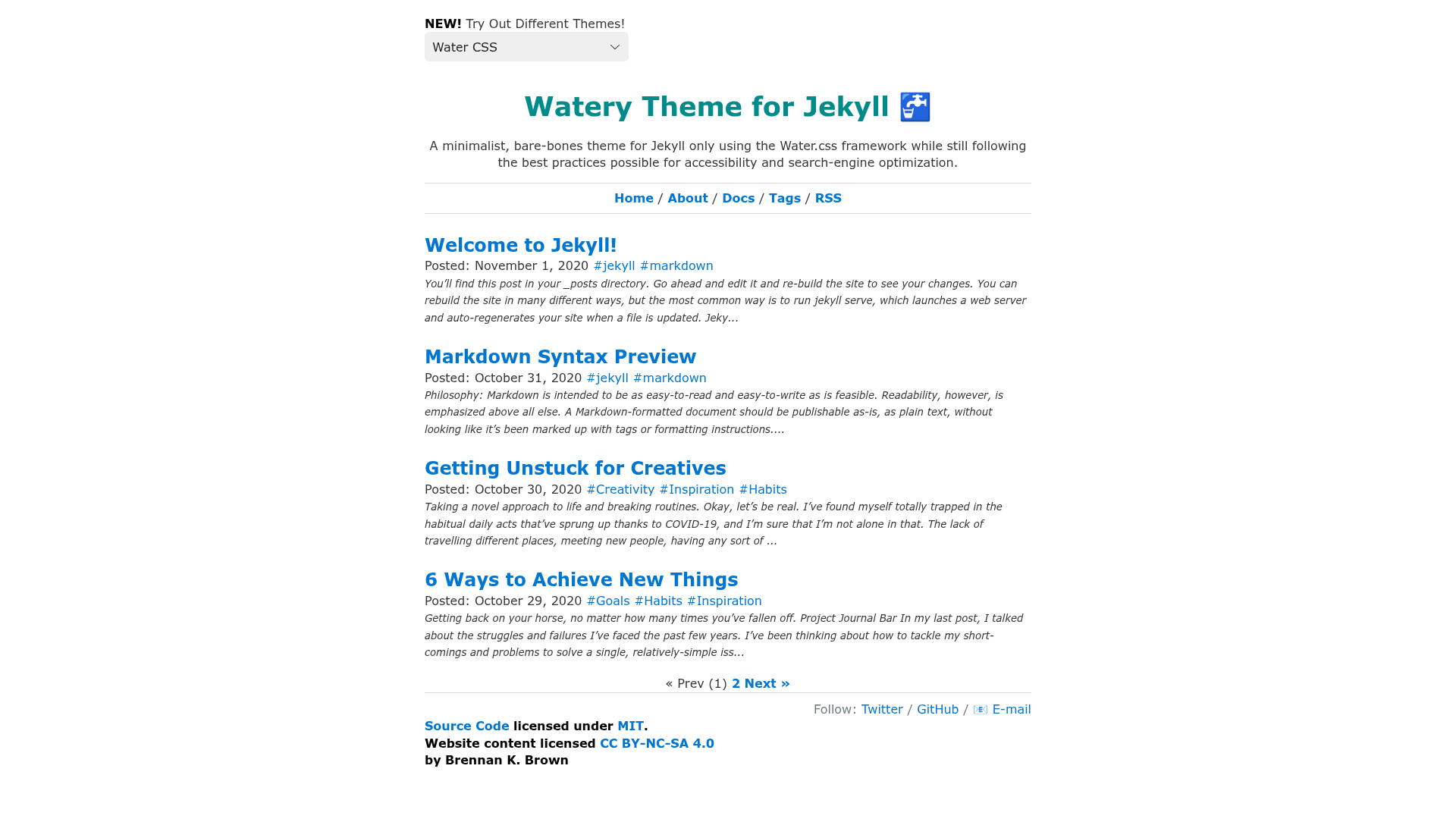
A minimalist, bare-bones Jekyll theme using the under-80kb Water.css framework, built for accessible, SEO-friendly static blogs and websites.
About this template
Watery is a minimalist, bare-bones Jekyll theme that builds a static blog or website using the classless Water.css framework (under 80kb) while following accessibility and SEO best practices.
What is Watery?
Watery is a starter/skeleton theme for the JAMstack static site generator Jekyll, created by Brennan Brown. It takes Jekyll content — Markdown posts, pages, and configuration files — and outputs a static HTML site styled with Water.css, a classless CSS framework that styles semantic HTML without requiring custom classes. The theme is available as a Ruby gem on RubyGems and is designed as a lightweight alternative to Jekyll's default Minima theme, which uses Bootstrap. It runs on Jekyll 4.3+ with Ruby 3.0+ and includes Webrick in its Gemfile so bundle exec jekyll serve works out of the box.
Key Features
- Under-80kb CSS framework — Uses Water.css so the entire styling for the theme weighs less than 80 kilobytes, with no custom CSS needed for basic elements.
- Auto-generated navigation — Pages placed in the
_pagescollection automatically appear in the site navigation, making organization easier. - Auto-generated tags page — All tags used across posts are collected and listed in chronological order at
/tags. - Author bio — A configurable author byline can appear at the end of each post via the
_includes/author.htmlpartial. - Rouge syntax highlighting — Code blocks are highlighted using Rouge with the
base16.solarized.lighttheme. - RSS feed and sitemap — Integrates with
jekyll-feedandjekyll-sitemapplugins to generate an auto-updating feed and sitemap. - SEO and accessibility — Includes
jekyll-seo-tagplugin and accessibility features; with over 70 posts, the theme scored a perfect 100 on Google Lighthouse for Performance, Accessibility, Best Practices, and SEO. - Optional CSS framework switcher — By including Dropin Minimal CSS, the theme can swap between competing classless frameworks with a single button.
Who is it for?
Watery is aimed at first-time Jekyll users who want to build from as close to scratch as possible without the overhead of the default Minima theme. It is also well-suited for bloggers who want a fast, accessible, and SEO-optimized personal site, and for developers who need a minimal, dependency-light starter for an informational website or blog.
What can you do with Watery?
- Personal bloggers — Publish Markdown posts with tags, author bios, and pagination, and get an auto-generated RSS feed, sitemap, and tags page.
- First-time Jekyll learners — Clone the repository, replace the blank
_BLANK_config.ymlwith your settings, and study a working theme that passes Google Lighthouse with a perfect score. - Developers — Add the
waterygem to your Gemfile, configuretheme: watery, and build locally withbundle exec jekyll serve, then deploy to Netlify with the one-click Deploy to Netlify button. - Site customizers — Remove
switcher.jsfrom the assets folder and plug in any other classless CSS framework from the Dropin Minimal CSS list.
How does Watery work?
Install the watery gem, add it to your site's Gemfile along with jekyll-feed, jekyll-seo-tag, jekyll-paginate, and jekyll-sitemap, then set theme: watery in _config.yml. Run bundle install and bundle exec jekyll serve to build the site locally; the repository also includes a one-click Deploy to Netlify button for launching the site in a browser.
Pros and cons
Pros:
- Very lightweight — the CSS framework is under 80kb, keeping page weight low.
- Perfect Google Lighthouse scores for Performance, Accessibility, Best Practices, and SEO with a site of 70+ posts.
- MIT licensed, so it can be used freely without attribution.
- Comes with a blank
_config.ymland example posts for quick setup.
Cons:
- Minimal by design, so it lacks extensive built-in components that a theme like Minima includes.
- Optional pagination with
jekyll-paginate-v2is not GitHub Pages–safe. - Requires Ruby 3.0 or higher and build tools (GCC and Make) to run locally.
Alternatives
- Minima — Jekyll's default theme, which uses Bootstrap and includes more out-of-the-box features but is larger and less minimal.
FAQ
Is Watery free?
Yes, Watery is distributed under the MIT License, meaning you can use it for personal or commercial projects without needing to give attribution.
What CSS framework does Watery use?
Watery uses Water.css, a classless CSS framework that automatically styles semantic HTML. It weighs under 80kb and requires no custom classes to style standard elements.
How do I install Watery?
Add gem "watery" to your Jekyll site's Gemfile, set theme: watery in your _config.yml, then run bundle install followed by bundle exec jekyll serve to start a local server.
Does Watery support pagination?
Yes, Watery supports pagination through jekyll-paginate by setting paginate: 5 in _config.yml. For more advanced pagination, an optional jekyll-paginate-v2 setup is documented, though that version is not GitHub Pages–safe.
Is Watery compatible with GitHub Pages?
As a theme gem, Watery can be used with GitHub Pages as long as it runs on a compatible version of Jekyll. However, the optional jekyll-paginate-v2 plugin is not supported by GitHub Pages.