Template details
WeMeet – Free Bootstrap 4 HTML5 Event Management Website Template
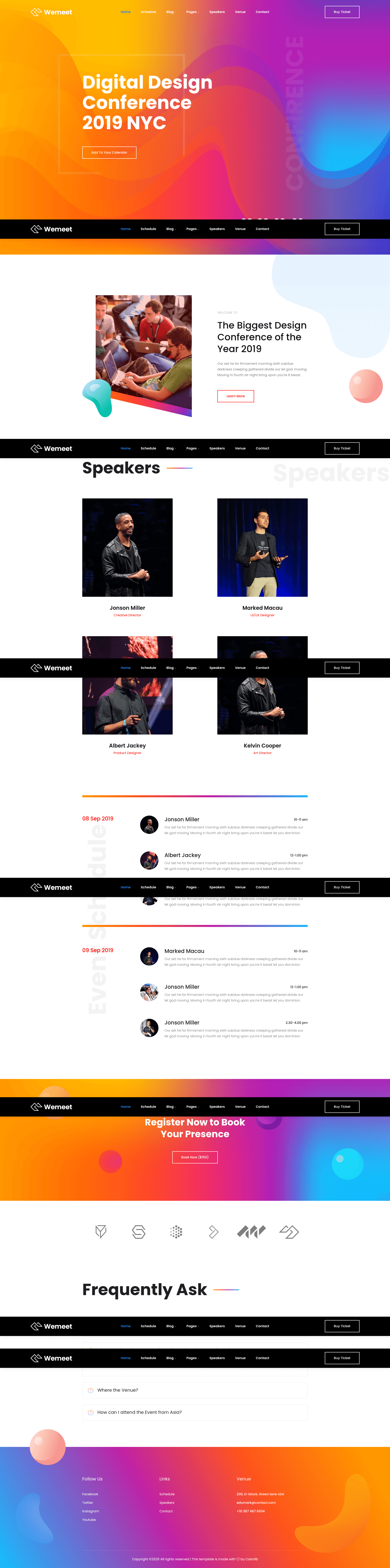
Free multi-page Bootstrap 4 event website template with countdown timer, gradient design, and contact form.
About this template
WeMeet is a free Bootstrap 4 HTML5 event management website template created by Colorlib and distributed by ThemeWagon, built for launching multi-page event sites with a modern gradient design. It is a static-site template that packages nine HTML files, one PHP file, SCSS/CSS stylesheets, JavaScript sources, and third-party plugin files, deployable on any static hosting.
What is WeMeet?
WeMeet is a fully responsive, cross-browser-compatible event management website template built on Bootstrap 4. It takes static HTML, CSS, SCSS, and JavaScript files and produces a multi-page event website with nine HTML pages, a PHP contact form file, and integrated plugins for carousels, pop-ups, maps, and newsletter signup. The template runs entirely in the browser and requires no server-side framework, making it easy to host on GitHub Pages or any static host. It is currently at version 1.0.0 and was first released seven years ago, with an update two months ago.
Key Features
- Bootstrap 4 foundation — Built on the Bootstrap 4 grid and component system, ensuring responsive behavior and compatibility with Chrome, Edge, Firefox, Opera, Safari, and mobile devices.
- Multi-page structure — Includes 9 HTML files and 1 PHP file, covering pages like events, blog, contact, and more, with footer navigation and pagination UI.
- Countdown timer — A JavaScript countdown displays time remaining until an event, ideal for conference or wedding landing pages.
- Gradient style and on-hover effects — Modern gradient backgrounds and image hover animations create a premium appearance without additional design tools.
- Google Maps and contact form — Embedded Google Maps show venue location, while a contact form UI with a PHP handler collects visitor messages.
- Blog and Instagram feed — A blog section with a search box, comment form UI, and an Instagram feed keeps event content fresh and socially connected.
- Plugin bundle — Includes Owl Carousel, Magnific Pop-Up, Masonry, Ajax Mailchimp, FontAwesome, Flaticon, and Themify Icons for sliders, lightboxes, grid layouts, and icons.
- Extensive documentation — The download includes documentation, all demo images, CSS and SCSS files, JavaScript source files, and library/plugin files for easy customization.
Who should use WeMeet?
- Event organizers — can quickly set up professional sites for conferences, meetups, or festivals, complete with schedules, a call-to-action button, and a countdown timer.
- Wedding planners and couples — can build a wedding website with a photo gallery using Magnific Pop-Up, a venue map, and an RSVP contact form.
- Small businesses — that host workshops or corporate events can use the multi-page layout, blog section, and newsletter signup via Ajax Mailchimp to attract attendees.
- Web developers — needing a clean, easily alterable Bootstrap 4 starting point can customize the SCSS styling and HTML structure, with documentation included.
What can you do with WeMeet?
- Conference promoters: set up an event site with a countdown timer, multiple content sections, and a call-to-action button to drive registrations and ticket sales.
- Wedding couples: create a personal wedding website with gallery, Google Maps for venue directions, and a contact form for guest messages.
- Agencies and corporate teams: launch a multi-page business event site with a blog, search box, and Instagram feed to announce updates and engage visitors.
Pricing
WeMeet is free to download, open source, and licensed for use in commercial projects with lifetime free updates. No payment is required to use the template.
FAQ
Is WeMeet free?
Yes, WeMeet is completely free. ThemeWagon provides it as a free download, and the license permits commercial use.
What files are included in the download?
The package includes 9 HTML files, 1 PHP file, CSS and SCSS files, font icons, JavaScript source files, library and plugin files, and all demo images.
Does WeMeet work on mobile devices?
Yes, the template is fully responsive and cross-browser compatible, and it is listed as compatible with mobile platforms as well as Chrome, Edge, Firefox, Opera, and Safari.
Can I customize WeMeet?
Yes, the code structure is simple and alterable. It includes SCSS files for styling, separate HTML pages, and documentation to guide changes.
What third-party plugins does WeMeet use?
WeMeet integrates Bootstrap 4, Owl Carousel, FontAwesome, Magnific Pop-Up, Masonry, Flaticon, Ajax Mailchimp, and Themify Icons.