Template details
Windows 95 Themed Portfolio
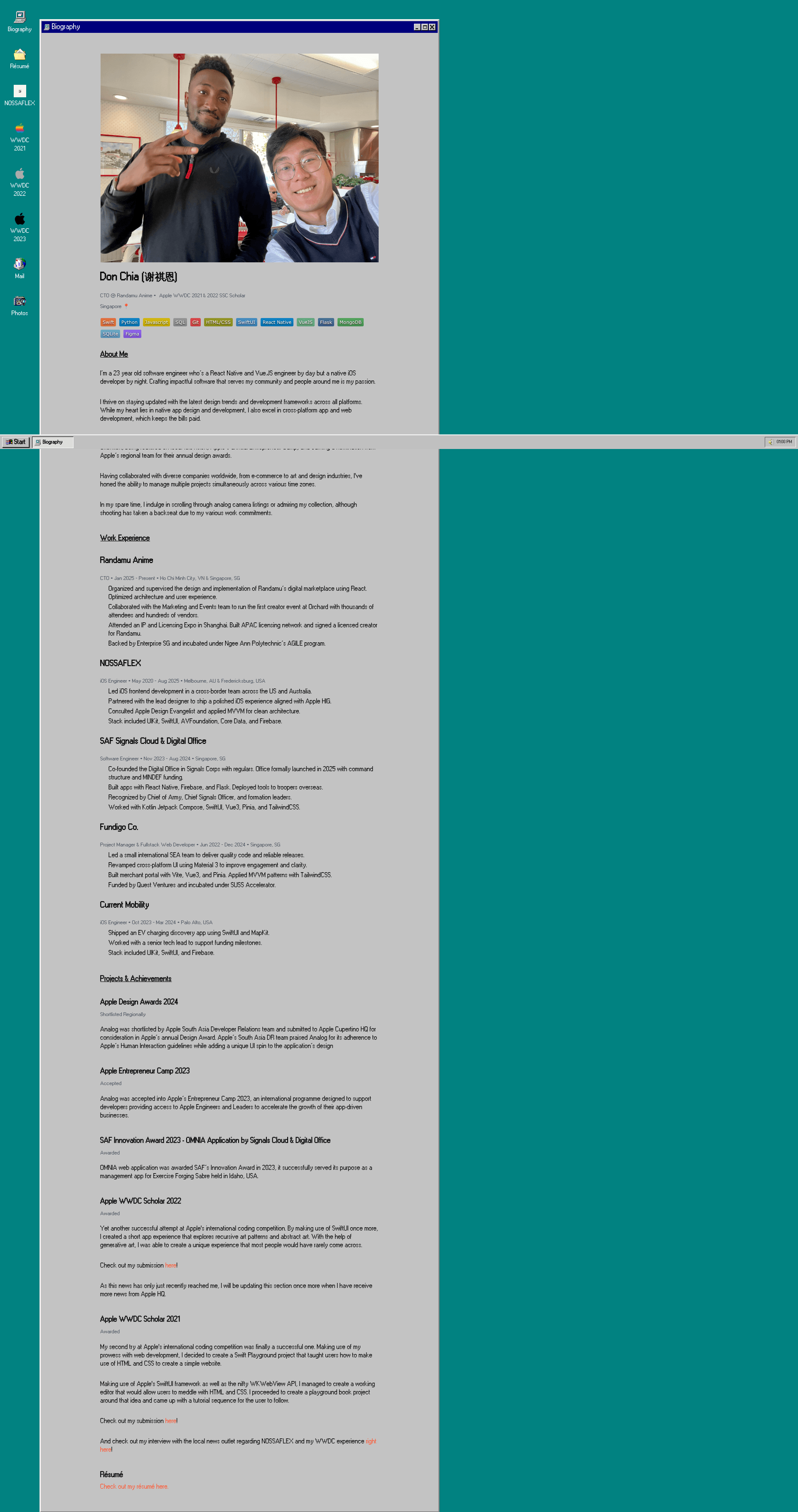
Windows 95-themed portfolio template built with Vue 3, Nuxt 3, Pinia, and Tailwind CSS that recreates the classic desktop in the browser.
About this template
The Windows 95 Themed Portfolio is an open-source portfolio template that recreates the Windows 95 desktop as an interactive website using Vue 3, Nuxt 3, Pinia, and Tailwind CSS. It transforms a developer's personal content into a fully clickable retro operating system, complete with draggable windows, a start menu, and working apps.
What is the Windows 95 Themed Portfolio?
The Windows 95 Themed Portfolio is a personal portfolio website built as an interactive desktop that mimics the Windows 95 operating system. It is created by DonChiaQE (Don Chia) and hosted at donchia.tech. The project is built on Nuxt 3 with Vue 3, uses Pinia for managing window states, and is styled with Tailwind CSS alongside handcrafted pure CSS.
The template takes content like project descriptions, resume details, and contact information and presents them inside desktop shortcuts and windowed applications. It outputs a client-rendered web app that runs entirely in the browser. The UI is assembled from pure CSS without external CSS libraries, taking reference from a Windows 95 emulator; the author notes that the CSS work took roughly one week.
Key Features
- Windows 95 desktop experience — The interface includes a start menu, draggable windows, and desktop icons that behave like the classic OS, all styled with handcrafted CSS.
- Nuxt 3 and Vue 3 stack — Built with the Nuxt 3 framework and Vue 3 composition API; state management is handled by Pinia.
- Tailwind CSS integration — Utility classes from Tailwind CSS are used in combination with custom CSS to speed up layout while keeping the vintage aesthetics.
- Working mail app — The built-in mail application is functional and connected to the author's Google Forms endpoint.
- Open source codebase — The entire project is on GitHub and can be cloned for personal use; note the repository includes image assets and the code is described by the author as 'fairly messy'.
- Related OS template — The author is developing a separate minimal 'Vue.js OS Template Project' that extracts the core windowing logic for reuse, making this portfolio a possible starting point for other OS-style interfaces.
Who is it for?
- Developers seeking a unique portfolio — Instead of a standard landing page, you can present your projects inside a desktop environment that immediately stands out to recruiters.
- Vue and Nuxt developers — Developers comfortable with Vue can adapt the codebase to add their own apps, windows, and content.
- Retro tech enthusiasts — Anyone who wants a nostalgic nod to the 1990s can use this template to build a personal site that feels like booting up an old PC.
What can you do with it?
- Personal branding: Display your projects, experience, and contact info through desktop shortcuts and apps, giving visitors a memorable experience.
- Learning tool: Study how to implement draggable windows, a start menu, and stateful applications with Vue 3 and Pinia, since the code is open for inspection.
- Custom OS-style site: Fork the project and restyle the desktop for an alternate retro OS (the author previously built a MacOS variant of the same concept).
How does it work?
- Clone the repository from GitHub.
- Install dependencies with
npm install. - Run the development server with
npm run dev. - Explore the desktop, open applications, and edit components to add personal content.
Pros and cons
- Pros: No CSS framework for the OS UI (pure CSS so full control); functional mail integration; the project is free to use and modify.
- Cons: The repository is large because image assets are bundled inside it; the code is still messy and not yet cleaned up; the default content is tied to the author's personal data and must be replaced.
FAQ
Is this open source?
Yes, the project is on GitHub and you can clone it. The author notes that image assets are still living inside the repository because they haven't been hosted externally, and the code is still fairly messy.
Is there an open source variant of this project?
Yes, the author is working on a Vue.js OS Template Project, a barebones/MVP version that holds all the required logic for windows and states so you can add your own styling.
Did you use any external CSS libraries to create the UI?
No. The UI was manually crafted with pure CSS, taking reference from a Windows 95 emulator and pieced together by hand.
How long did it take you?
Approximately one week for the CSS work. Most of the logic had already been assembled in an older project, including a MacOS variant of the portfolio.
Does the mail app work?
Yes, the mail app works and is linked to the author's Google Forms.
Can I contact you?
Yes, by email at donchia@ymail.com.