Template details
Milky
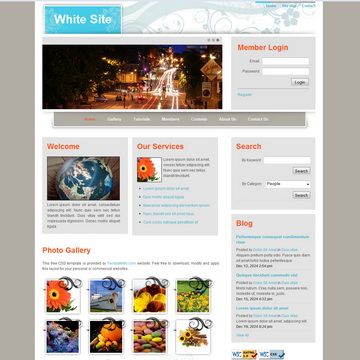
Free 3-column HTML CSS website template with a blue, yellow, and white color scheme from TemplateMo.
About this template
Milky Template is a free 3-column HTML CSS website layout from TemplateMo that uses a blue, yellow, and white color scheme to create a bright, simple page structure.
What is Milky Template?
Milky Template is a downloadable website layout created by TemplateMo, added to their free template library on 03 June 2010. It is built with plain HTML and CSS, producing a static three-column page that separates content into side-by-side sections. The template is 100% free for anyone to download, edit, and use on commercial or non-commercial websites, and it is distributed as a ZIP file from TemplateMo. As of the page's current data, Milky Template has received 84,338 views and 23,413 downloads.
Key Features
- Three-column layout — Organizes content into three vertical columns, ideal for pairing a main content area with sidebars.
- Blue, yellow, and white color palette — The design uses these three colors in what TemplateMo describes as a "perfect combination."
- Free commercial license — The template may be used on commercial or non-commercial sites without payment; editing is also permitted.
- Plain HTML and CSS — No JavaScript framework is required, so the files can be hosted on nearly any static web server.
- ZIP distribution — TemplateMo packages the template and its assets as a single downloadable ZIP file.
- Screenshot preview — A full-size screenshot and a live view are available on TemplateMo to review the design before downloading.
- Long-standing template — Originally added in June 2010, it has accumulated over 23,000 downloads, indicating a stable file.
Who is it for?
This template is suited for web developers who want a ready-made HTML/CSS base to customize for a simple site. Hobbyists can use it to launch a personal page with a bright color scheme, and students can inspect the three-column structure to learn how CSS layouts are built. Because it is free and unrestricted, it also works for small business owners who need a temporary or low-cost webpage.
What can you do with Milky Template?
- Build a small content website — Use the three columns to separate main articles, navigation links, and supplementary widgets.
- Create a portfolio page — Showcase images or project text in the central column while using side columns for about or contact information.
- Practice front-end customization — Edit the HTML and CSS files to change colors, column widths, and content, making it a hands-on learning exercise.
Pricing
Milky Template is free. TemplateMo states it is "100% free to download for anyone" and allows editing and use for both commercial and non-commercial sites, with no mention of a paid tier.
Alternatives
- Tooplate — Another free HTML template provider that offers a variety of layouts; Tooplate is linked from TemplateMo's own page as a source for HTML templates.
FAQ
Is Milky Template free?
Yes, Milky Template is completely free to download, edit, and use. TemplateMo says it is "100% free to download for anyone," and you are allowed to use it on commercial or non-commercial websites.
How many columns does Milky Template have?
Milky Template uses a three-column layout. This means the page is split into three vertical sections, which are commonly used for a main content area and two sidebars.
Can I use Milky Template for a commercial project?
Yes. TemplateMo's license for this template permits commercial and non-commercial use. You can edit the HTML and CSS to fit your project without any payment.
When was Milky Template published?
Milky Template was added to TemplateMo's library on 03 June 2010. Since then it has received over 23,000 downloads.
What colors are used in Milky Template?
The template uses a combination of blue, yellow, and white colors. TemplateMo describes this palette as a "perfect combination" for the layout's design.