Template details
yii2-adminlte-asset
AdminLTE Asset Bundle for Backend Theme in Yii2 Framework
About this template
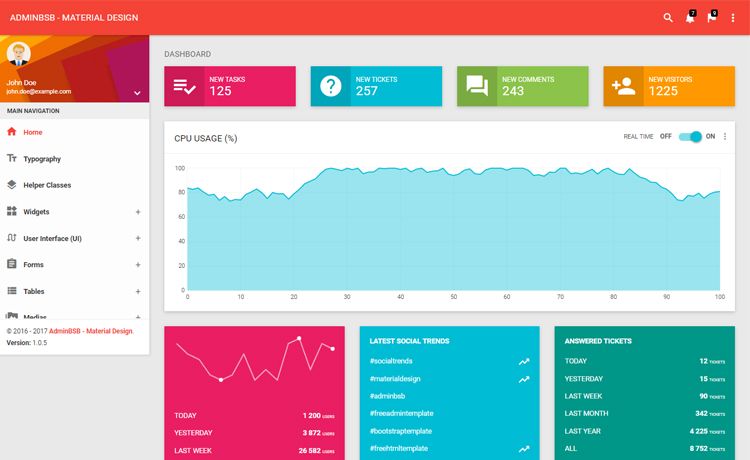
yii2-adminlte-asset is a Composer-installable asset bundle for the Yii 2.0 Framework that registers the CSS of the AdminLTE backend UI theme and ships example views, letting PHP developers spin up an admin dashboard without writing the front-end from scratch.
What is yii2-adminlte-asset?
yii2-adminlte-asset is an asset bundle maintained by dmstr, the team behind the Yii2-based phd5 application, and is distributed through Packagist with over a thousand GitHub stars. It wraps the AdminLTE theme (versions 1 and 2) so that Yii 2.0 Advanced and Basic application templates can load the theme's CSS through Yii's asset manager, and it provides example layout and view files under the example-views/yiisoft/yii2-app directory. The bundle takes advantage of Yii's theme pathMap configuration to remap default views to AdminLTE-styled views, and it requires the fxp/composer-asset-plugin v1.1.1 or later for installation.
Key Features
- Dual AdminLTE version support — Install AdminLTE v2 with
composer require dmstr/yii2-adminlte-asset "^2.1"or AdminLTE v1 with the^1constraint, matching the compatibility matrix that maps bundle versions to AdminLTE 2.0–2.4 and Font Awesome requirements. - Yii theme integration — Reconfigure the view component's
pathMapin your application config to immediately preview the theme, with ready-made examples for both the Advanced/Basic templates and the phd5 app. - Example views and layouts — Copyable layout and view files from the
examples/folder that are meant to be copied into your application and customized, not edited insidevendor/. - Custom content header block — Use Yii's
beginBlock('content-header')and thebreadcrumbsparameter to render AdminLTE's native header HTML likeAbout <small>static page</small>. - Widget menu with headers and badges — The left sidebar menu supports section headers via an
headeroption, icon prefixes such asfarfor Font Awesome Free, and HTML badges on items. - Gii CRUD generator template — Register the
adminltetemplate in your Gii module config to generate CRUD views styled with AdminLTE from thegii/templates/crud/simpledirectory. - AdminLTE plugin assets — Plugin files (e.g., Chart.js) live under
vendor/almasaeed2010/adminlte/plugins; create a customAdminLtePluginAssetbundle that depends onAdminLteAssetto load only the plugins you need. - Docker-based testing stack — The
tests/folder provides adocker-composesetup to run the bundle in a containerized Yii2 test application.
Who is it for?
- Yii2 backend developers who need a pre-built admin interface and want to avoid hand-coding layout CSS. They install the bundle, remap views, and get a functional dashboard.
- Teams using Yii2 Advanced or Basic application templates that want to standardize their admin UI on AdminLTE and benefit from the provided example views.
- Gii users who generate CRUD scaffolding and want output that matches the AdminLTE look from the start.
- Maintainers of custom Yii2 admin panels who want to reuse AdminLTE plugins (Chart.js, etc.) through a custom asset bundle while keeping the core dependency minimal.
What can you do with it?
- Rapid prototyping: Preview the AdminLTE theme in minutes by adding the
pathMapconfiguration to your existing Yii2 app, then copy the example views into your project as the starting point. - Custom sidebar menus: Build a left navigation with labeled section headers, Font Awesome icons, and badge counts (e.g., an unread mail counter) using the menu widget's item options.
- Generate consistent CRUD pages: Configure the bundled Gii template so that every generated controller view inherits the same AdminLTE card, table, and button styling.
- Extend with plugins selectively: Create an asset bundle that depends on
AdminLteAssetand list only the plugin CSS/JS files your page needs, keeping payloads smaller than loading the whole plugin directory.
How does it work?
- Install the package via Composer (
composer require dmstr/yii2-adminlte-asset "^2.1"). - Add a theme configuration to your view component (
'theme' => ['pathMap' => ['@app/views' => '@vendor/dmstr/yii2-adminlte-asset/example-views/yiisoft/yii2-app']]). - Copy the example views into
@app/views, remove the pathMap, and edit your views using AdminLTE's HTML markup. - Optionally configure the Gii CRUD generator template and create custom plugin asset bundles as needed.
FAQ
Does AdminLTE include web fonts in this asset bundle?
No. AdminLTE dropped web-font inclusion in version 2.4.0, so you must add a font like Source Sans Pro yourself, for example via a Google Fonts link. The bundle's own FAQ recommends adjusting the font to your project's asset-bundling workflow for production.
Which AdminLTE and Font Awesome versions are compatible?
According to the compatibility matrix, bundle version 2.4 works with AdminLTE 2.0–2.3 and requires Font Awesome; version 2.5 works with AdminLTE 2.4 and requires Font Awesome; version 3.0 works with AdminLTE 2.4 and has no Font Awesome dependency (because icons are handled differently).
Are AdminLTE plugins included in the main asset bundle?
No. The main AdminLteAsset only registers the core theme CSS. Plugin files such as Chart.js are available in the vendor directory, but you need to create a custom asset bundle that depends on AdminLteAsset and lists the specific plugin files you want.
Where should I customize the example views?
The example views in the vendor/ folder are not meant to be edited directly. Copy them from example-views/yiisoft/yii2-app into your application's @app/views directory, then remove the temporary pathMap configuration and customize the copied files.
What should I do when upgrading to a newer AdminLTE version?
Check the AdminLTE upgrade guide linked from the bundle's documentation, and review the compatibility matrix to ensure your asset bundle and Font Awesome versions still match. The GitHub issues section also tracks known installation problems, such as the DmitryBaranovskiy/eve.git issue.