Template details
11ty Midnight
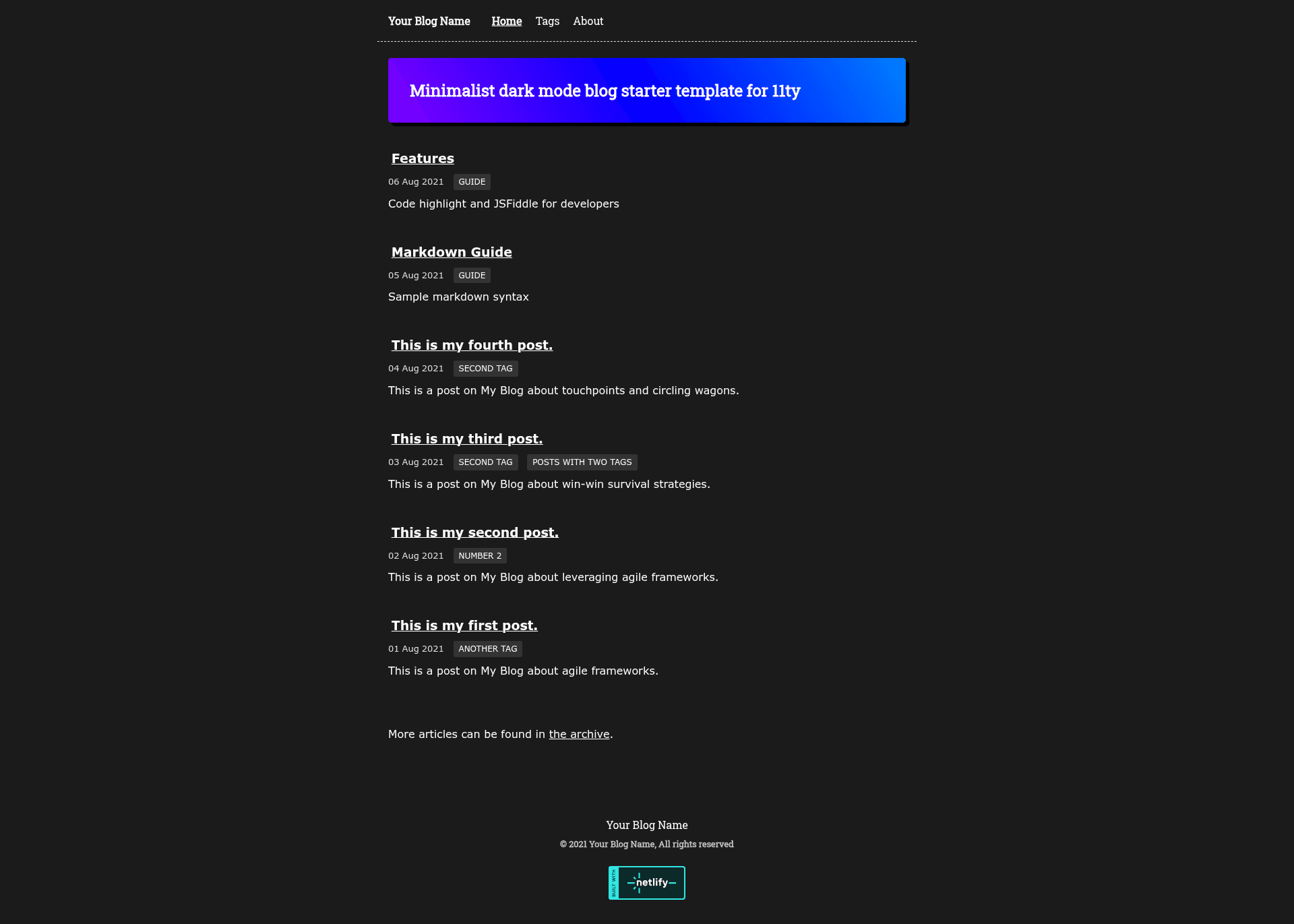
Minimalist dark mode starter template for 11ty with support for jsfiddle embeds and prismjs syntax highlighting.
About this template
Eleventy Midnight Blog Starter is a minimalist dark-mode starter template for the Eleventy static site generator that produces a blog with jsFiddle embeds and PrismJS syntax highlighting.
What is Eleventy Midnight Blog Starter?
It's a ready-to-use blog template built on the official Eleventy Base Blog. You give it content files (Markdown or any template format Eleventy supports) and it outputs a static site with a dark theme, gradient accent highlights, PrismJS code styling, and a built-in jsFiddle embed shortcode. The repository lives on GitHub under sidswork, and it can be cloned or copied via the "Use this template" button.
Key Features
- Minimalist dark mode design — The theme uses a dark background with color gradient highlights for headers and accents, giving the blog a modern developer-focused look.
- jsFiddle embed shortcode — A Nunjucks shortcode named
jsFiddlelets you embed an iframe by pasting the jsFiddle source URL, e.g.{% jsFiddle "//jsfiddle.net/sidswork/apk0wg96/embedded/js,html,result/dark/" %}. - PrismJS syntax highlighting — Code blocks in posts are formatted with Prism, supporting a wide range of languages and integrating cleanly with the dark theme.
- Based on the official Eleventy Base Blog — The starter inherits the base blog's structure, including a posts collection, an RSS feed at
feed/feed.njk, and a reusable post list component in_includes/postlist.njk. - Three Nunjucks layouts — The HTML shell (
layouts/base.njk), the home page (layouts/home.njk), and the blog post layout (layouts/post.njk) are separated, so you can override a single layer without touching the rest. - Flexible content formats — Posts can live in any directory as long as they have the
posttag. Eleventy copies static files like CSS and PNG to the output unchanged because they are listed intemplateFormatsin.eleventy.js. - Global site metadata —
_data/metadata.jsonholds the blog title, description, and other fields used across templates and the feed.
Who should use Eleventy Midnight Blog Starter?
- Developers who want a dark-mode blog quickly — Clone the repo, edit
_data/metadata.json, and runnpx eleventyto get a static site ready for hosting. - Technical writers and tutorial authors — The combination of PrismJS highlighting and one-line jsFiddle embeds makes it easy to publish code examples and runnable demos.
- Eleventy learners — The implementation notes explain how layouts, collections, shortcodes, and global data work, using the official Base Blog as a starting point.
What can you do with it?
- Publish a personal developer blog — Set your metadata, write posts in Markdown, and deploy the generated
_sitefolder to any static host. - Embed live code demos — Use the
jsFiddleshortcode inside posts to show interactive HTML, JS, and CSS examples without leaving the page. - Customize navigation and pages — Tag a template with
navto add it to the top-level menu, and create about pages or other content usingabout/index.mdas a reference.
How does the template work?
- Clone the repository or click "Use this template" on GitHub to create your own copy.
- Run
npm installto install dependencies. - Edit
_data/metadata.jsonto set the blog title, description, and other site data. - Run
npx eleventyto build the site,npx eleventy --servefor local development, ornpx eleventy --watchto rebuild automatically when files change.
FAQ
How do I start a blog with this template?
Clone https://github.com/sidswork/11ty-midnight.git or use the "Use this template" button, then run npm install and npx eleventy --serve. The site will be available at the local dev server URL, and you can write posts in the posts/ directory.
Does it include syntax highlighting?
Yes, code formatting uses Prism, and the dark theme applies color gradient highlights to code accents. The highlighting works in Markdown code blocks without additional configuration.
Can I change the blog name and description?
Yes, edit _data/metadata.json and update the title and description fields. Global data from that file is used by the templates and the RSS feed, so the change propagates site-wide.
What is the difference between the layouts?
base.njk provides the top-level HTML structure, home.njk wraps the homepage, and post.njk wraps blog posts. The post list is defined in the reusable Nunjucks include _includes/postlist.njk and displayed on the home page via index.njk.