Template details
Academic project page template
Astro boilerplate for building a research paper project page with Markdown content and GitHub Pages deployment.
About this template
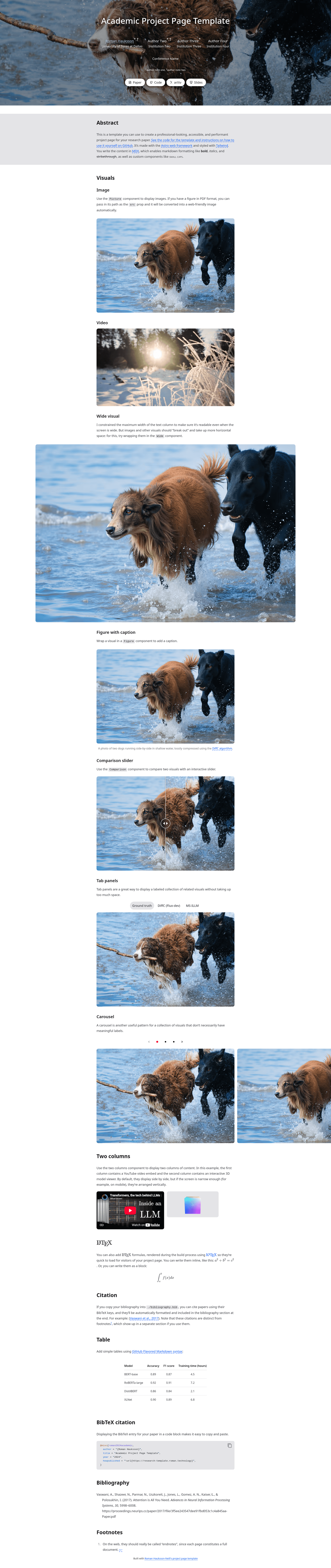
The Academic project page template is an Astro boilerplate for creating research paper project pages, allowing authors to write content in Markdown and deploy a polished, Nerfies-inspired site with GitHub Pages.
What is the Academic project page template?
The Academic project page template takes a single Markdown/MDX file (src/paper.mdx) as input and produces a static website with a layout modeled on the original Nerfies project page. It runs on the Astro framework with React, Tailwind, MDX, and TypeScript, and is maintained by Roman Hauksson, who also offers direct support via email and virtual meetings. The template is open source under a Creative Commons Attribution-ShareAlike 4.0 International License.
Key Features
- Pre-built components — Includes components for LaTeX, figures, tables, code blocks with syntax highlighting, videos, YouTube embeds, 3D objects, comparison sliders, carousels, tabbed slides, and two-column pairs.
- Dark mode — Optional dark mode is available with no extra setup.
- Image optimization — Automatically converts PDF figure files into images, compresses with AVIF, and uses responsive images to minimize loading time.
- Header media — An optional cover image or video can sit behind the page header.
- Extensible — Custom components can be added with plain HTML or any JavaScript framework; React is pre-configured, while Vue, Svelte, and others are also supported.
- Performance and SEO — Responsive, accessible, and SEO-optimized, with resized fallback font faces to prevent cumulative layout shift.
- Tech stack — Built with Astro, React, Tailwind CSS, MDX, and TypeScript, so content lives in one MDX file and styling is Tailwind-based.
Who is it for?
- Academic researchers — PhD students and faculty can create a project page for a paper without hand-writing HTML, using the demo structure to present figures, videos, and 3D interactions.
- Research labs and companies — Groups like NVIDIA Research, MIT CSAIL, and ByteDance Seed have used the template (or its predecessor) for their paper pages, so teams can standardize their publication websites.
- Developers wanting a quick static site — Anyone familiar with Markdown and Git can scaffold a page, edit
src/paper.mdx, and deploy to GitHub Pages automatically via GitHub Actions.
What can you do with the template?
- Publish a paper website: Turn a research abstract, figures, and supplementary videos into a polished page with LaTeX math, tables, and code blocks, then deploy it at your GitHub-hosted URL.
- Embed interactive media: Showcase demos with YouTube embeds, 3D object viewers, comparison sliders, and carousels using the included components.
- Customize the design: Use the optional dark mode, swap the header background for a cover video, or add custom React (or other framework) components for unique interactive sections.
How does it work?
Start by clicking "Use this template" on GitHub, then enable GitHub Pages with the GitHub Actions source. Every push to main triggers a workflow in .github/workflows/astro.yml that builds a static site and deploys it to https://<username>.github.io/<repository>/. Locally, install Node.js version 24 or later, run npm install and npm run dev to preview at http://localhost:4321, then edit src/paper.mdx to update content. A production build via npm run build outputs the site to ./dist/.
Alternatives
Clarity, a minimalist website template for AI research by Shikun Liu, offers a different look as a single HTML file styled with Sass.
FAQ
Is the template free to use?
Yes. The template is open source and released under a Creative Commons Attribution-ShareAlike 4.0 International License, so you can use and modify it freely, as long as you share derivative works under the same license.
Do I need to know HTML or React to edit the content?
No. The main content is authored in Markdown/MDX inside src/paper.mdx, which you can edit directly in the GitHub web interface without installing anything. React knowledge is only necessary if you want to add custom interactive components beyond the built-in ones.
What Node.js version is required?
The page recommends Node.js version 24 or later. If your installed version is older, you can use Node Version Manager to install and switch to version 24.
Can I host the site somewhere other than GitHub Pages?
Yes. Running npm run build creates a static website in ./dist/, which can be copied to any static hosting service. The template's built-in automation is configured for GitHub Pages, but the output is framework-agnostic.