Template details
Nuxt SaaS Template
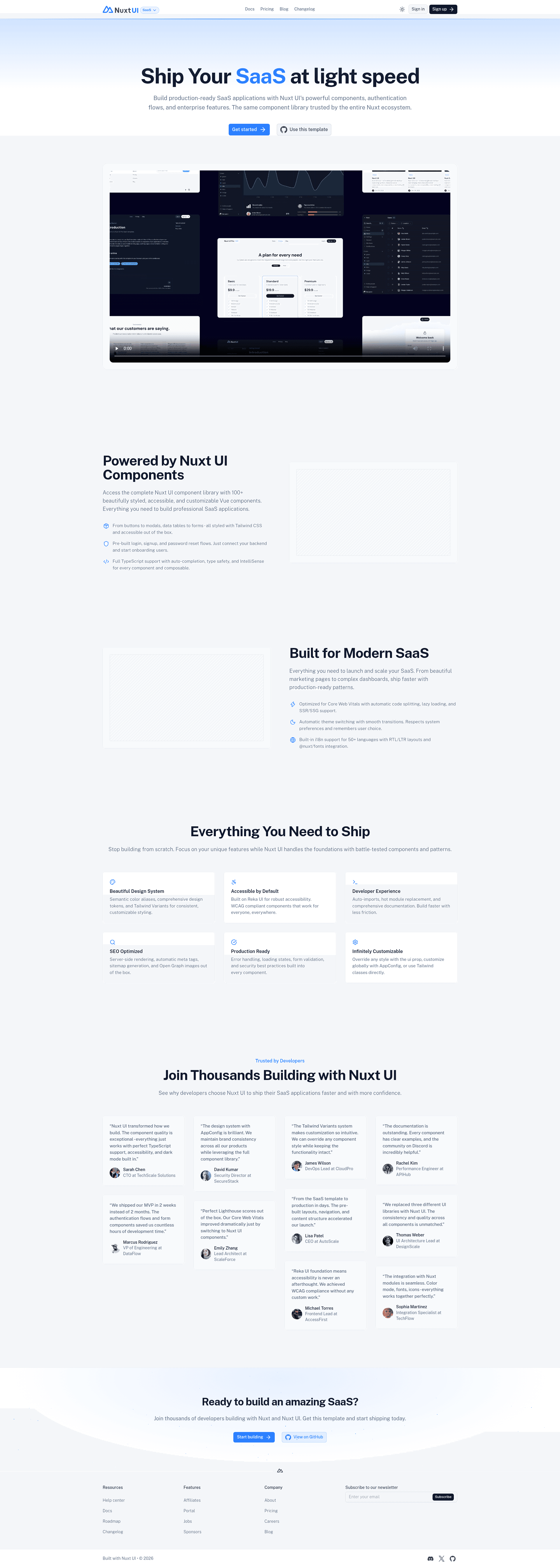
A SaaS starter template with landing, pricing, docs, and blog pages built with Nuxt UI and Nuxt Content.
About this template
Nuxt SaaS Template is an open-source SaaS starter built on Nuxt that ships with a landing page, pricing page, documentation, and blog, all powered by Nuxt UI and Nuxt Content.
What is Nuxt SaaS Template?
Nuxt SaaS Template is a fully built application skeleton for launching a SaaS product, provided as a Nuxt starter template. You start from an empty Nuxt project using the ui/saas theme and get a complete multi-page website with marketing, pricing, docs, and blog sections. The template is maintained by the Nuxt UI team and uses Nuxt UI components for the interface and Nuxt Content to manage documentation and blog content as markdown files.
Key Features
- Landing, pricing, docs, and blog pages — The template includes these four core page sections out of the box, so you do not need to build them from scratch.
- Nuxt UI components — The interface is built with the Nuxt UI library, giving you consistent Vue-based components with a design system already applied.
- Nuxt Content integration — Documentation and blog posts are written and stored as markdown, then rendered by Nuxt Content, so adding a new article is as simple as creating a file.
- Quick start command — Scaffold a new project with
npm create nuxt@latest -- -t ui/saasin one terminal command. - One-click deployment — A Vercel deploy button is provided to clone the repository and deploy it directly to a live URL.
- Local development workflow — Standard Nuxt commands include
pnpm install,pnpm devfor a local server athttp://localhost:3000,pnpm buildfor production, andpnpm previewto test the production build locally. - Renovate integration — The repository is set up to work with the Renovate GitHub app for automated dependency updates.
- Light and dark mode — The template's design supports both light and dark color schemes via the user's system preference.
Who is it for?
Nuxt SaaS Template is made for developers who want to launch a SaaS product without spending time on boilerplate setup. It is also useful for Nuxt developers who want a reference implementation of a marketing site, documentation, and blog built with Nuxt UI. Teams that need a clean, maintainable content structure for docs and blog will find the Nuxt Content workflow straightforward.
What can you do with Nuxt SaaS Template?
- SaaS founders: Get a landing page and pricing page live quickly, then focus on the actual product instead of front-end setup.
- Startup teams: Publish product documentation and a company blog using markdown files, with no separate CMS to maintain.
- Vue/Nuxt developers: Study how Nuxt UI and Nuxt Content are combined in a real application, using the template as a starting point for custom features.
How does Nuxt SaaS Template work?
Start a new project by running npm create nuxt@latest -- -t ui/saas, then install dependencies with pnpm install. Run pnpm dev to start the development server at http://localhost:3000, write content in markdown, and use pnpm build to create a production bundle. You can deploy the result to Vercel using the provided deploy button or any Nuxt-compatible hosting service.
FAQ
Is Nuxt SaaS Template free?
The template is an open-source starter distributed as a Nuxt theme, and the source repository is publicly available with 555 stars. You can scaffold a new project from it at no cost using the included command.
What pages are included in Nuxt SaaS Template?
The template includes a landing page, a pricing page, a documentation section, and a blog. All of these are prebuilt with Nuxt UI components and are ready to be customized with your own content.
How do I add a new blog post or doc page?
Since the template uses Nuxt Content, you add new markdown files to the content directory. Nuxt Content automatically renders them into the documentation and blog sections without needing to modify page components.
What hosting can I use to deploy Nuxt SaaS Template?
The repository includes a Vercel deploy button for a one-click deployment. You can also deploy to any host that supports Nuxt applications, such as Netlify, Cloudflare Pages, or a Node.js server.