Template details
AI Workflow Builder Template
Free open-source Next.js template for building a visual AI workflow automation platform with drag-and-drop builder and code generation.
About this template
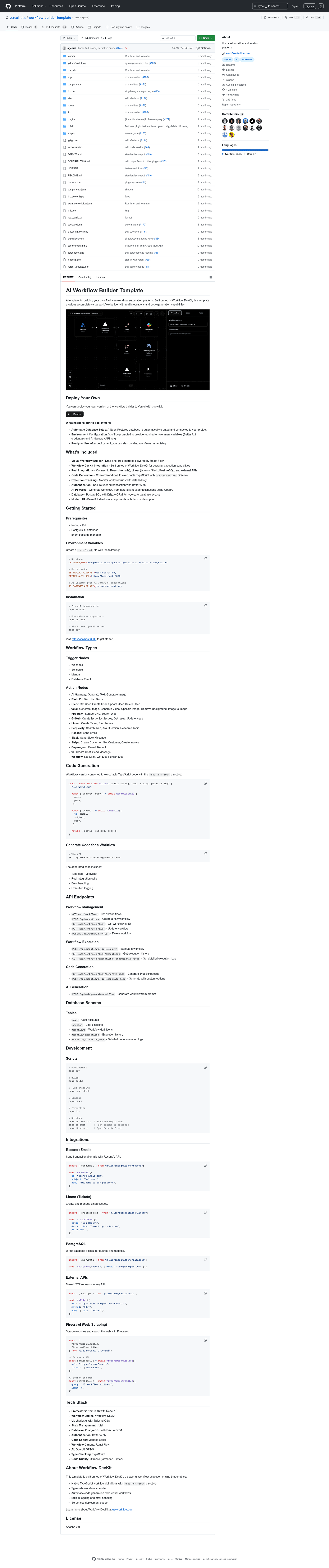
AI Workflow Builder Template is a free, open-source Next.js template for building a visual AI workflow automation platform, combining a drag-and-drop workflow canvas with TypeScript code generation.
What is the AI Workflow Builder Template?
This template is a starting point for creating a visual workflow automation platform where users connect trigger nodes (Webhook, Schedule, Manual, Database Event) to action nodes (Resend, Linear, Slack, Firecrawl, GitHub, Stripe, and more) on a drag-and-drop React Flow canvas. It runs on Next.js 16 with React 19 and can be deployed to Vercel in one click, with a Neon Postgres database configured automatically. It is built on Workflow DevKit, the execution engine described at useworkflow.dev.
Key Features
- Visual Workflow Builder — drag-and-drop canvas powered by React Flow with trigger and action nodes, including Webhook, Schedule, and Database Event triggers.
- Code Generation — converts any visual workflow into executable TypeScript code using the "use workflow" directive, accessible through the generate-code API endpoint.
- Real Integrations — built-in connectors for Resend (email), Linear (tickets), Slack (messages), Stripe (customers and invoices), Firecrawl (scraping and search), GitHub (issues), Perplexity (search), and external APIs via HTTP calls.
- AI Workflow Generation — generates workflows from natural language prompts through OpenAI GPT-5, exposed at the AI generate-workflow endpoint.
- Authentication — Better Auth handles user sign-in and sessions out of the box.
- Execution Tracking — records run history in workflow_executions and workflow_execution_logs tables with API endpoints for logs.
- Database — PostgreSQL with Drizzle ORM provides type-safe schema for users, sessions, workflows, and executions.
- Modern UI — shadcn/ui components with Tailwind CSS and dark mode support, plus Monaco Editor for code viewing.
Who should use the AI Workflow Builder Template?
- Startup founders building a SaaS automation product can deploy this template to get a working workflow editor, auth, database, and API endpoints without building from scratch.
- Full-stack developers who want to create internal automation tools can use the drag-and-drop canvas and generate TypeScript code to inspect or extend the workflow logic.
- Agencies and product teams that need to deliver workflow automation features to clients can customize the provided integrations and AI generation endpoint.
What can you do with the AI Workflow Builder Template?
- Build a customer-facing automation platform: deploy the template to Vercel, connect Resend and Stripe, and let users create email-sending or invoice-creating workflows.
- Generate code from visual workflows: design a workflow in the canvas and call the code generation API to get type-safe TypeScript with real integration calls and error handling.
- Automate internal operations: use the Schedule trigger and Slack action nodes to send regular notifications or create Linear tickets from database events.
How does the AI Workflow Builder Template work?
During deployment you choose the Vercel deploy option, a Neon Postgres database is created automatically, and you provide Better Auth credentials and an AI Gateway API key. Locally, you clone the repository, run pnpm install, set the same environment variables in a .env.local file, run pnpm db:push to create tables, and start the dev server with pnpm dev. Workflows are executed by Workflow DevKit, which handles logging, type safety, and serverless execution.
Pricing
The template is free and open source under the Apache 2.0 license. You can deploy it to Vercel or run it locally without purchasing a license.
FAQ
Is the AI Workflow Builder Template free?
Yes, the template is free and open source, released under the Apache 2.0 license. You can deploy it to Vercel directly or run it locally with Node.js 18+, pnpm, and a PostgreSQL database.
What does the AI Workflow Builder Template do?
It provides a complete visual workflow builder with drag-and-drop nodes, real integrations for services like Resend and Slack, AI-powered workflow generation from natural language, and automatic conversion of workflows into executable TypeScript code through the "use workflow" directive.
Which technologies does the template use?
The template is built on Next.js 16 with React 19, Tailwind CSS, shadcn/ui, React Flow, Drizzle ORM, Better Auth, Jotai, and Monaco Editor. It uses OpenAI GPT-5 for AI workflow generation and Workflow DevKit as the execution engine.
What integrations are included?
Included integrations are Resend, Linear, Slack, Stripe, Firecrawl, GitHub, Perplexity, Clerk, fal.ai, Blob, v0, Webflow, and Superagent, each with specific action nodes such as Send Email, Create Ticket, Send Slack Message, Create Customer, and Scrape URL.
Can I generate code from a workflow?
Yes. The API endpoint for generating code converts a saved workflow into type-safe TypeScript that retains real integration calls, error handling, and execution logging. A code example shows a welcome email flow using generated functions.