Template details
Bento
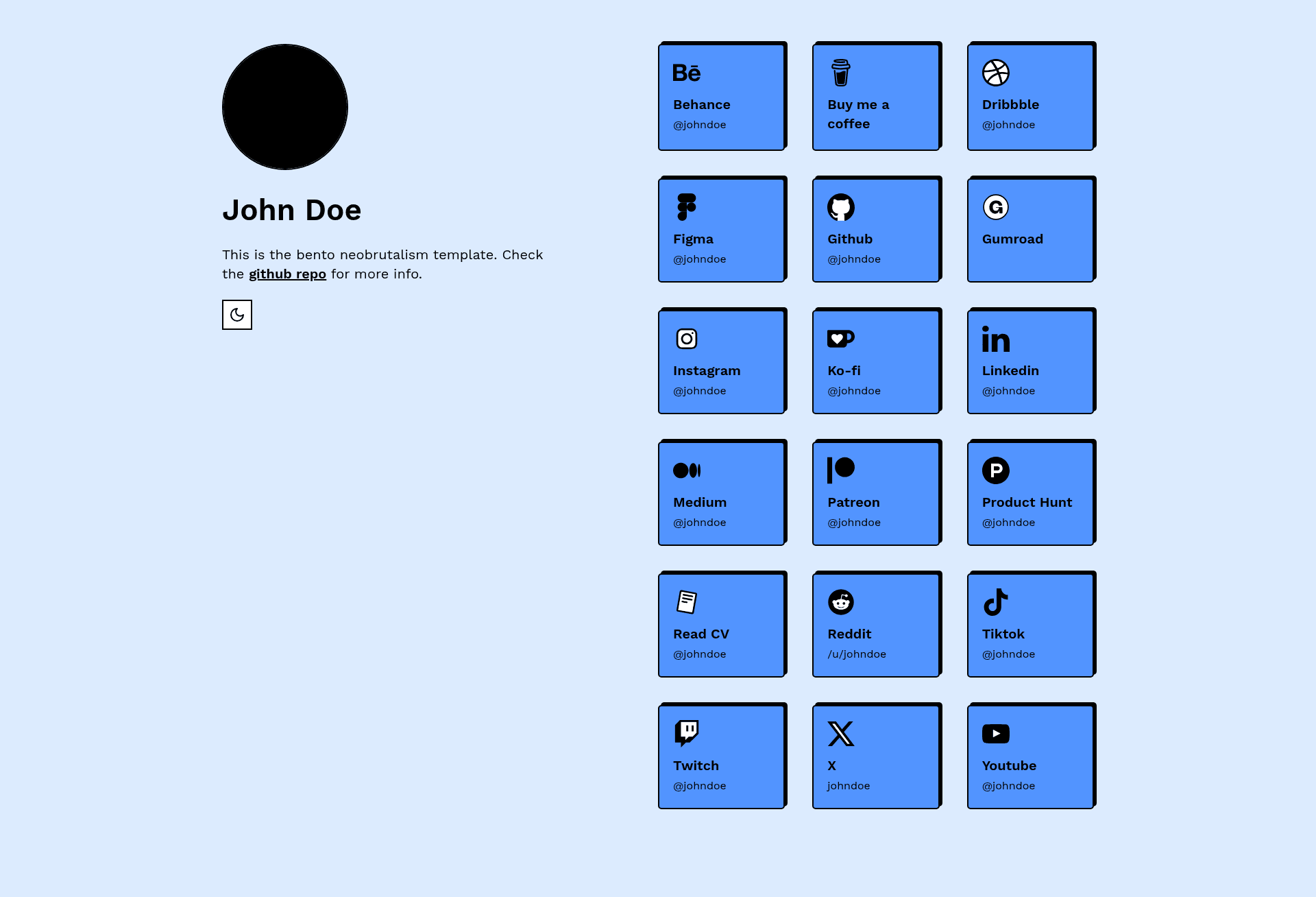
A neobrutalism-styled Next.js and Tailwind CSS template for a personal bento-style links page, inspired by bento.me.
About this template
Bento is a neobrutalism-styled Next.js and Tailwind CSS template for building a personal bento-style links page, inspired by bento.me and published by the neobrutalism-templates GitHub organization.
What is Bento?
Bento is a single-page website template that presents a curated set of links in a bento grid layout. It takes configuration files — the links list in links.ts, profile image as pfp.png, favicon, and page content in page.tsx — and produces a fully styled, responsive home page built with Next.js. The project runs on the Next.js App Router and uses Tailwind CSS for styling, with pnpm as the package manager. It is distributed as a GitHub template, so anyone can create a new repository from it and start editing.
Key Features
- Next.js App Router — The template is built on Next.js, giving you file-based routing, server components, and a modern React framework.
- Tailwind CSS styling — All layout and component styling is handled with Tailwind utility classes, with a neobrutalism design language.
- Centralized links configuration — All displayed links live in
links.tsas a singleLINKSobject; each entry has atitle, an SVGicon, a destinationlink, and atextlabel, and you can delete any entry to hide it. - SVG icon system — Icons are imported as SVG files from
public/icons, and you can swap them without touching layout code. - Simple personalization — Update metadata in
layout.tsx, replacefavicon.icoandpfp.png, and edit the content inpage.tsxto make the page your own. - Swappable styling — The neobrutalism styling can be replaced by copying a different style from the dedicated styling documentation at neobrutalism.dev/styling.
- pnpm-based workflow — Install dependencies with
pnpm iand run the dev server withpnpm run dev.
Who is it for?
- Developers who want a fast, code-first way to launch a personal links page without building from scratch.
- Designers and creative professionals who appreciate the neobrutalism aesthetic and want a portfolio-like link hub with a distinctive look.
- Individuals looking for a self-hosted alternative to hosted link-in-bio services, with full control over the code and deployment.
What can you do with Bento?
- Personal link aggregation: Display your GitHub, Twitter/X, email, or any other URLs as a clean bento grid on your own domain.
- Profile page for a project: Use the same layout to feature social links, documentation, and community channels for an open-source project.
- Design playground: Because styling is swappable via the neobrutalism.dev docs, you can use Bento as a base to experiment with different neobrutalism looks.
How does Bento work?
To get started, create a new repository from the template using the "Create a new repo" link on the GitHub page. Then install dependencies with pnpm i, run pnpm run dev, and edit links.ts, layout.tsx, page.tsx, and the profile image to customize the page. When you are finished, deploy it anywhere Next.js is supported, such as Vercel.
FAQ
How do I install Bento?
Install the dependencies with pnpm i and start the development server with pnpm run dev. The template requires pnpm, so install pnpm first if it is not already on your machine.
How do I add or remove links?
Open links.ts and edit the LINKS object. Each property in the object corresponds to a link shown on the home page, and you can delete any property you do not want to display.
How do I change the profile picture?
Replace the pfp.png file with your own image. The template references this file for the profile picture, and you can also update the favicon by replacing favicon.ico.
Can I change the styling?
Yes. The template uses neobrutalism styling, and the project documentation points you to the styling docs at neobrutalism.dev/styling, where you can copy a different style into your CSS.
What package manager does Bento use?
Bento uses pnpm. All commands in the README, such as pnpm i and pnpm run dev, are written for pnpm.