Template details
Next.js Starter
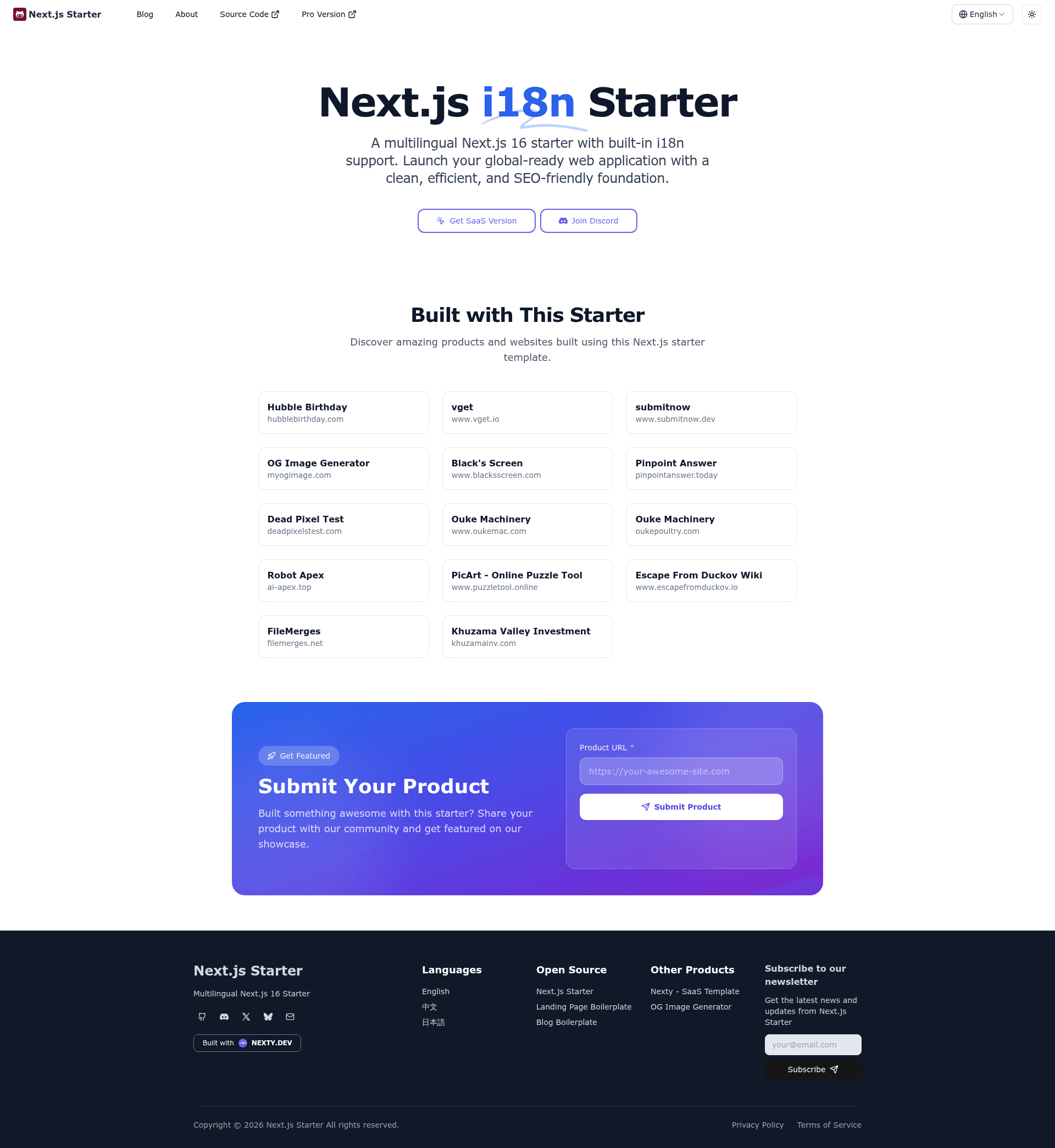
Lite version of the Nexty.dev SaaS Boilerplate based on Next.js. A multilingual Next.js 16 starter with built-in i18n support.
About this template
Next.js Starter is a multilingual website boilerplate built on Next.js 16 that gives you a pre-configured internationalized site with an MDX blog, SEO metadata, and analytics integrations. Created by full-stack developer weijunext, this repository is the free, MIT-licensed lite version of the commercial Nexty.dev SaaS Boilerplate.
What is Next.js Starter?
Next.js Starter is a template that takes your multi-language content and produces a production-ready website with server-side rendering and static generation. It accepts MDX files for blog posts and static pages, plus JSON translation files for interface strings, and outputs a Next.js app with built-in i18n routing under the App Router. The template runs on Next.js 16, uses TypeScript for all code, and deploys to Vercel with one click. It is maintained by weijunext, who offers development, performance optimization, and SEO services.
What makes Next.js Starter stand out?
- Built-in i18n — Ships with English, Chinese, and Japanese translations using next-intl; adding a language is a matter of adding a message file and updating i18n/routing.ts.
- MDX blog system — Blog posts live in blog/ with per-locale folders and support frontmatter fields for title, description, image, slug, tags, date, publish visibility, and pin status.
- Tailwind CSS + Shadcn/ui styling — The UI is built on Tailwind CSS and the shadcn/ui component library, and includes a dark/light theme toggle.
- SEO optimization — Includes server-side rendering, automatic sitemap.xml, robots.txt, optimized metadata, Open Graph, and multilingual SEO support with no extra packages.
- Analytics integrations — Google Analytics, Baidu Analytics, Google AdSense, and Vercel Analytics can be enabled through environment variables.
- Multilingual static pages — Static pages are stored as locale-specific MDX files in content/, so translated about, contact, or legal pages work out of the box.
- Developer experience — The project pins its package manager version with Corepack, provides lint and type-check scripts, and documents its folder structure for app, components, config, i18n, lib, and public.
Who is Next.js Starter for?
- International content creators who want to publish a blog or docs site in English, Chinese, and Japanese without manually managing localized routes.
- Indie hackers and early-stage startups who need a fast, SEO-ready landing page plus a blog, and may later upgrade to the full Nexty.dev SaaS boilerplate for auth and billing.
- Next.js developers looking for a clean reference implementation of i18n routing, MDX content, and analytics configuration to adapt in their own projects.
- Agencies that build multilingual client sites and want a Tailwind/shadcn-ui base they can fully restyle.
What can you do with Next.js Starter?
- Publish a multilingual blog: Write MDX posts in blog/en, blog/zh, or blog/ja, then control visibility and pinning through the frontmatter fields.
- Launch a landing page quickly: Edit config/site.ts and the public assets to deploy a production site with a generated sitemap and robots.txt on every build.
- Expand to a new locale: Copy an existing translation JSON, add the language to i18n/routing.ts, and create matching directories under blog and content.
- Monetize with ads: Paste your Google AdSense or Baidu Analytics ID into the .env file to start tracking traffic or displaying ads.
How does Next.js Starter work?
The quick start is a standard Next.js flow: clone the repository, enable Corepack, install dependencies with pnpm, copy .env.example to .env, and run pnpm dev. For production, run pnpm build and pnpm start, or use the one-click Vercel deploy button that imports the GitHub repository. All site metadata is centralized in config/site.ts, i18n routes are configured in i18n/routing.ts, and content lives in the blog and content directories as MDX.
FAQ
Is Next.js Starter free?
Yes, the repository is MIT-licensed and free to use. The author also offers a commercial, full-featured SaaS boilerplate at Nexty.dev, but this lite version remains open source.
What Node.js version do I need?
Node.js 20.9 or higher is required, and pnpm 9.0 or higher is recommended. The project pins pnpm 10.12.4 through the packageManager field and Corepack.
How do I add a fourth language?
Add a new message file in i18n/messages, update the routing configuration in i18n/routing.ts, create matching locale folders in blog and content, and use the Link component from i18n/routing.ts for navigation.
Which analytics tools are supported?
Google Analytics, Baidu Analytics, Google AdSense, and Vercel Analytics are supported. Add the appropriate ID to the .env file using the NEXT_PUBLIC_GOOGLE_ANALYTICS, NEXT_PUBLIC_BAIDU_TONGJI, or NEXT_PUBLIC_GOOGLE_ADSENSE environment variables.
Does the lite version include SaaS features like authentication and billing?
No. This is the lite version, so it does not include authentication, payments, or dashboard features. Those are part of the full Nexty.dev SaaS boilerplate.