Template details
Air
Responsive Bootstrap-based Hugo theme with image galleries, single-page landing, Google Maps, and Smoobu booking.
About this template
Air is a Hugo theme that provides a responsive, Bootstrap-based foundation for static sites, including image galleries, single-page landings, and vacation-rental booking via Smoobu.
What is Air?
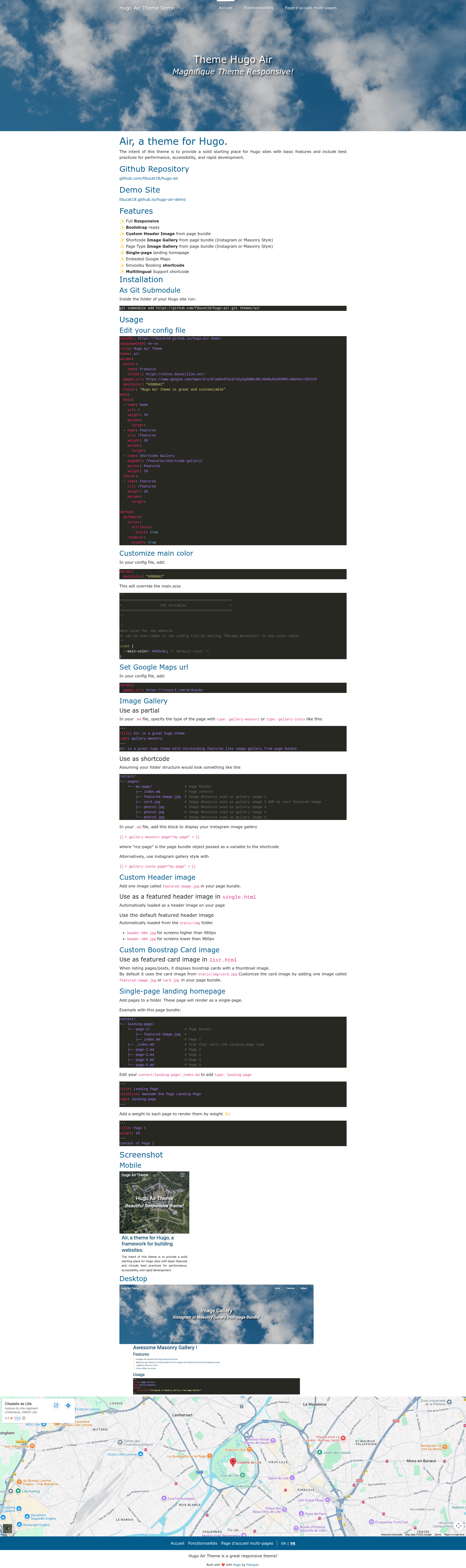
Air is a Hugo theme created by François Ducatillon, available on GitHub as fducat18/hugo-air. It takes standard Hugo content (pages, page bundles, images) and renders a static website styled with Bootstrap, with a configurable main color, mobile-aware header images, and optional embedded Google Maps. The theme is installed as a git submodule and ships with an example site under exampleSite for quick setup.
Key Features
- Responsive layout — The theme is fully responsive and built on Bootstrap, so pages adapt to mobile and desktop breakpoints without extra work.
- Custom header image — Place a
featured-image.jpgin a page bundle and it automatically becomes the page header; for pages without one, the theme falls back toheader-960.jpg(over 960px screens) orheader-480.jpg(under 960px) fromstatic/img. - Image gallery as shortcode or page type — Two gallery styles are built in:
gallery-insta(Instagram grid) andgallery-masonry(Masonry layout), both reading images from a page bundle; can be invoked with a shortcode in any Markdown file or by setting the page front mattertype. - Single-page landing homepage — A
landing-pagecontent type stacks child pages in weighted order, letting you build a one-page site with sections like features, map, and booking. - Embedded Google Maps — Configure a
gmaps_urlparameter in your site config and the theme renders an embedded map iframe. - Smoobu booking shortcode — A built-in shortcode lets you embed Smoobu vacation rental booking widgets into any page.
- Multilingual support — The theme includes a multilingual shortcode and works with Hugo's standard i18n configuration.
- Bootstrap card listings — List pages render posts as Bootstrap cards with thumbnail images; card images default to
static/img/card.jpgor can be overridden withfeatured-image.jpgorcard.jpgin a page bundle.
Who is it for?
- Hugo beginners — Developers who want a pre-configured, best-practice theme with basic features and documented installation via git submodule.
- Photographers and visual artists — Users who need masonry or Instagram-style galleries fed from page bundles without writing gallery code.
- Vacation rental owners — Site owners who can embed Smoobu booking widgets alongside Google Maps and a one-page landing design.
- Small business sites — Anyone needing a single-page landing homepage with sections, a map, and a footer menu.
What can you do with Air?
- Create a photo gallery site — Add a page bundle with images, set the
typetogallery-masonryorgallery-insta, and the theme produces a responsive gallery page. - Launch a one-page landing — Structure content under
content/landing-pagewith a_index.mdoftype: landing-page, order pages byweight, and get a single-page site. - Set up a vacation rental page — Use the Smoobu booking shortcode and
gmaps_urlto show availability and location on the same page. - Customize the look — Override
params.mainColorinhugo.yaml, for example#386641, to change the theme's CSS variable; swap the favicon by placing an.icoinstatic/.
How does Air work?
The theme is installed by cloning the repository as a git submodule into themes/air, then referencing theme: air in your Hugo config. The exampleSite/hugo.yaml file contains the required menu structure (menu.main and menu.footer) and theme params (mainColor, gmaps_url, footer). To run the demo locally, clone the repo into an air folder and execute hugo server -s exampleSite --themesDir ../... Google Analytics can be added through Hugo's services.googleAnalytics.id setting.