Template details
Apollo
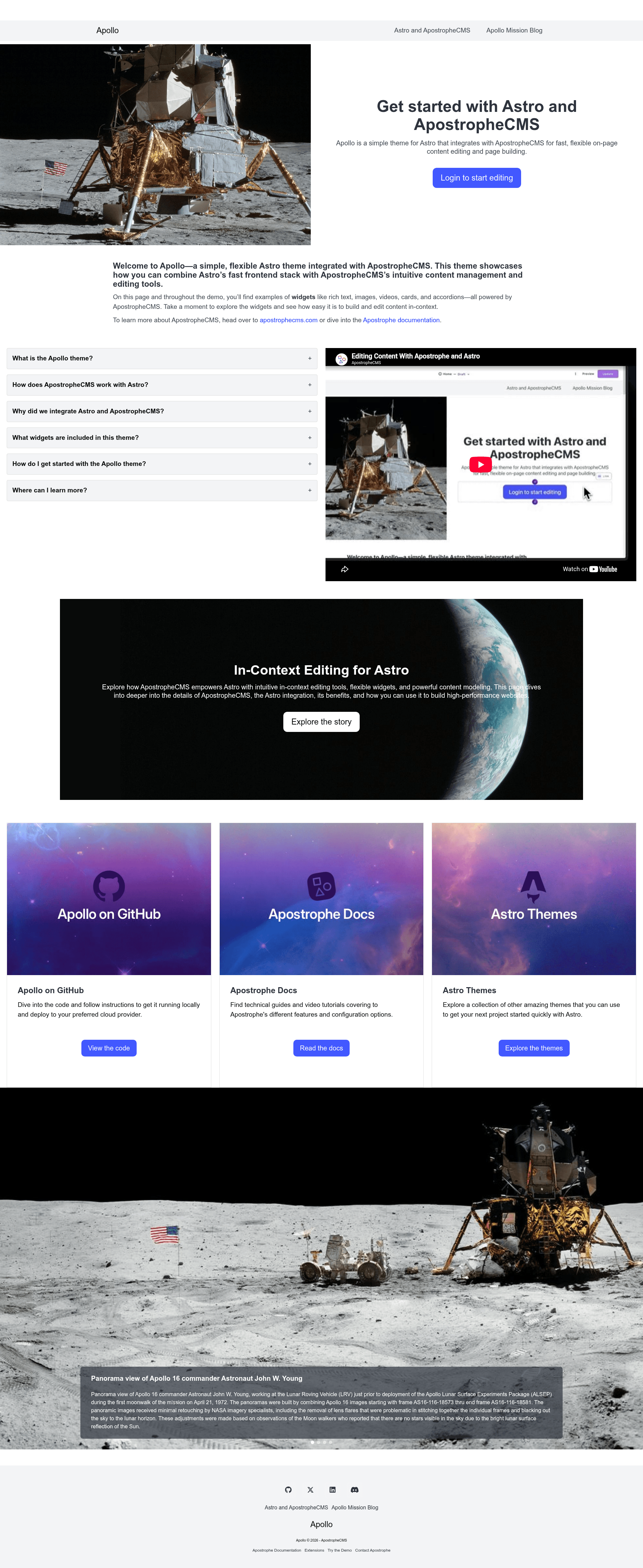
A flexible Astro theme that integrates directly with ApostropheCMS, enabling full in-context editing on an Astro-powered frontend.
About this template
Apollo is a free, MIT-licensed starter kit and companion codebase for the ApostropheCMS + Astro tutorial series that demonstrates how to run ApostropheCMS as a headless CMS backend with an Astro frontend while preserving full in-context editing.
What is Apollo?
Apollo is a monorepo containing two interlinked projects: a backend folder with an ApostropheCMS application (Node.js, with MongoDB, PostgreSQL, or SQLite support) and a frontend folder with an Astro site. It uses the apostrophe-astro bridge package so content editors get the ApostropheCMS Admin UI directly on Astro-rendered pages, and developers fetch content without writing REST API calls. The project is maintained by the ApostropheCMS team and licensed under MIT.
Key Features
- In-context editing — Editing happens on the Astro frontend via the
apostrophe-astrointegration; the Admin UI and widgets render inside the Astro pages. - Single route architecture — The Astro app uses one
[...slug].astrofile that handles all URL routing, maps page types to templates, and renders widgets. - Five custom widgets — Content widgets include hero, slideshow, accordion, card, and link/button widgets, on top of the core ApostropheCMS widgets.
- Article and author pieces — The backend defines article and author piece types, with index and show page templates (
ArticleIndexPage.astro,ArticleShowPage.astro) and pagination support. - Bulma CSS theming — Styling uses the Bulma framework via SASS with modern
@usesyntax; variables can be overridden infrontend/src/styles/main.scssbefore Bulma is imported. - Image helper functions — The frontend includes attachment utilities (getAttachmentUrl, getAttachmentSrcset, getWidth, getHeight, getFocalPoint) that respect crops and focal points set in the CMS.
- Flexible deployment — Supports ApostropheCMS hosting with automatic database, asset storage, SSL, and backups, or third-party SSR hosts such as Vercel, Netlify, Cloudflare Pages, and AWS Amplify.
Who is it for?
- ApostropheCMS developers — Learn the headless-plus-Astro pattern; the backend stays familiar with modules in
backend/modules, while frontend code moves to Astro components. - Astro developers — Explore a single-route, CMS-driven architecture and see how page types map to templates and widgets.
- Teams that need in-context editing — Let content editors use the full ApostropheCMS Admin UI on an Astro frontend, avoiding a separate dashboard.
What can you do with Apollo?
- Content editors: edit page content, images, and widgets directly on the Astro-rendered site with the ApostropheCMS Admin UI.
- Developers: build a production website with Astro SSR, using custom widgets and pieces; follow the tutorial branches to progress through stages.
- Designers: customize the theme by overriding Bulma SASS variables in
frontend/src/styles/main.scssto match brand colors and typography.
How does Apollo work?
The repo is a monorepo with backend and frontend folders. After npm install at the root, run npm run dev in both folders; the scripts set APOS_EXTERNAL_FRONT_KEY=dev for development. The Astro frontend uses a single [...slug].astro route that fetches content from the backend and renders templates from frontend/src/templates and widgets from frontend/src/widgets. For an empty database, add an admin user with node app @apostrophecms/user:add admin admin.
Pricing
The Apollo starter kit is free and open source under the MIT License. The ApostropheCMS team also offers a commercial Apollo Pro tier with advanced permissions, automated translation (DeepL, Google Translate, Azure), visual design tools, AI-powered SEO optimization, document management, and user registration.
FAQ
Does Apollo require Node.js? What version?
Yes. Apollo requires Node.js v22 or later (v24 recommended). ApostropheCMS runs natively on Windows, and WSL2 is recommended but no longer required.
How do I get Apollo running?
Run npm install at the repo root, then start the backend and frontend in two terminals: cd backend && npm run dev and cd frontend && npm run dev. Optionally load starter content with npm run load-starter-content. The site appears at http://localhost:4321.
Does Apollo work with databases other than MongoDB?
Yes. ApostropheCMS supports MongoDB (v6.0+), PostgreSQL, and SQLite. The backend connection is configured via the APOS_DB_URI environment variable; the README shows examples for all three databases.
Can I deploy Apollo to third-party hosting?
Yes. The backend requires a Node.js environment with a database and asset storage (like AWS S3). The Astro frontend can be deployed to any SSR-capable static host, including Netlify, Vercel, Cloudflare Pages, and AWS Amplify. You must set the same APOS_EXTERNAL_FRONT_KEY on both sides.
Is Apollo free?
Yes, the Apollo starter kit is free and MIT-licensed. The optional Apollo Pro upgrade is a paid product from ApostropheCMS.