Template details
Codestream
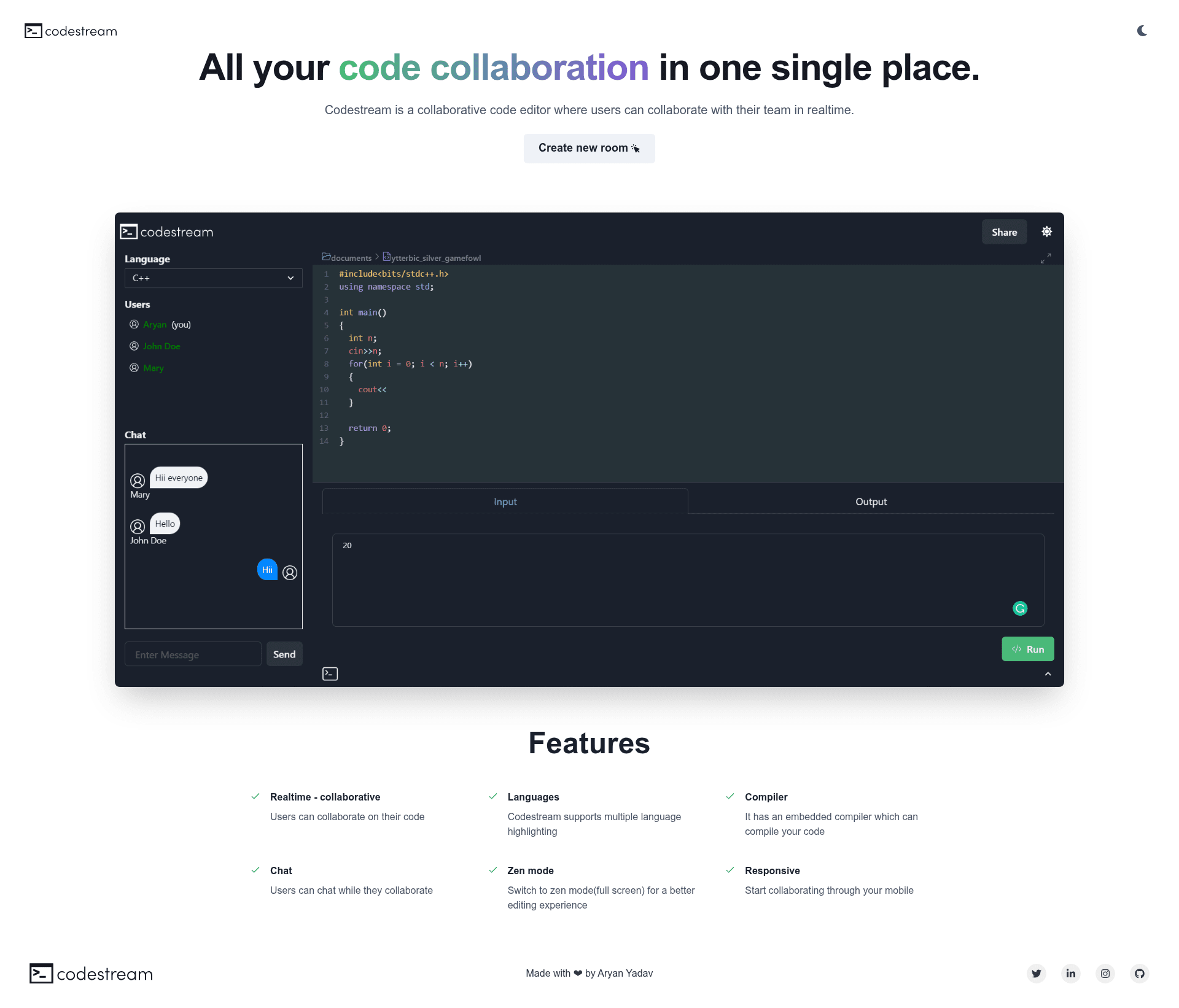
Collaborative web-based code editor with real-time editing, chat, compiler, and multi-language syntax highlighting.
About this template
Codestream is an open-source collaborative web-based code editor built with React, Chakra UI, CodeMirror, and Socket.io that lets teams edit code together in real time while solving programming problems.
What is Codestream?
Codestream is a client-side React application that runs in the browser and connects to a companion server (codestream-server) through WebSockets. The editor itself is powered by CodeMirror, the interface uses Chakra UI components, and Socket.io handles real-time syncing of edits and chat messages. The project is authored by Aryan Yadav (GitHub: starwiz-7) and licensed under MIT, with a live demo hosted at codestream.vercel.app.
Key Features
- Real-time collaboration — multiple users can edit the same document simultaneously and see each other's changes as they type.
- Multi-language syntax highlighting — CodeMirror provides highlighting for many programming languages inside the editor.
- Embedded compiler — code can be compiled directly within the browser without leaving the room.
- Integrated chat — teammates can exchange messages alongside the code.
- Zen mode — a distraction-free editing mode for focused work.
- Responsive layout — the interface works on mobile browsers so collaboration can start from a phone.
- Question pane — add problems directly into the room from LeetCode, Codeforces, AtCoder, and CSES.
Who is it for?
- Remote development teams who need a lightweight environment for pair programming, code reviews, or debugging sessions.
- Competitive programmers who want to share a room and solve problems from supported platforms while compiling code in the browser.
- Interviewers and candidates conducting live coding interviews with real-time editing and chat.
- Students and educators working on group assignments or teaching coding in a shared editor.
What can you do with Codestream?
- Pair programming: two developers can open a room, edit code simultaneously, chat, and compile code without installing an IDE.
- Competitive practice: a group can load a problem from LeetCode or Codeforces into the question pane and work through it together.
- Remote teaching: an instructor can share code with students and observe their edits in real time to give feedback.
How does Codestream work?
The repository is the front-end of a two-part system. After cloning, install dependencies with npm install, then create a .env file setting REACT_APP_SERVER to either a local instance of codestream-server at http://localhost:5000 or a deployed server URL. The app then connects to that server for synchronization and chat. A faster path is to import the GitHub repository directly into CodeSandbox.
Pros
- Open source under the MIT License.
- No login or account required to try the live demo.
- Supports multiple problem source websites in the question pane.
- Responsive design allows editing from mobile.
Pricing
Codestream is free and open source. The source code is available on GitHub under the MIT License, and the project can be self-hosted at no cost.
FAQ
Is Codestream free?
Yes, Codestream is open source under the MIT License. You can use, modify, and self-host the client and server without paying licensing fees.
Does Codestream have a compiler?
Yes, the app includes an embedded compiler that can compile code directly in the editor, so you can check your solution without switching windows.
Can I use Codestream on mobile?
Yes, the interface is responsive and works on mobile browsers, though typing heavy code may be more comfortable on a desktop.
How do I set up Codestream locally?
Clone the repository, run npm install, create a .env file with REACT_APP_SERVER pointing to a local or deployed server URL, and start the app. Alternatively, you can import the repository into CodeSandbox to avoid local setup.
What platform is Codestream built on?
Codestream uses React.js, Chakra UI, CodeMirror, and Socket.io. It is not a Next.js app; it is a standard React client that talks to a separate Node.js server.