Template details
Next Course Starter
Next.js starter template for building Markdown-based course websites for Frontend Masters and GitHub Pages.
About this template
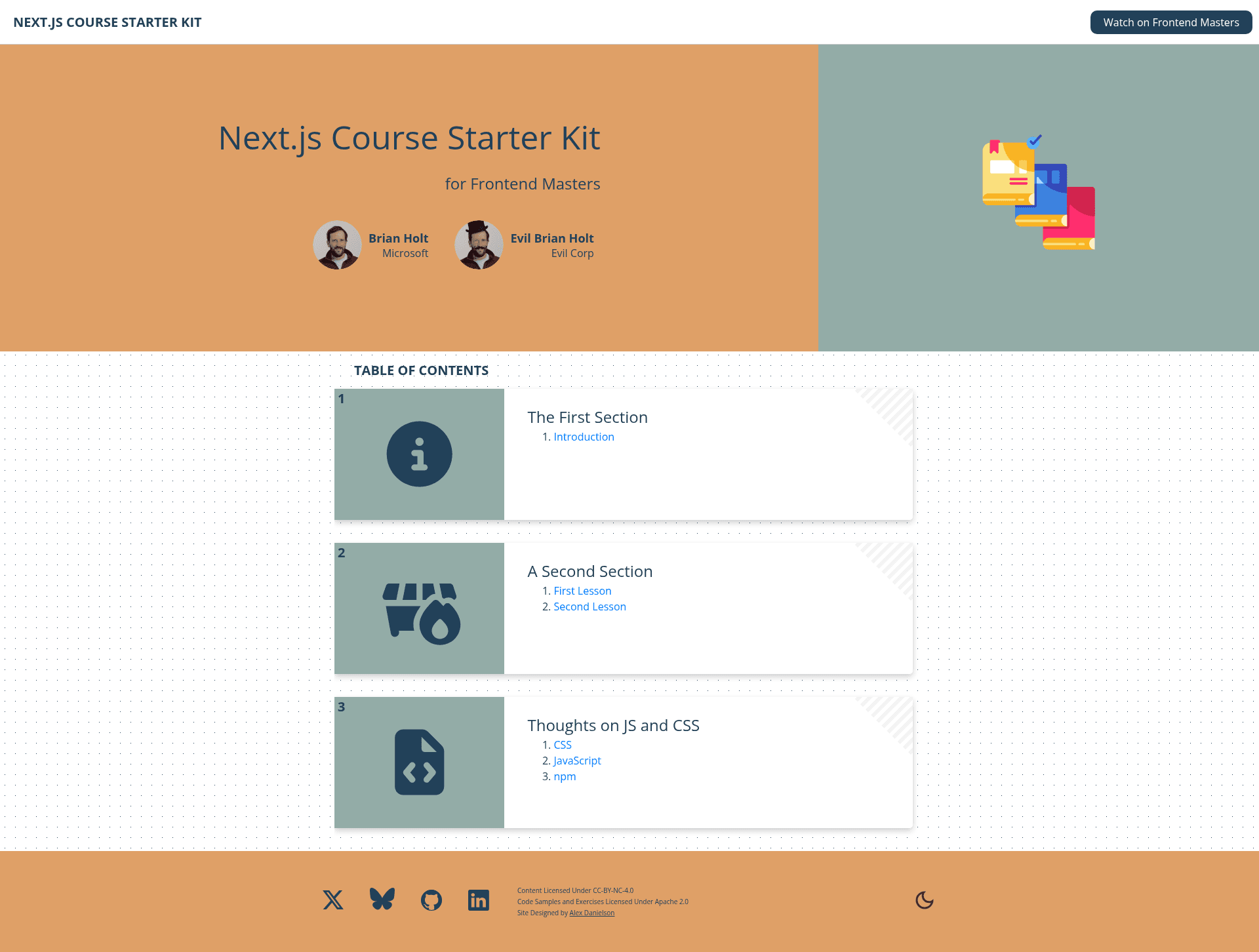
Next Course Starter is a free, open-source Next.js boilerplate for turning Markdown files into a complete course website, built by Brian Holt as the starter kit for publishing Frontend Masters courses. It takes a configured course.json file plus a folder of Markdown lessons and outputs a static, deployable site with a home page, lesson pages, per-section icons, and SEO metadata. The project also ships a GitHub Actions workflow so the site can be published to GitHub Pages with each push.
What is Next Course Starter?
Next Course Starter is a Next.js application that converts Markdown lesson files into a structured course website. It accepts lesson content organized into numbered section folders and lettered lesson files, reads configuration from course.json, and generates a site with automatic navigation, titles, and slugs. The template was created for Frontend Masters courses and is used by example sites such as Complete Intro to React v9 and Complete Intro to MCP. All text content is authored in Markdown with optional YAML frontmatter for per-lesson titles, descriptions, and keywords.
Key Features
- Markdown lesson system — Lessons live in
lessons/under numbered section folders (e.g.,01-section-one) and lettered lesson files (e.g.,A-lesson-one.md); section and lesson titles are auto-generated using title-case. - Central configuration —
course.jsoncontrols authors (with images, companies, social links), course title/subtitle, SEO description and keywords, a Frontend Masters link, and the production base URL for GitHub Pages. - AI-assisted SEO — Running
npm run seoauto-generates missing descriptions and keywords using Claude (viaANTHROPIC_API_KEY) or GPT (viaOPENAI_API_KEY); existing descriptions are skipped. - Themeable via CSS variables —
styles/variables.cssdefines variables for both light and dark themes, so the entire site can be re-themed without touching components. - GitHub Pages deployment — A GitHub Actions workflow builds and deploys the site to the
gh-pagesbranch; settingproductionBaseUrlincourse.jsonmatches the repository name for correct asset paths. - LLM and CSV exports — The build or a dedicated command can concatenate all lessons into a single text file for LLM use, and generate a CSV of lesson metadata.
- Per-section icons — Each section folder can include a
meta.jsonto set a Font Awesome v5 icon for the home page and header. - Customizable code theme — Code blocks use Highlight.js with an
a11y-lightdefault theme; changing the CSS import inpages/_app.jsswaps to any Highlight.js theme.
Who is it for?
Next Course Starter is for technical instructors and course authors who want to publish structured educational content without building a website from scratch. It targets Frontend Masters instructors who need a site matching that platform's content organization, and it also suits independent developers creating free or paid course sites. Teams that want to collaborate on lessons in Markdown and deploy to GitHub Pages will find the built-in workflow useful.
What can you do with Next Course Starter?
- Course creators — publish a full multi-section course with per-lesson pages, auto-generated navigation, and SEO, just by writing Markdown.
- Frontend Masters instructors — structure lessons with the same numbered section and lettered lesson convention used on FrontendMasters.com and link back to the published video.
- LLM-assisted learners or editors — use
npm run llm-textto generate one long text file of all lessons, then load it into an AI model for help, grammar fixes, or content review. - Indie educators — deploy a free static course site to GitHub Pages, with social share covers, favicons, and analytics optional, without paying for hosting.
How does Next Course Starter work?
After cloning the repo, set up Node.js v20+, run npm install, then configure course.json with your course metadata and base URL. Add Markdown lessons to the lessons/ directory following the numbered-folder and lettered-file convention, then run npm run dev to preview locally. For production, push to GitHub with the included workflow; the productionBaseUrl must match the repository name for GitHub Pages hosting.
FAQ
How do I deploy to GitHub Pages with this template?
Set productionBaseUrl in course.json to your repository name, push to the main branch, enable Pages with the gh-pages branch in Settings, and the included GitHub Actions workflow will deploy the site on every push. Note that if productionBaseUrl is set, the site's root path will return 404.
Can I use AI to write descriptions and keywords for my lessons?
Yes. Run npm run seo with either ANTHROPIC_API_KEY or OPENAI_API_KEY set; Claude is preferred when both are present. The command adds descriptions and comma-separated keywords to any Markdown lesson file that lacks them.
How do I add a second author to the course?
Add another object to the authors array in course.json, specifying an image file name for that author's photo. Place the photo in public/images/ and reference it, e.g. second-author.jpg; the home page renders multiple authors in a row.
What licenses apply to the template and my content?
The template code is licensed under Apache 2.0, so you can reuse and modify it freely. The template recommends licensing your own course content under CC-BY-NC-4.0, which allows sharing and adaptation but prohibits selling the content.
How can I change the code block theme?
Edit pages/_app.js and change the Highlight.js theme import. The default is a11y-light, but you can use any theme from the Highlight.js library.