Template details
Astro Marketing Theme
Astro 6 marketing theme with sidebar nav, JSON content files, blog importer, Web3Forms contact, simulated chat, and Docker CI/CD.
About this template
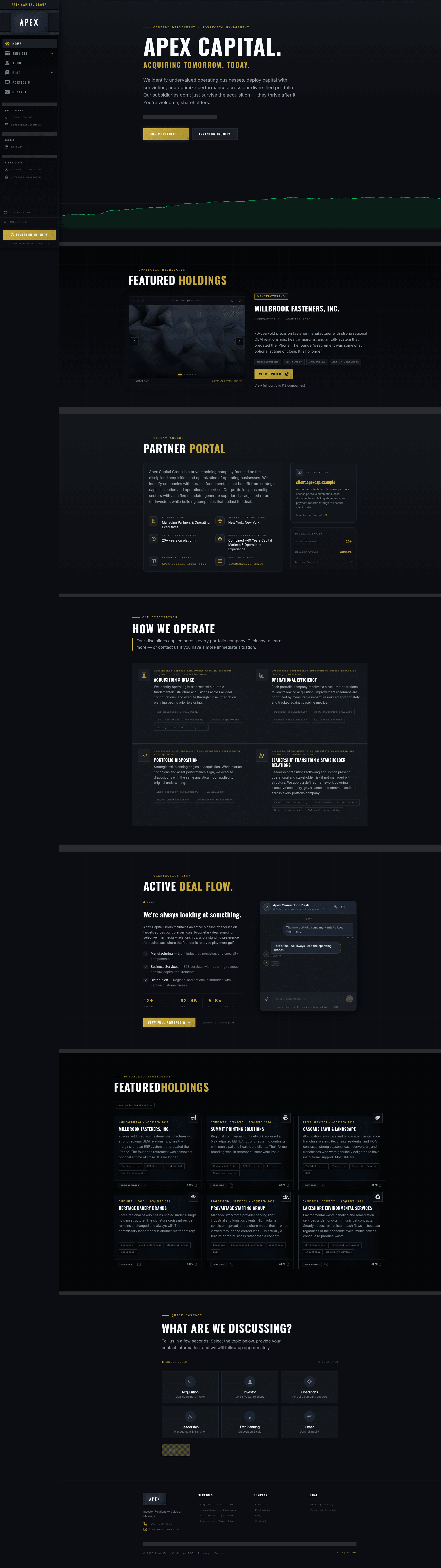
astro-marketing-theme is a static marketing-website template built with Astro 6, Tailwind CSS 4, and TypeScript that turns JSON content files into a complete corporate site with sidebar navigation, services sub-pages, blog, portfolio, and contact tools.
What is astro-marketing-theme?
It is a ready-to-run Astro 6 theme for marketing and services websites. You edit JSON files under src/data/, add markdown posts under src/content/posts/, and run a build to get a fully static output in ./dist/ (pnpm) or ./output/ (Docker). The theme includes a persistent sidebar layout with nested dropdowns, social links, and quick-access external site links; pages for Home, About, Blog, Services, Portfolio, Contact, Privacy, Terms, and a custom 404 are included. It is designed to be deployed on GitHub Pages, GitLab Pages, Gitea/Forgejo, Cloudflare Pages, Netlify, Vercel, or any static host.
Key Features
- Stack — Uses Astro 6, Tailwind CSS 4, TypeScript, and pnpm 11; without Docker it requires Node 22+ and pnpm 11.
- JSON-driven content — All site copy lives in
src/data/files (site.json,navigation.json,services.json,projects.json,contact.json, etc.); no code edits are needed to customize sections. - Blog importer —
src/lib/fetchBlog.tsfetches an external RSSfeed.xmlandsitemap.xmlat build time, scrapes missing post URLs, merges them newest-first, and caches results inblog-post-cache.json. - Contact tools — The two-step Quick Contact widget submits through Web3Forms with no backend server, and the homepage has a simulated live-chat widget with zero third-party scripts.
- Auto-populated slider and GitHub images — The featured hero carousel is built from entries in
projects.json; withGITHUB_USERset, the build also fetches the first non-badge image from each project repo and caches it ingithub-image-cache.json. - Asset downloader —
scripts/download-assets.mjsdownloads icons and external scripts from CDNs topublic/scripts/before every build so the browser only requests from your own domain. - Dark/light mode — Defaults to dark regardless of OS preference; the user toggle is stored in localStorage under
site-theme. - Docker build and supply-chain controls — The multi-stage Dockerfile runs ESLint,
astro check, andastro build; pnpm 11 is configured withstrictDepBuilds,blockExoticSubdeps, a 7-dayminimumReleaseAge,trustPolicy, andverifyDepsBeforeRunon every install.
Who should use astro-marketing-theme?
- Agencies and marketing consultants — Create client-ready marketing sites with services sub-pages, portfolio, blog, and contact without writing custom components.
- Professional services firms — Swap the placeholder financial business content for their own name, services, team, and testimonials.
- Developers — Use the Docker multi-stage build (lint, typecheck, build) and CI/CD workflows for GitHub Pages, GitLab Pages, and Gitea/Forgejo to automate deployments.
- Blog owners — Point the blog importer at an existing blog domain and RSS feed to mirror posts automatically in the Astro site.
What can you do with astro-marketing-theme?
- Launch a services website: Edit
services.jsonto define service cards with slugs, highlights, and theme colors; create matching pages undersrc/pages/services/; and add them to the sidebar navigation. - Aggregate external blog content: Set
blog_urlinpersonal.jsonto your blog domain; the build will fetch and combine latest posts from the feed and sitemap. - Deploy to multiple platforms: Use the included workflows for GitHub Pages, GitLab Pages, or Gitea/Forgejo, or connect to Cloudflare Pages, Netlify, or Vercel with
pnpm run buildand thedistoutput directory. - Run a supply-chain-hardened install: pnpm 11 is configured with five build-time controls that block known npm attack patterns, including install-script abuse and same-day poisoned releases.
How does astro-marketing-theme work?
Edit the JSON files in src/data/ and add markdown posts with frontmatter in src/content/posts/. Run docker compose build && docker compose up (output goes to ./output/) or pnpm install && pnpm run dev for a local server at http://localhost:4321. The predev and prebuild hooks automatically run the asset downloader and blog importer before each build.
FAQ
Do I need a backend or database?
No. The theme generates a fully static site with no server-side runtime, no user accounts, and no database. Contact forms go through Web3Forms, and the chat widget is simulated during the build.
How do I deploy to GitHub Pages?
Enable Pages with GitHub Actions, add GITHUB_USER as a repository variable, run the Deploy to GitHub Pages workflow once, then uncomment the push trigger in .github/workflows/deploy.yml to auto-deploy on future pushes to main.
What are the system requirements?
With Docker you only need Docker and Docker Compose. Without Docker, you need Node 22+ and pnpm 11. The build pipeline runs ESLint, astro check in strict TypeScript mode, and astro build before producing output.
Can I deploy under a sub-path?
Yes. Set BASE_PATH (for example /demo) and SITE_URL (for example https://staging.example.com) in docker-compose.yml or as CI variables. Note that hard-coded href="/" strings in components must be prefixed with import.meta.env.BASE_URL for full sub-path support.
Does the theme include a light mode?
Yes. The theme defaults to dark mode regardless of OS preference, and the toggle is saved in localStorage under site-theme. You can restore OS-controlled theming by editing the before-paint script in src/layouts/Layout.astro.