Template details
Shinayaka
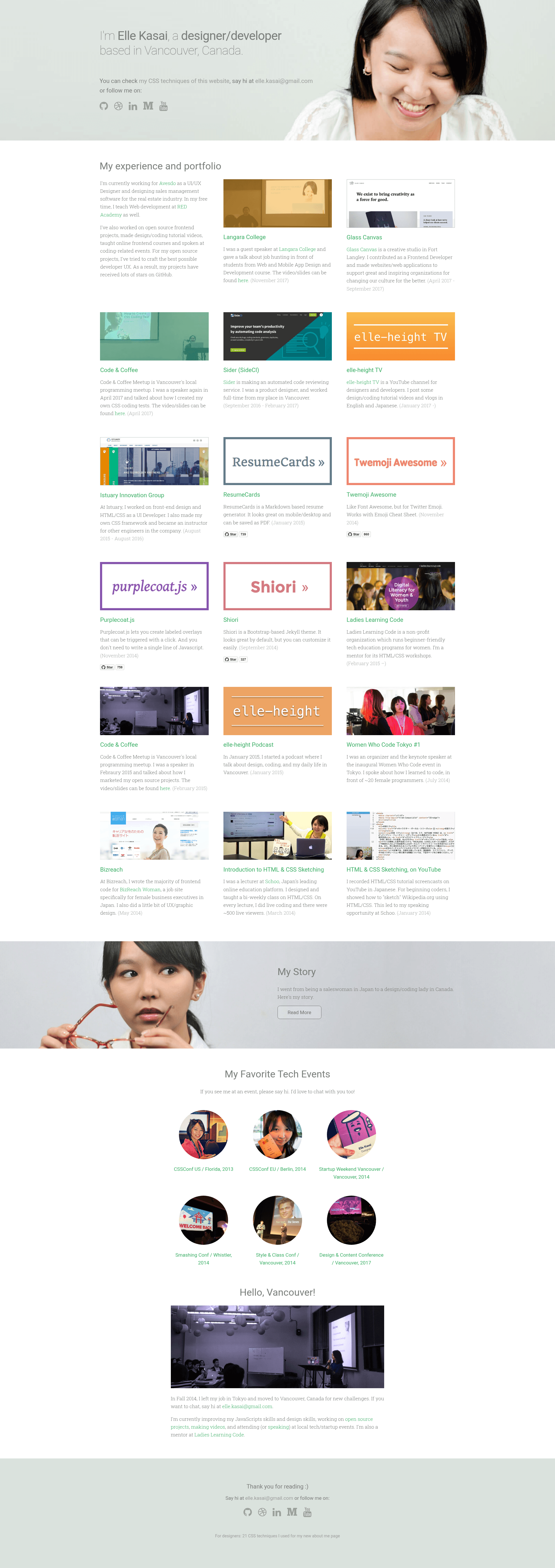
An unmaintained Jekyll blog theme with a live demo at ellekasai.com.
About this template
Shinayaka is an unmaintained Jekyll blog theme created by ellekasai, designed to turn a Jekyll-powered site into a personal blog. The theme is distributed as an open-source GitHub repository with a live demo at ellekasai.com. It is written for the Jekyll static site generator, meaning it uses Liquid templating and stores content as Markdown files, which makes it deployable to GitHub Pages or any Jekyll-compatible host. Because the repository is explicitly marked as unmaintained, users should expect no ongoing updates, bug fixes, or security patches.
What is Shinayaka?
Shinayaka is a Jekyll blog theme that takes a standard Jekyll site and applies a blog-oriented layout with posts, a homepage, and a personal writing style. As a theme, it consists of Liquid templates, stylesheets, and configuration files that replace Jekyll's default look. The output is a static HTML site ready to be served. The theme was created by ellekasai and is hosted on GitHub under the repository name shinayaka.
Key Features
- Jekyll-based — Built specifically for the Jekyll static site generator, so it works with the standard
jekyll newworkflow and GitHub Pages. - Live demo — The theme is used on ellekasai.com, giving you a real example of the design in production.
- Usage wiki — Installation and configuration steps are documented on the project's GitHub wiki, so setup starts there.
- Open source — The source code is freely available on GitHub; the repository shows 16 stars at the time of this analysis.
Who is it for?
- Jekyll bloggers — People who run a personal blog on Jekyll and want a custom design without building templates from scratch.
- Developers learning Jekyll — A working theme is a practical reference for how Jekyll layouts, includes, and posts fit together.
- Personal site owners — The demo site shows a personal homepage combined with blog posts, suitable for writers and designers.
Use cases
- Personal writing: publish Markdown posts and have them rendered in a clean blog layout, as demonstrated on ellekasai.com.
- Portfolio plus blog: use the theme to present a short bio alongside an article archive, matching the structure seen in the demo.
Pros and cons
- Pro: Free and open source — The theme can be downloaded and reused at no cost.
- Pro: Real-world demo — You can see exactly how the theme behaves on a live site.
- Con: Unmaintained — The repository is marked as unmaintained, so there is no active development or support.
Alternatives
- Minima, which is the default Jekyll theme and is actively maintained.
FAQ
Is Shinayaka still maintained?
No, the GitHub repository is marked as unmaintained. This means there are no ongoing updates, and users should be prepared to handle any issues themselves or fork the project.
What does Shinayaka do?
Shinayaka is a Jekyll blog theme that changes the default presentation of a Jekyll site into a blog-style layout. It provides the templates and styling needed to display posts and pages on a static website.
How do I install Shinayaka?
Installation instructions are provided on the project's GitHub wiki. In general, you copy the theme files into your Jekyll project and adjust the configuration, but the wiki is the authoritative source for the exact steps.
Is Shinayaka free?
Yes, the theme is open source and available on GitHub at no cost. You can download the code and use it for your own blog.
What is the demo site?
The theme is live at ellekasai.com, which serves as a working example of Shinayaka in production.