Template details
AstroLaunch UI
Astro startup template by Creative Tim with 70+ coded elements, 3 example pages, and Material Tailwind styling.
About this template
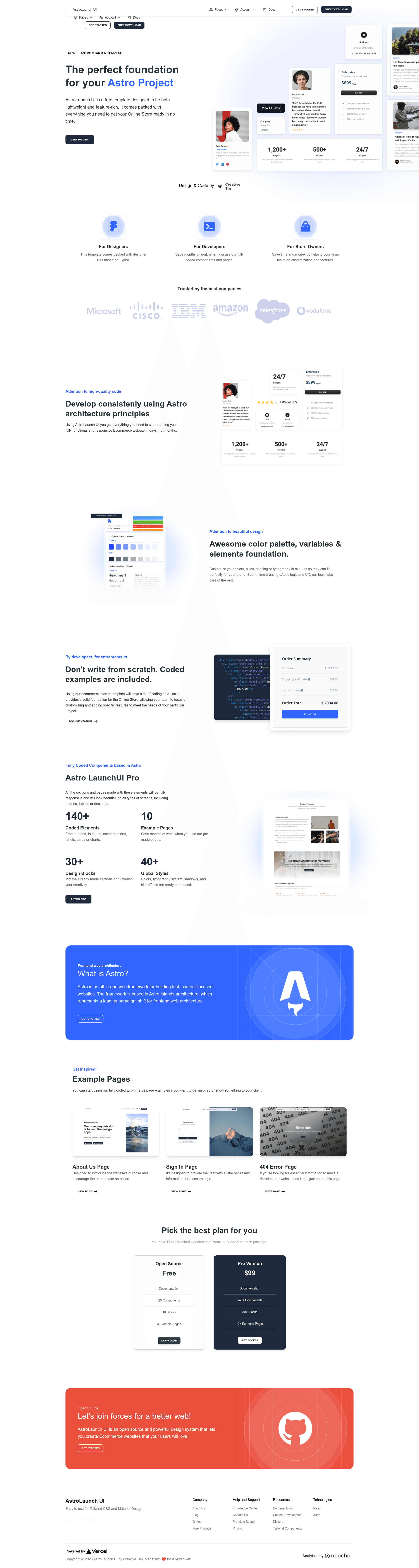
Astro LaunchUI is a publicly available starter template for startup websites, built on the Astro framework by Creative Tim, that ships with landing, product, and shopping cart pages out of the box.
What is Astro LaunchUI?
Astro LaunchUI is a UI starter template created by Creative Tim that runs on Astro's island architecture and combines React components with Material Tailwind styling. It takes in your project content and produces a static or server-rendered website with pre-built pages and components. The template includes 70+ fully coded elements, 30+ blocks, and 3 fully coded example pages — Landing, Product, and Shopping Cart — plus a 404 page, About page, login page, and an index page in the source structure.
Key Features
- Astro island architecture — Uses Astro's partial hydration to deliver static HTML with isolated interactive React islands for better performance out of the box.
- Material Tailwind styling — Styling is built on Material Tailwind, with a
tailwind.config.jsandmaterial-tailwind.cssasset included in the project. - 70+ coded elements — Ready-made UI components for forms, navigation, cards, and more, so you don't have to write common interface pieces from scratch.
- 30+ blocks — Reusable page sections that can be composed to build landing and storefront layouts.
- 3 fully coded example pages — Landing, Product, and Shopping Cart pages are included under
src/pages/, each with a demo link in the README. - Additional pages included — The
src/pages/directory also contains404.astro,about.astro,login.astro, andindex.astro. - Responsive design — Layouts adapt to desktop, tablet, and mobile viewports.
- Standard Astro workflows — The project includes
package.jsonscripts fornpm run dev,npm run build, andnpm run preview, and it runs a local dev server atlocalhost:3000.
Who is it for?
- Startup founders can use the landing page and product page templates to present their product and collect early sign-ups without hiring a designer.
- Front-end developers get a clean Astro + React + TypeScript starting point; they can extend the 70+ components or replace the example pages with their own.
- E-commerce teams can leverage the shopping cart page, which includes an order summary and a form for billing and shipping information, to prototype a checkout flow.
- Web designers can use the included Material Tailwind block collection as a visual reference for client projects or pitch decks.
What can you do with Astro LaunchUI?
- Launch a startup landing page — Customize
landing.astroto explain your product's purpose and drive visitors to take an action. - Showcase a single product — The product page gives buyers all the details needed to make a purchase decision, including layout for imagery and pricing information.
- Prototype a shopping cart — The shopping cart page lists cart items and shows a billing/shipping form, suitable for demonstrating an e-commerce flow.
- Build an about or login page —
about.astroandlogin.astroare included, so you can add company information and user authentication entry points quickly.
How does the template work?
The template follows the standard Astro workflow: install dependencies with npm install, start the local dev server with npm run dev (which serves at localhost:3000), and edit the .astro files inside src/pages/. When you're ready, run npm run build to output a production site to ./dist/. React components live alongside Astro files, and any static assets go in the public/ directory.
FAQ
What example pages are included in Astro LaunchUI?
Astro LaunchUI includes three fully coded example pages — Landing, Product, and Shopping Cart — each with a live demo link from the README. The source also contains 404, About, Login, and index pages under src/pages/.
Does Astro LaunchUI use React?
Yes. The project structure includes .tsx files such as example.tsx and header.tsx, and the repository metadata lists React as a key topic. React components are integrated as islands within Astro pages.
What styling system does Astro LaunchUI use?
It uses Material Tailwind, which is a component library built on top of Tailwind CSS. The project includes tailwind.config.js and an asset stylesheet at src/assets/css/material-tailwind.css.
How do I start the development server?
Run npm install from the project root, then execute npm run dev. The Astro dev server will start at localhost:3000. To build the production site, use npm run build, which outputs to ./dist/.
Is Astro LaunchUI the same as other Creative Tim templates?
No, this template is specifically built on Astro, whereas many Creative Tim products use React, Next.js, or other frameworks. It uses Astro's island architecture and ships with its own set of components and example pages for startups.