Template details
Bitwiser Material
A minimal Material Design theme for Jekyll blogs, built on MUI CSS with Disqus, Google Analytics, and per-post cover images.
About this template
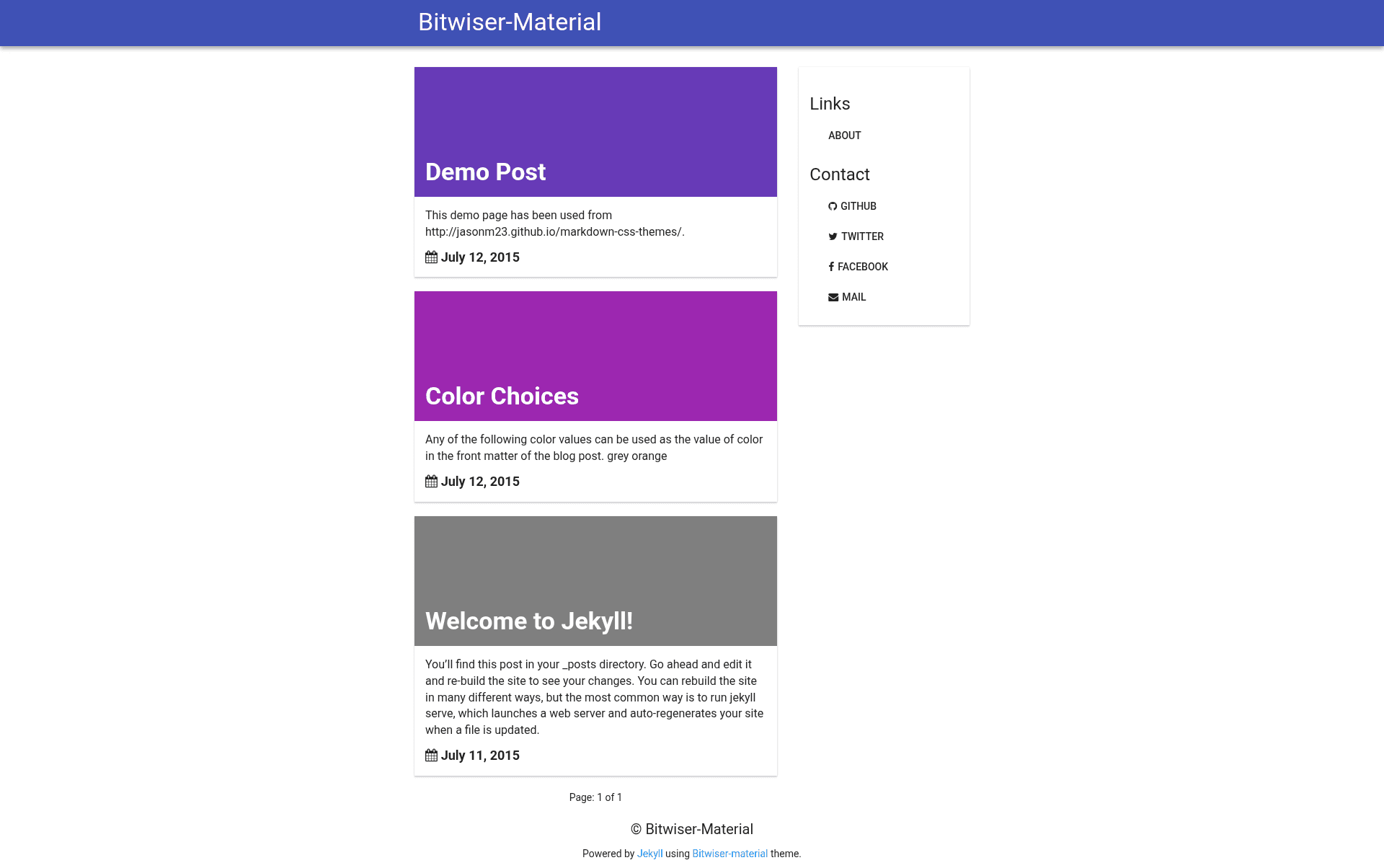
Bitwiser Material is a free, open-source Jekyll blog theme that applies Google's Material Design styling through the MUI CSS framework. It turns a standard Jekyll site — _config.yml settings plus markdown posts in _posts — into a responsive static blog with Disqus commenting, Google Analytics, social sharing, and a custom 404 page. The theme is developed by brijeshb42 and distributed through GitHub with a dedicated theme website, demo post, and usage guide.
What is Bitwiser Material?
Bitwiser Material is a Jekyll theme that produces a Material Design–styled blog using the lightweight MUI CSS framework rather than a heavier framework like Bootstrap. It takes a Jekyll configuration file and post files as input, and outputs a static website suitable for GitHub Pages, with features like code formatting, sitemap, robots.txt, and a custom 404 page. The theme is maintained on GitHub by brijeshb42, with issues tracked and pull requests welcome.
Key Features
- Material Design layout — built on muicss, a lightweight CSS framework implementing Google Material Design, giving a clean, responsive look across devices.
- Post-specific colors and cover images — add
colororcoverattributes in a post's front matter;coloraccepts 16 values (grey, orange, yellow, amber, light-blue, lime, teal, blue, black-87, blue-grey, brown, indigo, purple, deep-purple, red, pink) andcoveraccepts an absolute image URL or a relative URL like/img/post-cover.jpg. - Disqus commenting — comments load lazily and are automatically added to all blog posts when the
disqusvariable is set in_config.yml. - Google Analytics — enabled by setting
ga_idandga_domainin_config.yml, with the tracking code injected automatically. - Social sharing — share buttons for Facebook and Twitter appear on blog posts.
- SEO and site files — includes a sitemap, robots.txt, and a custom 404 error page.
- Code formatting — built-in code highlighting for blog posts, useful for technical writing.
- Responsive navigation — the menu collapses into an accessible format on small screens.
- Configurable social links —
_config.ymlsupports links for Facebook, Twitter, email, and GitHub in the site'slinksvariable.
Who is it for?
- Jekyll bloggers — who want a Material Design look without building a theme from scratch; they can edit
_config.yml, replace example posts, and runjekyll serveto preview. - GitHub Pages users — the theme can be deployed by pushing to a
githubUserName.github.iorepository, and custom domains are supported by editing theCNAMEfile. - Developers who prefer lightweight CSS — muicss is a small CSS framework, so the theme avoids the weight of larger UI kits while still providing Material Design components.
- Open-source contributors — the GitHub repository accepts pull requests and has an issues page for reporting bugs or suggesting features.
What can you do with Bitwiser Material?
- Personal bloggers: publish markdown posts with per-post cover images or accent colors by adding
colororcoverto front matter, as shown in the theme's demo post. - Site owners needing analytics and comments: enable Google Analytics and Disqus comments purely through
_config.ymlvalues, without touching templates. - Technical writers: use the built-in code formatting to present code snippets cleanly in posts.
- Developers testing locally: clone the repo, install Ruby and Jekyll, and run
jekyll serveto iterate on the theme before deploying.
How does Bitwiser Material work?
- Download the latest ZIP from the theme website or clone the GitHub repository with
git clone https://github.com/brijeshb42/bitwiser-material.git. - Install Ruby and Jekyll (
gem install jekyll), then edit_config.yml— the file documents every variable with##comments and default values below them. - Add posts to the
_postsdirectory with filenames inYYYY-MM-DD-your-post-title.mdformat, optionally addingcolororcoverfront matter. - Replace the default
favicon.pngandsharer.pngimages with your own. - Test with
jekyll serve, then push to GitHub Pages or use a custom domain by editing theCNAMEfile.
FAQ
Is Bitwiser Material free?
Yes, Bitwiser Material is open source and free to use. It is distributed as a downloadable ZIP on the theme website and through GitHub releases, with no paid tiers or licensing fees mentioned.
How do I enable Disqus comments?
Set the disqus variable in _config.yml to your Disqus forum name. Once set, Disqus is automatically added to all blog posts and loads lazily to avoid slowing down page rendering.
What colors can I use for post headers?
The front matter color attribute accepts 16 values: grey, orange, yellow, amber, light-blue, lime, teal, blue, black-87, blue-grey, brown, indigo, purple, deep-purple, red, and pink. A demo of all color choices is available on the theme's website.
Can I use a custom domain?
Yes, edit the CNAME file in the theme directory and add your own domain, such as example.com. You must also ensure your domain points to GitHub's IP address for GitHub Pages to serve the site.
What does the theme include for SEO?
Bitwiser Material ships with a sitemap, robots.txt, a custom 404 error page, and meta description and keywords that you can set in _config.yml via the description and keywords variables.