Template details
Blog
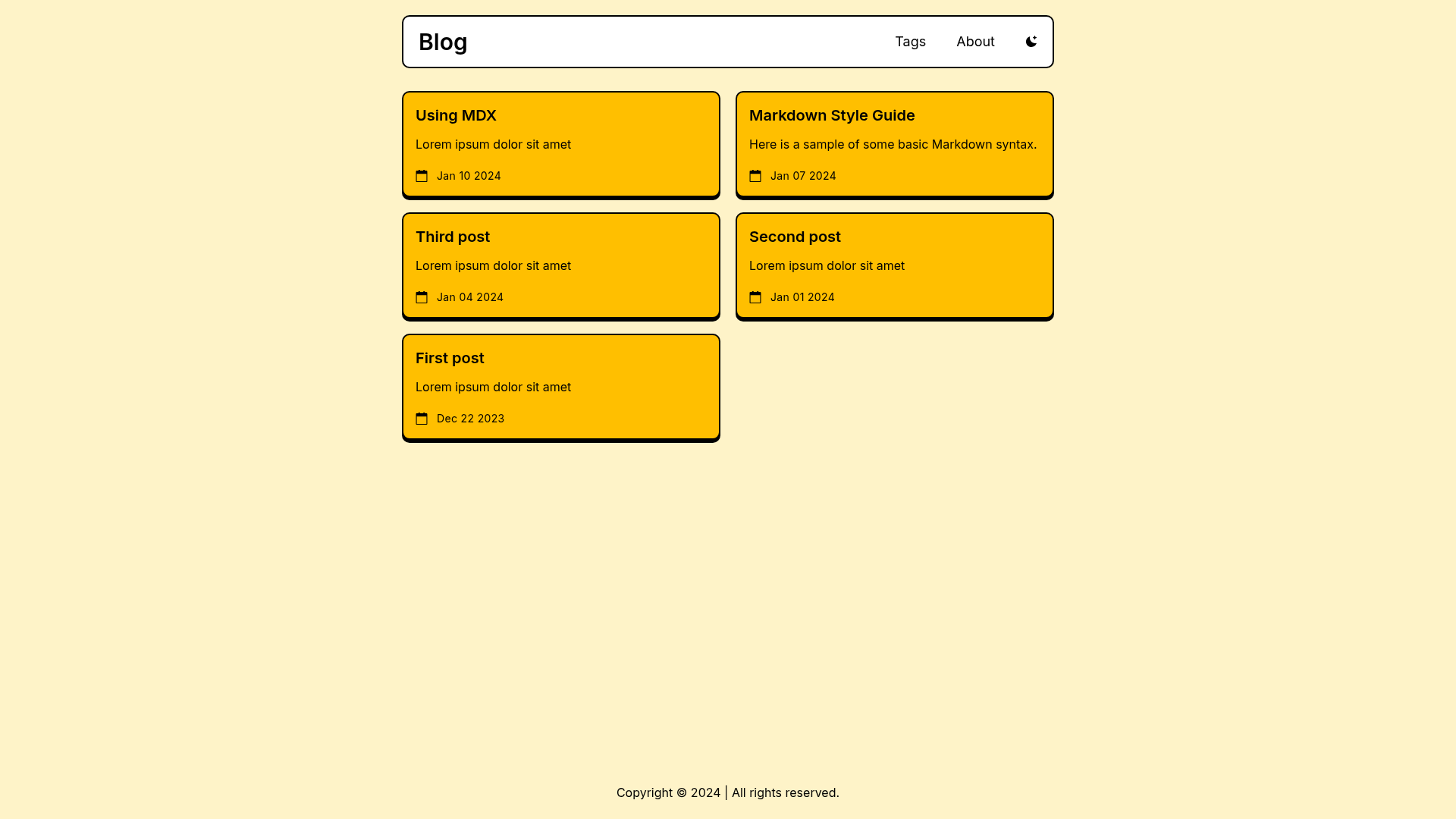
An Astro and Tailwind CSS blog template with neobrutalism design, using Markdown/MDX content collections.
About this template
Blog is an Astro and Tailwind CSS template for building neobrutalist-styled blogs from Markdown or MDX files, published by the neobrutalism-templates organization on GitHub.
What is Blog?
Blog is an open-source Astro template styled with Tailwind CSS in a neobrutalism design, whose core function is to turn Markdown and MDX posts into a static blog website. It uses Astro's content collections located in src/content/posts, with each post defined by frontmatter containing title, description, pubDate, and tags. The template is maintained by the neobrutalism-templates organization and is available as a GitHub repository that can be copied with its "Create a new repo" button.
Key Features
- Neobrutalism styling — The template ships with a neobrutalism design system built on Tailwind CSS; you can replace the look by copying alternative styling from the neobrutalism.dev styling docs.
- Markdown/MDX content — Posts are authored as .md or .mdx files in
src/content/posts, with required frontmatter fields title, description, pubDate, and tags. - Expressive Code integration — Code blocks are rendered and themed through Expressive Code, configured via the
expressiveCodeobject inastro.config.mjs; theme changes must be applied in both thethemesarray andsrc/config.ts. - Centralized site config — Site URL is set in
astro.config.mjs, while meta-tag data for the blog is configured insrc/config.ts. - pnpm workflow — The template is built around pnpm: install dependencies with
pnpm iand start a local dev server withpnpm run dev. - Tailwind config guardrails — When restyling, you must keep
fontFamily,screens, andtypographyin the Tailwind config; changing font weights also requires updating font imports insrc/layouts/Base.astro.
Who is it for?
- Astro developers — Use this as a pre-configured starting point for a Markdown/MDX blog, with content collections and frontmatter handling already in place.
- Developers who want a distinctive blog design — The neobrutalism aesthetic sets the blog apart visually without requiring custom CSS work beyond copying styling from neobrutalism.dev.
- Bloggers comfortable with the command line — Create a new repo from the GitHub template, install with pnpm, and publish posts as Markdown files.
What can you do with Blog?
- Tech bloggers: publish Markdown posts with tags and publication dates to a static Astro site with minimal configuration.
- Personal blog owners: run a local dev server with
pnpm run devto preview posts, then build a static site for deployment. - Design explorers: swap the neobrutalism styling for another look using the neobrutalism.dev styling docs, keeping the blog's content structure intact.
How does Blog work?
Start by clicking "Create a new repo" on the template's GitHub page, then clone it locally. Install dependencies with pnpm i, launch the dev server with pnpm run dev, and edit astro.config.mjs and src/config.ts for site and meta information. To add a post, create a new .md or .mdx file in src/content/posts with frontmatter containing title, description, pubDate, and tags.
FAQ
How do I add a new post?
Create a new Markdown or MDX file inside src/content/posts. It must include frontmatter with four fields: title, description, pubDate, and tags. The file content after the frontmatter becomes the post body.
How do I change the styling?
Visit the neobrutalism.dev styling docs, copy the desired styling into your CSS, and follow the docs exactly. Make sure not to remove fontFamily, screens, or typography from your Tailwind config, and update font imports in src/layouts/Base.astro if you change font weights.
How do I configure the site?
Set the site URL in astro.config.mjs. Configure meta-tag data in src/config.ts. For code block themes, update the expressiveCode object in astro.config.mjs and make sure themes match between the themes array and config.ts.
Does the template work with npm?
The documented workflow is built around pnpm, so the instructions assume pnpm is installed. Commands like pnpm i and pnpm run dev are the ones shown in the repository README.