Template details
Revolve Jekyll
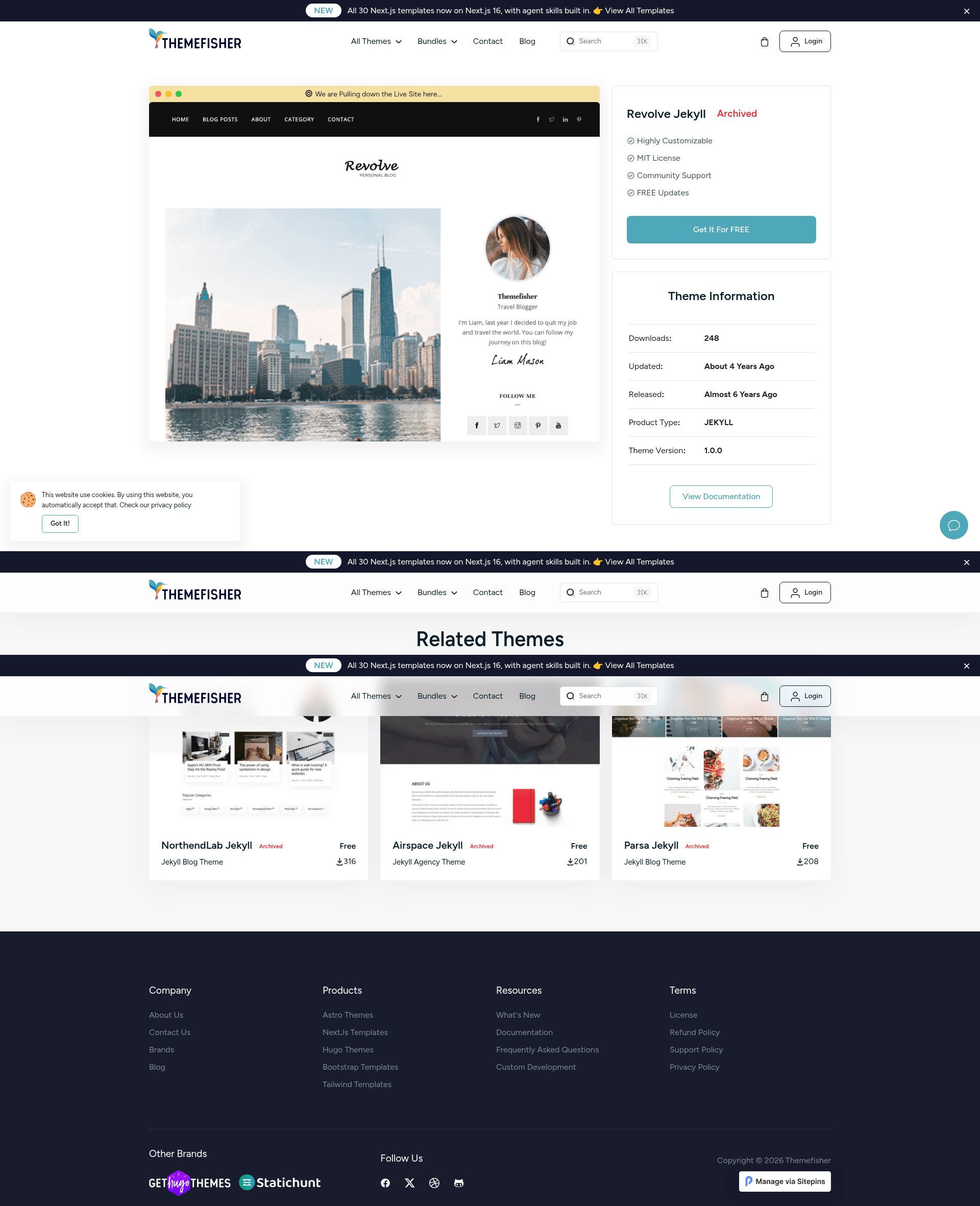
Revolve is a Jekyll blog theme for personal blogs and portfolios, configurable via YAML and featuring Sitepins CMS integration.
About this template
Revolve Jekyll is an open-source Jekyll blog theme by Themefisher that creates a personal blog and portfolio site from a single YAML settings file.
What is Revolve Jekyll?
Revolve Jekyll is a Jekyll-based blog theme ported from the Revolve HTML template and maintained by Themefisher. It takes configuration from a _data/settings.yml file and generates a static site ready for GitHub Pages, including sections such as hero, about, team, skills, experience, education, services, portfolio, testimonials, clients, and contact. The theme is designed to be run as a GitHub Pages site or locally using Jekyll, and it includes a pre-configured integration with the Sitepins headless CMS.
Key Features
This theme includes a set of practical features that make it easy to launch and maintain a static blog or portfolio.
- YAML-only configuration — All site content, including name, logo, contact details, and every section's text, is editable in
_data/settings.ymlwithout writing HTML or CSS. - 12 built-in sections — The theme provides hero, about, team, skills, experience, education, services, portfolio, testimonials, client slider, and contact sections, all populated from the settings file.
- Instant GitHub Pages deployment — Fork the repository, enable GitHub Pages in the repo settings, and your site is live at
yourusername.github.io/repo-namewithin minutes. - Sitepins CMS integration — A button on the repository links to Sitepins, a Git-based headless CMS, allowing text, image, and configuration edits through a visual interface.
- Local development workflow — Install dependencies with
bundle installand runbundle exec jekyll serveto preview changes locally before deploying. - MIT-licensed code — The theme's code is released under the MIT license; the demo images are not included in that license and are for demonstration only.
- Performance — The demo site reports an 89% PageSpeed score on desktop, as linked from the project readme.
Who is it for?
Revolve Jekyll is aimed at individuals who want a simple, static site to publish blog posts and showcase their work without maintaining a complex backend.
- Personal bloggers — Publish a clean, fast blog hosted on GitHub Pages with no backend or database setup, editing posts and settings through a single YAML file.
- Freelancers and creatives — Use the portfolio, testimonials, and services sections to present work and client feedback on a personal site.
- Jekyll newcomers — The centralized settings file and GitHub Pages workflow make it an approachable starting point for learning static site generation.
What can you do with Revolve Jekyll?
With this theme, you can quickly set up a production-ready personal site with minimal effort.
- Launch a portfolio site quickly — Clone or fork the repo, enable GitHub Pages, and edit
_data/settings.ymlto publish a professional-looking personal site within a day. - Edit content visually with Sitepins — Use the provided Sitepins setup to modify images and text in the browser, avoiding direct file editing if you prefer a CMS-style workflow.
- Run a local preview — Use Jekyll's built-in serve command to develop and test changes locally, then push to GitHub for deployment.
FAQ
Is Revolve Jekyll free?
Yes. The theme's code is open source under the MIT license, so you can use it for personal or commercial projects without payment. The bundled demo images are not included in the license and are only for preview purposes.
Can I change the site name and contact information?
Yes. Edit _data/settings.yml to set the site name, logo, email, phone, and address. All section content, from the hero to the contact form, is managed in the same file.
Do I need to know HTML or CSS to customize the theme?
For basic customization, no. Every text and image in the theme is controlled by _data/settings.yml. Only advanced styling changes would require editing the theme's templates or CSS.
How do I deploy Revolve Jekyll to GitHub Pages?
Fork the repository, go to the repo's Settings → Pages, and choose the branch you want to publish. The site will appear at your GitHub Pages URL after a short propagation period.
What should I do if I find a bug?
Check the existing issues on the GitHub repository first, and if no one has reported the problem, open a new issue there. For direct questions about integration, you can email Themefisher at themefisher@gmail.com.