Template details
Bootstrap Wizard
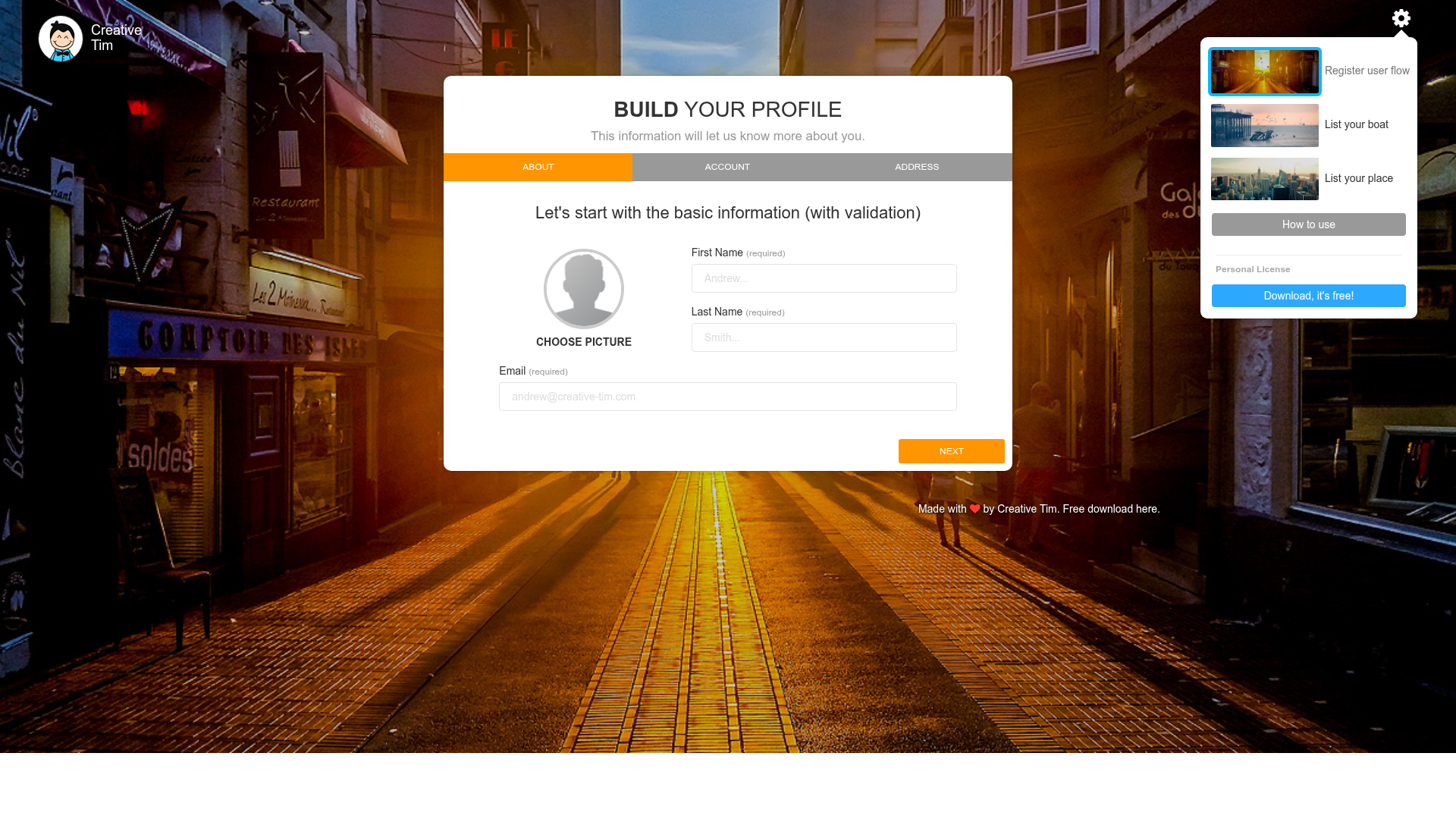
Free responsive Bootstrap multi-step form wizard with 3 example flows and 5 color schemes.
About this template
Bootstrap Wizard is a free, responsive multi-step form plugin and HTML template from Creative Tim that splits long forms into guided, step-by-step pages. It is built on Bootstrap 3.3.5, jQuery, and the open-source twitter-bootstrap-wizard plugin created by Vadim Vincent Gabriel, and it ships as static HTML files that run in any browser.
What is the Bootstrap Wizard?
Bootstrap Wizard is a JavaScript plugin plus starter template that converts any long form into a sequence of manageable steps. It takes a form with many fields as input and renders it as a wizard with a progress indicator, showing users one step at a time and reducing the intimidation of a long process. The template includes three complete HTML example pages, a custom CSS/SCSS design layer, and integrates with jQuery validation for per-step input checking.
Key Features
- Three ready-made example flows — Includes Register User Flow, List Your Boat, and List Your Place pages, each demonstrating a realistic multi-step form you can adapt.
- Five color schemes — Ships with 5 bright color variants for the wizard, controlled through the gsdk-bootstrap-wizard.css stylesheet.
- Built-in form validation — Integrates jquery.validate.min.js, validating fields before the user advances to the next step.
- Fully responsive layout — Adapts to mobile screens, with a fix for narrow step navigation on viewports under 600px.
- Customizable source files — Provides gsdk-bootstrap-wizard.scss so you can recompile colors and styles, plus the original JavaScript plugin code.
- Plugin architecture — Extends Vadim Vincent Gabriel's twitter-bootstrap-wizard with Creative Tim's design, including large-icon checkboxes and a cleaner visual style.
- One-click deployment — A Genezio deploy button in the GitHub repo launches the template as a serverless site without manual setup.
Who is it for?
- Web developers building registration, checkout, or onboarding flows who need a polished wizard UI without writing the step logic from scratch.
- Product teams dealing with forms over 10 fields that want to reduce user drop-off by breaking information into smaller, less intimidating steps.
- Marketplace startups that need a quick structured form for listings — the included List Your Boat and List Your Place examples are ready to adapt.
- Event organizers who want a multi-step registration flow like the included Register User Flow example.
What can you do with it?
- SaaS onboarding: Turn a 10+ field signup form into a step-by-step wizard, guiding users through profile setup, billing, and preferences one screen at a time.
- Marketplace listings: Use the List Your Boat or List Your Place example pages to let users submit detailed listings through a structured, validated multi-step process.
- Event registration: Adapt the Register User Flow example to collect attendee information, ticket choices, and payment details across separate steps.
- Custom multi-step forms: Reuse the plugin and SCSS to build any step-by-step form, from surveys to checkout, with color and style changes via CSS.
How does the Bootstrap Wizard work?
The wizard works by pairing the jquery.bootstrap.wizard.js plugin with HTML markup that defines each step as a separate section. When a user completes a section and passes validation, the plugin advances to the next step, showing a progress indicator so users know how many steps remain. The included files handle the styling and behavior — you just structure your form sections and initialize the plugin.
Pricing
Bootstrap Wizard is free and open source, released under the MIT License. You can download it from Creative Tim or GitHub and use it in personal and commercial projects without licensing fees.
FAQ
Is Bootstrap Wizard free?
Yes, Bootstrap Wizard is completely free. It is released under the MIT License, so you can use, modify, and distribute it in personal and commercial projects without paying a fee.
What files are included in the download?
The download contains three HTML example pages (index.html, wizard-list-boat.html, wizard-list-place.html), assets with Bootstrap CSS/JS, jQuery, jquery.bootstrap.wizard.js, jquery.validate.min.js, the gsdk-bootstrap-wizard.css stylesheet, and the SCSS source files.
Can I change the colors of the wizard?
Yes, you can change the colors by editing the gsdk-bootstrap-wizard.css stylesheet or by recompiling the provided SCSS source. The template includes 5 preset bright color schemes you can switch between.
Does the wizard include form validation?
Yes, the template integrates jquery.validate.min.js, which provides client-side validation on form fields. Users cannot advance to the next step until they complete the current step's required fields correctly.
What browsers and devices does it support?
The wizard is fully responsive and works in modern browsers. It uses Bootstrap 3.3.5 and jQuery, and the included CSS fixes the step navigation width on small screens under 600px.