Template details
Rollbar Next.js Starter Kit
A Next.js App Router starter kit with Rollbar error monitoring, source maps, and a public demo interface.
About this template
Rollbar Next.js Starter Kit is a boilerplate template that integrates Rollbar error monitoring into a Next.js App Router application, providing a clickable demo for sending and inspecting error events and a one-click deploy path to Vercel.
What is the Rollbar Next.js Starter Kit?
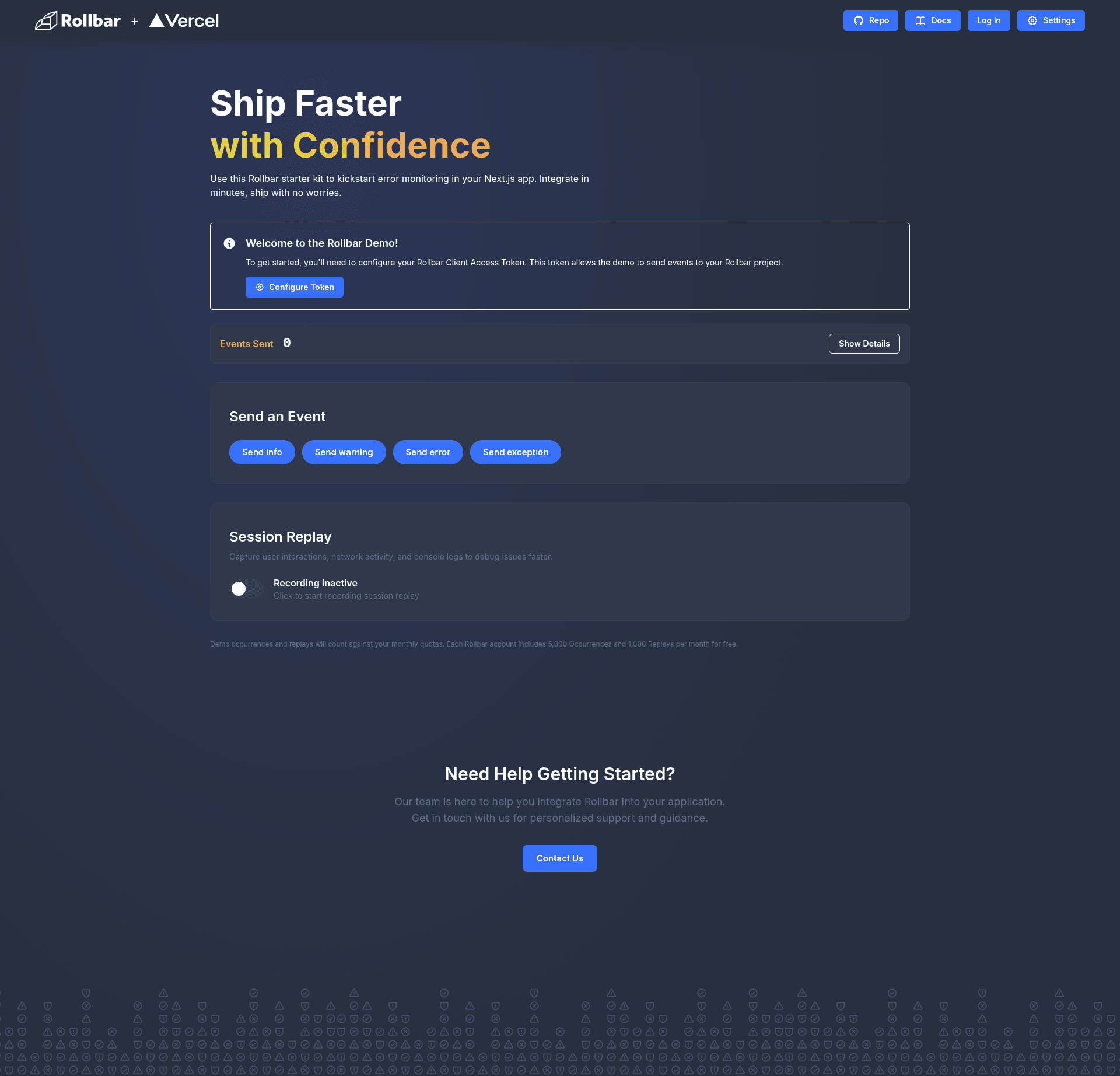
The Rollbar Next.js Starter Kit is a demo and starter project maintained by Rollbar that shows how to wire Rollbar's browser SDK into a Next.js App Router app. You configure it with a Rollbar client access token, and it produces a web page where you send info, warning, error, and exception events and view their Rollbar item UUID, network status, and timestamp in a slideout panel. The app runs on Next.js 18+ and is set up for deployment on Vercel via the included vercel.json and one-click Deploy button.
What makes the Rollbar Next.js Starter Kit stand out?
- One-click Vercel deployment — the repository includes a Deploy with Vercel button and a vercel.json configuration, so you can clone and deploy the demo without setting up a server.
- Public demo mode — users can enter their own Rollbar client token in the UI (stored in localStorage), which makes the app usable as a self-service trial or workshop sandbox without environment variables.
- Four event types ready to send — EventControls.js provides buttons for Log (info), Warning, Error, and Exception; each uses Rollbar's browser SDK method and shows the result in an interactive slideout.
- Readable stack traces via source maps — next.config.js enables production source maps and scripts/upload-sourcemaps.js uploads them to Rollbar after
npm run build:production, turning webpack-internal paths into real file names and line numbers. - Client-side only tracking — everything runs in the browser with a
post_client_itemtoken, so there is no server component needed for the demo. - Tailwind CSS styling — global styles use Tailwind, and the project includes tailwind.config.js and postcss.config.js; component files are in
components/(EventControls.js, EventSlideout.js, Header.js) and the main page isapp/page.js.
Who should use the Rollbar Next.js Starter Kit?
- Frontend developers who want a working reference for adding Rollbar to a Next.js App Router app and seeing how the SDK is initialized and called.
- Teams deploying Next.js to Vercel who need a turnkey example of setting Rollbar environment variables, building with source maps, and verifying stack traces in production.
- Rollbar evaluators or support engineers who need a live, public demo page where anyone can type in their own token and explore error tracking without creating an account first.
- Technical writers or workshop leaders who want a minimal, runnable code sample to teach event levels, client tokens, and Rollbar's dashboard workflow.
What can you do with the Rollbar Next.js Starter Kit?
- Demo Rollbar at a meetup or webinar: deploy the public demo to Vercel and let every attendee configure their own token in the UI to see events arrive in their own project in real time.
- Prototype error reporting in your own app: copy the
lib/rollbarClient.jsinitialization and the EventControls pattern into a Next.js project to start capturing client-side errors. - Set up source maps for production: run
npm run build:productionwithROLLBAR_SERVER_TOKENandBASE_URLconfigured, then confirm stack traces show paths likecomponents/EventControls.js:57instead of webpack-internal paths.
How does the Rollbar Next.js Starter Kit work?
- Install dependencies with
npm installand copy.env.exampleto.env.local. - Add your
NEXT_PUBLIC_ROLLBAR_CLIENT_TOKENandNEXT_PUBLIC_ROLLBAR_ENVvalues. - Run
npm run devto start the app at http://localhost:3000. - Click one of the four event buttons to send an info, warning, error, or exception event to Rollbar.
- Click View History to open the slideout, which lists each event's color-coded level, UUID, network status, and timestamp.
- For production stack traces, set
ROLLBAR_SERVER_TOKENandBASE_URL, then runnpm run build:productionto upload source maps.
Pros and cons
- Pros: Quick setup, one-click Vercel deploy, source map upload script included, and no backend required for the demo.
- Cons: Event history lives in browser memory only and resets on page refresh; the demo uses client-side tracking only, so it does not capture server-side errors out of the box; a Rollbar account and client token are required to use it.
FAQ
How do I get a Rollbar client access token?
Log in to Rollbar, go to Project Settings → Project Access Tokens, and find or create a token with the post_client_item scope. Put that value in your environment file as NEXT_PUBLIC_ROLLBAR_CLIENT_TOKEN.
Why don't my events appear in Rollbar?
Check that your token has post_client_item scope, look at the browser console for errors, and open the Network tab to confirm requests to Rollbar's API for items return a 200 status. Also make sure the project selected in your Rollbar dashboard matches the token you used.
Does the demo save event history across sessions?
No, event history is stored only in browser memory. Refreshing the page clears the counter and the slideout history. This is intentional to keep the demo simple.
Can the template run without environment variables?
Yes, the app supports a public demo mode where users enter a Rollbar token directly in the UI; that token is stored in localStorage. This avoids requiring any environment variables for basic demo use.
What does the source map upload do?
When you run npm run build:production, Next.js generates source maps and the included script uploads them to Rollbar. Rollbar then maps minified production stack traces back to your original source files, so you see real file names, function names, and line numbers instead of webpack-internal paths.